Enforced rules (hard constraints)
A guidance note the Executor also enforces in code. Three kinds, buys only, your code to create, and how it differs from the denylist and a risk limit.
- Who it is for
- Owners & operators
- Reading time
- 6 min read
- Updated
Soft is something the PM reads and must ; the never sees it. An (a hard constraint) is a guidance note that is also compiled into a rule the Executor checks on every order, whatever the PM thinks. It has the same lifetime as any guidance: standing, or until a date or an event.
The three kinds
When you tell your desk something on Strategy › Guidance, the card that reads your words back says which of these three rules they read as and offers Enforce; Build the rule yourself, on the card that keeps your words exactly, opens the builder with the same three choices:
No new buys
- What it does
- Rejects every new buy order, for the whole book or for one symbol
- Scope
- Whole book or one symbol
- Reason on a rejection
steering:<note_id>:no_new_buys
Cap gross %
- What it does
- Caps how much of the account may be invested at once, tighter than the risk limit
- Scope
- Whole book only
- Reason on a rejection
steering:<note_id>:max_gross_pct
Never buy… (blocklist)
- What it does
- Rejects buys in the tickers you list (up to 40)
- Scope
- Whole book, or one symbol plus the list
- Reason on a rejection
steering:<note_id>:blocklist_symbols
Cap gross % is tighten-only: the Executor uses the lower of your value and the limit (60% of equity on Moderate); a looser value is ignored and the risk limit decides. A guidance note can never loosen a risk limit.
Every enforced rule also carries your words to the PM so it knows why and plans around it instead of proposing orders that will be refused. Like any guidance it has a lifetime: standing (until you dismiss it) or until a date or an event (1 day to 2 weeks; the server caps "until" notes at 10 trading days).
It only ever blocks buys
Hard constraints run before the and can only reject a buy. A sell is never touched by steering, whatever the note says: the system will always let you get out. Everything a hard constraint lets through still passes every risk check; what it rejects never reaches the policy or the broker. A malformed note is reported once and skipped, so one bad row cannot disable the others.
A new constraint is applied as a sweep, not just a filter. On the first Executor loop after the set of active hard constraints changes (a note added, dismissed or expired), the Executor also looks at buys that already exist:
- Working buy orders at the broker that the new set forbids are cancelled. For a gross cap the Executor goes newest first and re-measures exposure after each cancel, so it cancels only the most recent buys until the book fits under the cap and leaves older ones alone. Each cancelled order's is marked cancelled (or partial, if some shares had already filled) with the steering reason, and an info alert names the order. If the broker filled the order in the meantime, that is a fill, not a cancel, and nothing is undone.
- Buys still queued, waiting for the , waiting for you in the Inbox or already approved that the new set forbids are rejected with the same steering reason, exactly as if they had been proposed after the note.
- One audit row and one "constraint applied" event record what the sweep touched. Sells, protective stops and Executor-authored exits are never swept.
Scope is taken literally: the Scope on the note decides it. A whole-book "no new buys" stays whole-book even if a symbol happens to be attached to it (a card drafted while a symbol chip was in context, say); only a note whose scope is One symbol narrows the rule to that symbol. A blocklist always needs its tickers spelled out unless the note itself is scoped to one symbol.
Creating one asks for your code
Because it becomes an Executor rule, adding one is a protected action:
- Open Strategy › Guidance (or Guidance… on a symbol page for Guidance pre-filled) and write the note to the PM in plain words: "no new NVDA buys until the print", "never buy TSLA or COIN", "keep gross under 40%".
- Press Read it back to me. A card opens under the box with your words and what the desk read in them, piece by piece; a piece that reads as a rule the Executor can enforce says so ("Hard rule: no buys in NVDA") with Enforce chosen. Keep as guidance on that piece leaves it soft.
- Press Confirm with code, enter your (one from the last 30 minutes still counts), then Confirm. Nothing is saved before Confirm.
- If you would rather keep your words exactly as typed, choose Use my words exactly on the card: press Save guidance there and the card lists each rule it found with Enforce (asks for your code) or Keep as guidance; Build the rule yourself lets you make the rule by hand instead.
- The rule is saved and audited with the code check recorded; your words, the suggested rules and what you chose are all in the audit row.
The Executor enforces it on its next loop, within 5 seconds, including the sweep of resting and waiting buys described above; the PM sees it in its next as a one-line rule such as "no new buys: NVDA" or "max gross exposure 40% of equity (tighten-only)".
Consult can also suggest a hard constraint as a card under its reply; Confirm there asks for your code the same way and saves the note. A hard-constraint card is never confirmed automatically, even on a deployment that lets Consult auto-confirm ordinary guidance notes: an Executor rule is only ever installed by a person with a fresh code. Ending a note is End now on its row in the list: it asks once ("Keep it" backs out), and ending an enforced rule also asks for your code, because lifting a rule loosens the book. Ending it stops both display and enforcement.
How it appears on a rejection
A buy that violates a hard constraint is marked rejected by policy with the reason steering:<note_id>:<kind> from the table above, with the numbers appended for the exposure cap ("gross 63.20% > 40%"). The row under Decided today in the Inbox reads with that reason as its note, and the proposal on Activity › Agent and on the session's page carries it too, so the rejection is attributed to your note, not a risk check; the counts these separately. For a buy rejected at decision time no order is ever created, so nothing appears under Orders & fills. The one exception is the sweep when a constraint is added: a buy order that was already working at the broker is cancelled and shows on Activity as a cancelled order whose proposal carries the same steering reason. The note's row on Strategy › Guidance shows the compiled rule on an amber "hard · …" badge until it expires or you dismiss it.
Not the denylist, not a risk limit
Three things say "never buy that".
- A hard constraint· Strategy › Guidance › enforced rules is temporary and in your words: it expires, carries a note the PM must acknowledge, and appears on the state card with your reasoning. Use it for "no new NVDA before earnings" or "stop adding until I say so".
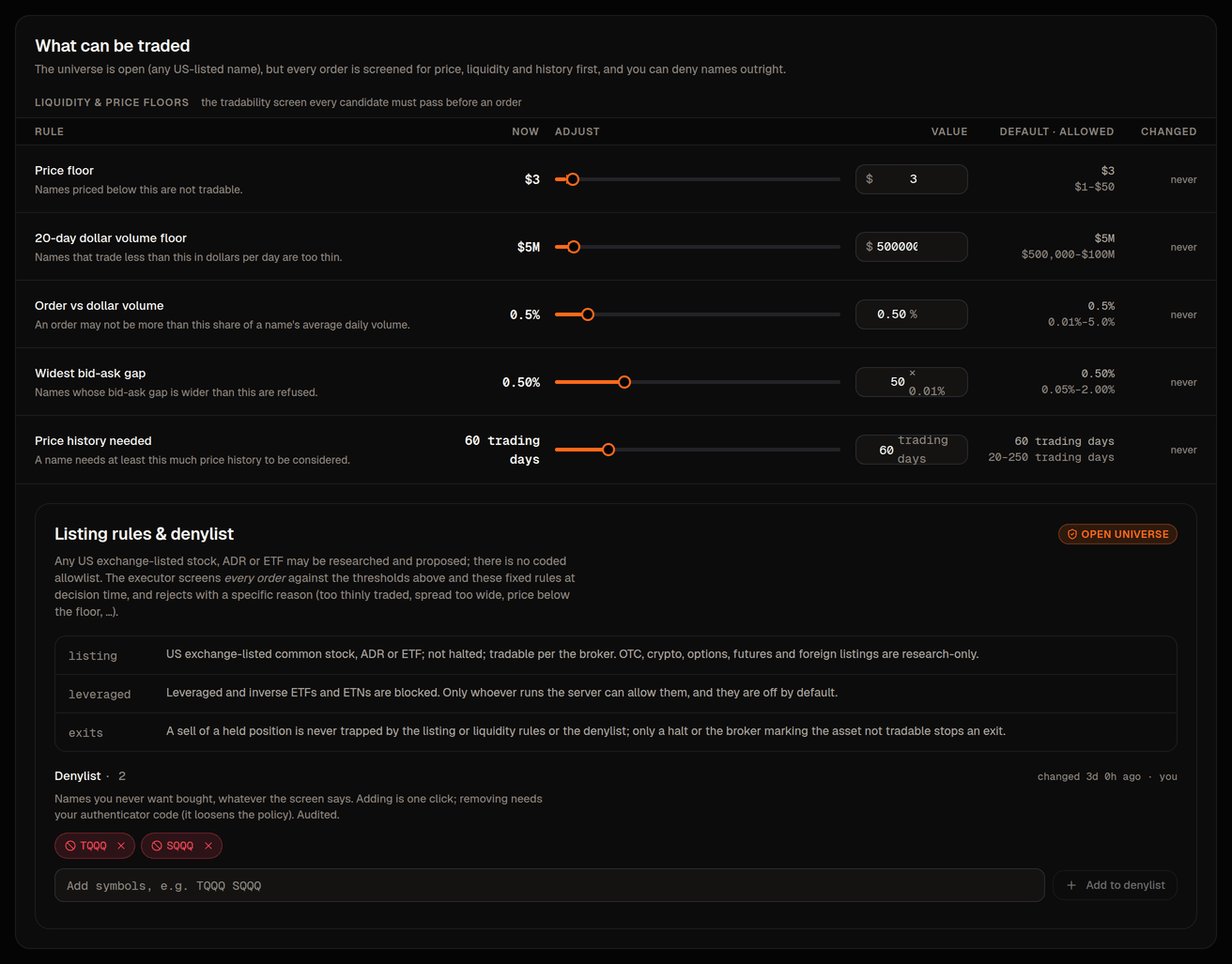
- The never-trade list on Risk › Universe is permanent and silent: a name on it fails the (check 3) until you remove it, which is itself a loosening that asks for your code. Use it for names you never want in the book.
- A risk limit on Risk › Limits is a number with a code-defined floor and ceiling, applied to every order every day. Cap gross % can tighten the gross exposure limit for a while; it cannot replace it.
To stop everything, use none of these: in the top bar stops all new buying within about 5 seconds and never asks for a code.