Approve or reject an order
What Approve actually sends, how to take a mis-tap back, what Reject tells the PM, what happens if you wait, and how it works on a phone.
- Who it is for
- Owners & operators
- Reading time
- 7 min read
- Updated
Approving lets one go to the broker, and only after the has re-priced and re-checked it. Rejecting drops the order and hands your reason back to the PM. Doing nothing is always safe.
What Approve does
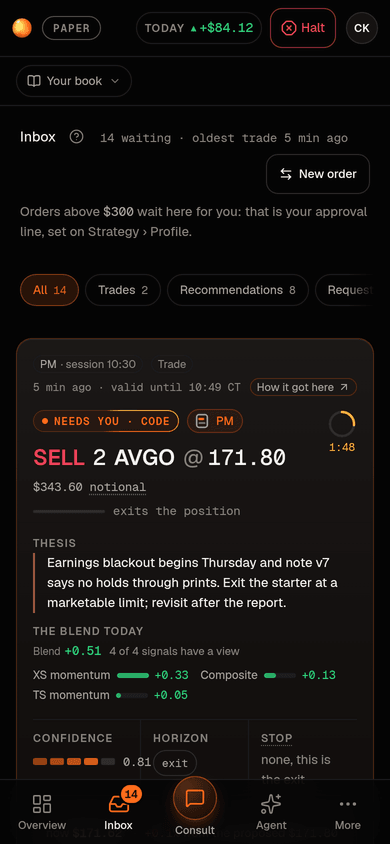
You are approving the , not the price frozen when the PM wrote it. Every waiting order is one row of the Inbox's Waiting tab, soonest deadline first: one sentence saying who wants to buy or sell what and why, its size, the most it will pay (or the least it will accept) and its stop, the time left, and the two buttons. The Approve button carries that price cap in its label: "Approve, up to $153.92" for a buy, "Approve, down to $168.36" for a sell. Details opens the order's full card (beside the list on a wide , under the row on a narrow one): the price now against the , why it waits for you, and, behind closed , the PM's note as written and the evidence it used.
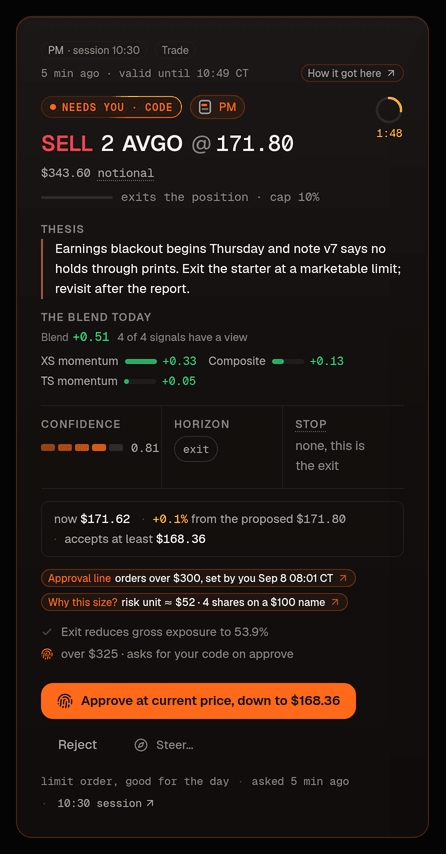
- Read the row's sentence and figures; open Details if you want the full card.
- Press Approve. The row says "Approving in 5 s" with Undo where Approve was, and a toast offers the same Undo: for five seconds nothing has been sent, so a mis-tap costs nothing. Send now skips the wait. After the five seconds the approval is recorded and audited and the row leaves the list; it appears under the Decided tab marked Sent, then Filled. Once it has been sent an approval cannot be taken back.
Where an approval asks for your , the code dialog is its confirm step, so there is no five-second hold after it. If you leave the Inbox or switch away from the page (another tab, another app on a phone) while a hold is running, the approval is sent at once: your last word was Approve, and a hold must never cost you your decision. Rejecting an order whose approval is still held ends the hold first, so an order gets one decision.
What happens next is the Executor's, on its next loop (within 5 seconds):
- It fetches a fresh quote and moves the working limit to the current price, bounded by the cap: the proposal's own cap price, or the re-quote drift allowance of 2% past the working limit, whichever is tighter. A buy's limit never goes above the cap; a sell's never goes below it.
- It runs all again on that price with live data (a quote older than 30 seconds fails check 7). Approval never skips a check.
- If everything passes, one limit, day order goes to the broker. It rests for 90 minutes from submission or the rest of its , whichever is longer, and is cancelled if still open after that; as a day order it also ends at the close.
- If the price is already beyond the cap, nothing is placed: no resting order at the cap, no chasing. The row under Decided reads Not sent with the reason that you approved but the price had moved past its cap, you get a "Not placed … price moved past your cap" mail, and the PM's tells the next session to re-propose at a fresh price if the thesis holds.
- If a check fails on the re-check, the order is rejected with that check's reason: under Decided it reads Not sent, with the reason in words beside it.
The price paragraph in the order's full card tells you which case you are in before you press anything; past the cap, the button itself warns. Approving is a yes to this idea, at a price the checks still allow, not a standing instruction.
What Reject does
- Press Reject on the row in the Inbox. A note field, "Note for the PM (optional)", opens under it.
- Optionally write a short note ("not before earnings", "too big for a first position").
- Press Reject SYMBOL. The order is dropped, nothing is sent, and the decision and note are audited.
The note is saved with the decision and goes back to the PM on its next state card and through get_prior_decisions. A rejection with a reason is one of the most useful things you can give it.
If you ignore it
The order expires at the end of its thesis window, unsent; doing nothing never places a trade. It leaves the Waiting list the moment it expires (an expired order is never counted as waiting) and shows under the Decided tab as Expired, the PM's state card lists it as expired unreviewed for the next 24 hours so the next session does not read silence as a no, and the (the day in words on Overview) counts expired cards so you can tell whether your approval threshold· Strategy › Profile › Autonomy is too low.
Cards that need you are emailed to the owner (the subject names the order, its size and when it expires: "Approve? BUY 2 NVDA @ 185.40 ($370)", expiring 14:30). While email is not switched on yet the message is only saved, and the owner reads it in the Mail log on Admin › People. The email's switch is the alert "An order needs your OK" under Settings › Notifications. A phone notification for a waiting card can be switched on there too, per device, with Notify this device. It opens the Inbox and cannot approve anything itself. See notifications.
NoteA notification only opens the Inbox; nothing is ever approved from one.
During a halt
While trading is from the top bar or Risk, or by the Executor itself on a loss limit or a broker problem, the book is reduce-only. Waiting orders keep their clocks and can still expire; a buy's row says in one line that it cannot be approved until trading resumes. A buy you approve during a halt is marked Blocked on the Executor's next loop, not rejected: the idea was fine, trading was stopped. It shows under Decided as Not sent with the halt as its reason, and it stays blocked after you resume; the PM proposes afresh in its next session. A buy you approved just before the halt that was already resting at the broker is cancelled there and reads Expired with a halt_cancel: note. A sell card (a trim or a close over your threshold) is different: approving it during a halt still sends it, re-quoted and re-checked like any approval, because taking risk off is exactly what a halt allows. The Executor's own stop and target exits never appear as cards at all; they are pre-authorized by the entry you approved and keep working through a halt.
On the phone
Below tablet width (768 px) each row stacks: the time left, the sentence, the three figures side by side, then Approve and Reject as two full-width buttons, so the first button is inside the first screen and inside the row's first 200 px. The five-second Undo works the same way under your thumb. Details opens the full card in place under the row. There is no swipe gesture any more: both verbs are in the row.
When the market is closed
An order that still waits after the close says so in its row: "The market is closed, so an approved order queues for tomorrow 08:30 CT.", and every waiting row says "queues for tomorrow 08:30 CT" under its time left. Its full card gives the last traded price with the close it is from, never a price called "now".
Dismissing a suggestion
What suggests and what the Quant recommends carry Dismiss beside Accept. Dismissing changes nothing; whoever suggested it sees the dismissal, with your note if you left one, and does not raise it again. A recommendation you accepted without a code shows Undo in its toast for a few seconds, and stays revertible for days on Strategy.
Who can approve
Owners and operators of the book, managed on the People page (Admin › People, or Settings › People for an operator of their own book). Reviewers see the same rows with Approve and Reject disabled and one line saying whose call it is; someone viewing the book read only sees no buttons at all. Every decision writes one audit line: who decided, the note and, for an approval, the cap the re-quote must honour and the window end. The same re-check, caps and halt apply on paper and on live.