Reading a card
The four tabs, what one row of the Waiting list tells you, what the order's full card adds, the recommendation tiles, and what each status under Decided means.
- Who it is for
- Everyone on the book
- Reading time
- 8 min read
- Updated
The Inbox is where the desk asks you things and where you see what came of them. It has four tabs, and each one owns the whole while it is showing:
- Waiting: everything that needs a yes or a no from you right now, soonest deadline first, and under it what the desk recommends. The number on the tab counts the decisions only.
- Decided: every order that left the queue today and why, and the things you asked the desk for ("Your requests").
- Activity: the book's log, one trading day at a time. See the Activity log.
- Feedback: what you and anyone you invited flagged with the .
The sentence under the title is the Inbox's status: how many decisions wait for you and when the first one expires ("5 decisions wait for you, and the first expires at 10:49 CT."), or that nothing needs you. The amount above which an order waits for you is set on Strategy; the empty Inbox names it.
One row of the Waiting list

Every waiting order is one row, and you can decide from the row without opening anything:
- One sentence built from the order's own facts: who wants to buy or sell how much of what, and why ("The PM wants to buy $300 of AMD as a new position.", "Your index core wants to buy $380 of QQQ to bring this fund up to its target."). The PM's own note is one step away, never on the row.
- Three figures: the size (dollars first when the PM sized it in dollars, the share count under it), the price cap ("Pays at most" on a buy, "Accepts at least" on a sale), and the stop ("Sells itself at") or, on a sale, how much is left after.
- The time left, said once and in one grammar ("3h 57m left", then "1m 40s left" in the last minutes, amber in the last two). Nothing else on the row tells the time a second way.
- Approve and Reject. Approve carries the cap in its label ("Approve, up to $153.92"), so you always see the most it can pay before you press. How the five-second Undo works is in approve or reject.
- At most one note line under the sentence, the most important thing first: what a trading does to this order ("The refuses new buys until you resume. This cannot be approved yet."), or the second opinion's objection in one amber sentence ("A second opinion disagrees. AMD has a scheduled event inside the trade's horizon that the plan does not address."), or, when the market is closed, when the order would go out ("The market is closed, so an approved order queues for tomorrow 08:30 CT."). While the market is closed every row also says "queues for tomorrow 08:30 CT" under its time left.
A protective exit that needs a person is pinned on top with a red edge. Stops on positions the desk opened sell by themselves and never appear here; this one asks because the position was not opened through Bellwether. A sale never asks for a code.
The chips above the list narrow it by kind (Trades, Recommendations, To confirm, each with its count; the three add up to All). When the list runs past one page a "From" menu also narrows it by who asked. An order the second opinion (the ) has questioned is one of the Trades: its objection rides the order it is about, never a second card that points at the first.
What is on a card
Details on a row opens the full card: beside the list on a wide screen, under the row on a narrower one. The list keeps its place either way. The card says each thing once:
- the order in one headline (side, size, symbol, limit price), who proposed it and the time left, with How it got here linking to the session that wrote it on Desk;
- the same sentence as the row, then why it is the size it is and what it would lose at its stop ("Sized so that selling at its stop loses about $12.72.");
- the second opinion's objection as one amber sentence, with its own note and what it suggests behind a ;
- the price now against the price when it was proposed, and the cap, in two sentences. After a drift the box turns amber and says what approving now would do; past the cap it turns red and says nothing would be placed. With the market closed it gives the last traded price and the close it is from, never a price called "now";
- why it waits for you, when there is a reason beyond its size;
- and, closed until you open them, the desk's own words and workings: the PM's note as written, how the Trader is working the order when it is a slice of a larger one, and what the PM looked at (its sources, the 's reading, its confidence and how long it means to hold).
Nothing in those folds is needed to decide; they are there when you want to check the desk's reasoning.
Things to confirm
Something you asked for that needs your yes (a note for the desk, a rule that blocks orders, something to watch, a or change) is a row of the same list with Accept and Dismiss, and the row says what is asked: the rule or the question is quoted, a watch names its price ("Consult suggests a rule about NVDA, “Never hold NVDA through earnings.” Orders that break it are refused."). Accept opens the same dialog the Consult thread uses, where you confirm it, with the same bounds and, where it loosens your protection, the same . Dismiss changes nothing; Consult sees it and does not raise it again in that thread. When the market is closed, "ask the PM to look at NVDA now" says that it runs as a read and cannot trade until the next open, which it names.
What a confirmed request becomes:
- What it becomes
- Active at once; the next session acknowledges it.
A rule that blocks orders
- What it becomes
- Enforced by the Executor; confirming asks for your authenticator code.
Something to watch (a name or a price level)
- What it becomes
- Starts at once and is checked at the next session.
A or a check by the PM
- What it becomes
- Queued right away with its cost estimate, or pinned to the next session if that is what you asked for.
Where each request stands afterwards is under Decided › Your requests.
Recommendations
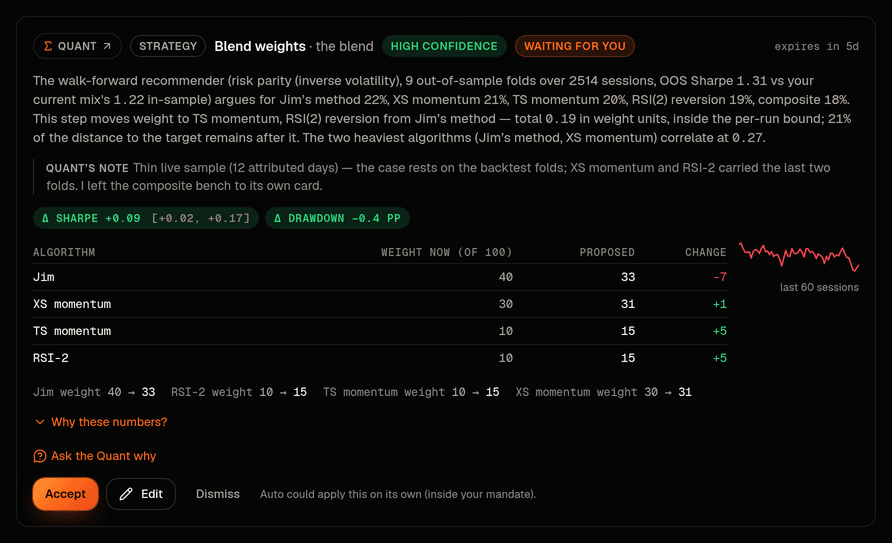
Under the list sits the Quant's panel. While decisions wait above it, it is one line ("6 from the Quant") with Show all 6: recommendations are reading for afterwards. With nothing waiting, or under the Recommendations chip, they show at once as tiles, six to a page: a title that names the change once, one sentence saying what would change, what the Quant expects from it in words ("The Quant expects slightly steadier returns."), and Accept and Dismiss. The numbers opens the recommendation in full: the change as labelled before-and-after rows, the evidence, Edit, and Ask the Quant. A change the desk already applied on its own shows Keep and Revert instead.
Two kinds are not offered here: an idea the Quant itself has little confidence in that improves nothing it measures, and kinds that were retired. A line under the tiles says how many were held back. Accepting one that needs no code shows Undo for a few seconds. After that the change can still be taken back for days: a whose weight was changed says so on its row on Signals, with revert beside it, and any other setting is changed back where it lives.
Decided

The Decided tab is one table, eight rows to a page, newest first: the time, the order in the same words the row used (side, size, symbol, "at" its limit), the amount, a status, and the reason. There are four statuses, and the reason says the rest:
Filled
- What it means
- The order went out and filled. The reason says who let it through ("You approved it, filled at $210.38", "Went through without asking (under $300)"), and on a buy what the position has made or lost since.
Sent
- What it means
- It went to the broker and is still working there.
Not sent
- What it means
- Nothing reached the broker. The reason says why: you rejected it (your note is quoted), a safety limit blocked it (the limit is named, with "Place it myself" where you may place it as your own order, or "A hard limit" where nothing can), your Guidance says no new buys, a newer idea from the desk took its place, the desk withdrew it, or you approved but the price had moved past its cap.
Expired
- What it means
- Nobody decided before its time ran out, or its trading window ended before it filled. Nothing more happens; the PM is told to propose it again at a fresh price if the idea still holds.
An order that expired unanswered is never counted as waiting: it leaves the Waiting list the moment it lapses and appears here. The chips above the table filter by status. Every row links to the whole story: See order opens the order's row in Activity when anything reached the broker, Open session opens the session that wrote it otherwise.
If you are a viewer
Reviewers see the same rows with Approve and Reject disabled and one line saying whose call it is; someone viewing a book read only sees no buttons at all. Nothing on a read-only view can place or drop an order.