How the Quant recommends changes, and what it can never do
The Quant turns its nightly measurements into typed cards (blend weights, taking an algorithm off or giving one a weight, display order, the sleeve split, guidance drafts, posture, a single risk knob), each with the expected effect on risk-adjusted return and the exact change; you accept, edit or dismiss; anything that loosens risk asks for your code; on Auto the cards inside your mandate apply themselves and revert unless they hold; every applied card is graded later.
- Who it is for
- Owners & operators
- Reading time
- 11 min read
- Updated
- What it is
- Typed cards from the Quant: one change each, with the expected effect on risk-adjusted return and the exact value before and after
- Where you see them
- Strategy › Recommendations (grouped by what they touch, with history and grades) and Inbox › Recommendations
- What Accept does
- Applies that change through the same editor you would use by hand, in one audited step, revertible for 7 days
- What asks for your code
- Anything that loosens risk (you type words that name it: MORE RISK, or the 's name), an enforced rule
- What can run by itself
- Nothing on Recommend. On Auto, the cards inside the mandate derived from your posture and one word of freedom — each with a notice, a grade and a one-click Revert — and they revert themselves after 7 days unless you keep them (Keep on the card acknowledges it; the grades stay for review)
- What it can never do
- Trade, pick a symbol or a size, make or lower a gate, write an , move your , or loosen a threshold — in any mode
The Quant measures; it does not trade. After the close (and whenever you press Run now on Desk › Quant) a deterministic engine replays the , tests every , asks which risk knobs stopped qualified entries, reads your closed trades for recurring patterns, and compares the book with the posture you declared. When the Quant's model session is switched on for this installation, each finding that clears its guard becomes one recommendation card; when nothing clears, the nightly note says so, and a run of "no change" findings is a healthy sign at this data scale, not a broken desk. Today that model session is off by default (it proposed nothing in 28 straight runs), so the nightly review is the engine's report in code: the Desk note on Desk › Quant says what was drafted and that no card was written. The card kinds, the guards and the Accept / Auto rules below apply unchanged whenever cards are written.
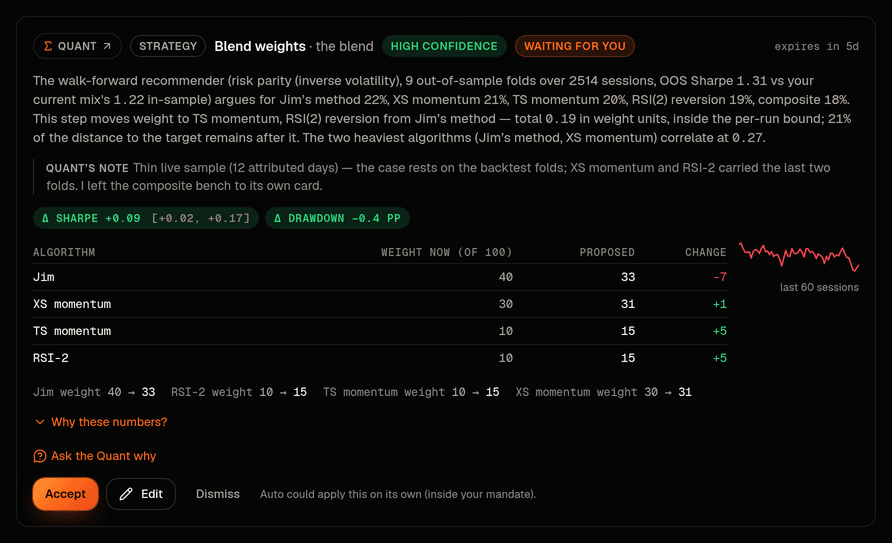
Reading a recommendation card
Every card, whatever it touches, reads top to bottom in the same order, and the top half never needs a statistics course:
- The title names the change once ("Take Composite off the blend", "Conservative posture", "Largest position limit", "Guidance note on SMCI"), beside who proposed it (the Quant, linking to the run that produced it), its state ("Waiting for you", "Applies automatically", "Accepted with your edits"), its confidence and when it expires.
- One sentence of effect says what accepting changes and what the Quant expects from it, in words: "Shift 7 points of blend weight away from , toward XS momentum, TS momentum and RSI(2) reversion. The Quant expects risk-adjusted return up about 0.09 and the worst shallower by 0.4 points." When the range still includes no change, the sentence says so.
- The exact change, one row per thing with its name and its value before and after in words ("Largest order, $500 to $250"; "Jim's method, 40 to 33, down 7 points"). When every row moves the same way the pill under them says "tighter" or "looser" once; a card that mixes the two says it per row. A small line beside the rows draws the return path of the algorithm (or the proposed blend) over the last sixty sessions.
- What deciding involves: Tightens risk (one click), Loosens risk, asks for your code (you also type words that name the action: MORE RISK, or the posture's name), A projection, not a test on history where the figure is one, only on a display-order card, Not projected, nothing in history to test it on for a sleeve nudge.
- Confidence: low, medium or high, from the width of the expected interval and the length of the record behind it. Never from prose.
- Show the numbers (or Show the reasoning on a card where nothing could be measured) opens the statistics: the engine's own rationale with every figure it measured (the terms it uses, such as out of sample, , and , carry a dotted underline that explains them on hover or tap), the Quant's short note beside it (labelled, never the numbers' source), the change in Sharpe with its 90% interval and the change in drawdown and exposure as chips, the trailing Sharpe of the algorithm the card is about, the method table for a blend card, how the effect was measured: a replay of the return paths with and without the change (weights, taking an algorithm off, giving one a weight), a measurement on closed trades (guidance), or an estimate at your desk's measured Sharpe (posture, risk limits: scaling how much risk you take scales return and drawdown, not the ratio). A replay chosen among several candidates is also checked against picking the luckiest one; a card that fails that check never reads "high confidence". The run and session identifiers behind the card sit one more fold down, under Technical details.
- Ask the Quant queues a short session that answers from the card's own evidence; the answer lands on the card, with the same underlined terms.
- Accept, Edit or Dismiss, then Revert for 7 days once applied. The line under the buttons says what is true now: on an open card whether Auto could apply it or what the ceremony asks for ("Asks for the words MORE RISK as well as your code"), on a decided one who decided when and until when it can be reverted ("You accepted this on Sep 7; revertible until Sep 14").
- Once applied the sentence turns to the past tense ("Set Composite's blend weight to zero … The Quant expected …") and How it turned out adds one row per check in words: "After 5 trading days, about as expected", "After 20 trading days, less than expected", "After 60 trading days, due Dec 1". The grader's own line with its interval sits behind the fold.
A kind that can no longer be applied (an older to let one algorithm block buys, a power that was retired) reads Retired, decline only: no confidence, no code, one sentence saying why, and Dismiss as its only button.
The kinds
Blend weights
- What it changes
- one bounded step of the blend toward the walk-forward recommender's weighting (no algorithm moves more than 0.10, 0.25 in total, sum preserved), measured out of sample; equal weights are the starting point and a fitted weighting replaces them only when it beats them out of sample by more than its own margin of error
- Who applies it, and how
- you, one click — or Auto, inside the weekly budget
Take an algorithm off the blend
- What it changes
- a member whose rolling contribution is negative past the guard goes to weight 0; the PM still sees its vote
- Who applies it, and how
- you, one click
Give an algorithm a weight
- What it changes
- a benched algorithm whose trailing year beats the weighted median and whose record clears the guard against picking the luckiest of those tested gets a 0.05 starter weight
- Who applies it, and how
- you, one click
Display order
- What it changes
- the order the algorithms are listed in on their page, when one algorithm's standalone record clearly leads; it changes no score and no trade, and this kind is being retired
- Who applies it, and how
- you, one click
Allocation targets
- What it changes
- a bounded nudge of the split between sleeves (core ETFs, satellite stocks, cash floor) inside your bands around the posture's split — more cash and less satellite in a risk-off tape, back toward the posture's split when it clears
- Who applies it, and how
- you — through the Allocation editor's own path; raising invested exposure asks for your code and MORE RISK; or Auto, inside the mandate's band
Guidance
- What it changes
- a draft note in fixed wording for a recurring loss pattern (a symbol that keeps losing, entries just before earnings, chasing gaps, going against the blend), or retiring a note whose blocked entries then rose
- Who applies it, and how
- you — it lands on Strategy › Guidance like a note you wrote; an enforced draft asks for your code; retiring an enforced note loosens risk (code + MORE RISK)
Posture
- What it changes
- one or down, from the tape and from your book's own volatility, drawdown and exposure against the posture you declared
- Who applies it, and how
- you — through the posture editor's own path: every limit in one transaction, your code and the posture's name (for example MODERATE) if any of them loosens
Risk knob
- What it changes
- one limit, one notch: looser where it kept stopping qualified entries (inside its bounds and never past the most permissive preset), tighter where the book never comes near it. The two halt thresholds are never loosened
- Who applies it, and how
- you — through the same bounded, audited write Risk uses; a loosening asks for your code and MORE RISK
Accept, Edit, Dismiss, Revert
Accept runs the owning editor's own code with you as the actor and the card as provenance, writes the audit rows in the same step, and stamps the card accepted. The direction that decides whether your code is needed is computed from the values the book holds now, not from what the card stored days ago, so a card can never be a way around a ceremony the editor would demand of you by hand, and nothing on a card can move a value outside its bounds.
Edit opens the card's values for the kinds where that makes sense (weights, display order, the wording / strength / lifetime of a guidance draft, the target posture, a knob's value). Your version is validated like the original and judged for direction like the original: turn a tightening into a loosening and it asks for your code. The card is stamped accepted with your edits and keeps both versions.
Dismiss changes nothing, records your optional note for the Quant's next run, and stops the same card from coming back while it would still be live. A run over the same evidence never duplicates an open card either: the same measurement produces the same card, and the open one simply stands.
Revert (7 days) puts back exactly what Accept captured, through the same editor. Undoing a tightening is a loosening, so that revert asks for your code too. A retired guidance note is re-added on Guidance, not reverted from the card.
Viewers and anyone looking at a book read-only see every card and never the buttons.
Auto, and the 7-day self-revert
Tuning· Strategy › Profile › Autonomy › Tuning (Off / Recommend / Auto), the second row of the card on Strategy › Profile, has three positions: Off, Recommend (the default: every card waits for you) and Auto (asks for your code and the word AUTO). On Auto you also pick one word of freedom (Tight, Balanced or Free hand) and the code derives the whole mandate from it and your posture: how many points a week the blend may shift, whether members may come and go, the posture range, how far limits and sleeves may move inside that range, whether soft guidance may be drafted. The card prints it as plain sentences; What the Quant may change on its own has the table. Cards inside the mandate apply themselves at the next session boundary, in either direction, including a step toward more risk when it is inside the range you armed, each with a notice, an entry in the audit log naming the card, and a one-click Revert. Cards outside it wait for you exactly as on Recommend, and say why in one line.
An automatic change then has to be : 7 days after it applied, it reverts itself unless you kept it (Keep on the card, one click, logged; the grades stay on the card for review but never decide the revert). The revert is its own audited change with a notice, never overwrites a value you changed since, happens only outside market hours, and waits while the book is halted. The desk also pauses itself (nothing more applies until you resume with your code) when the book draws down most of the way to its halt, when two automatic changes in a row miss, when its own run fails or the data is stale, or when trading is halted. Pause is always one click for you. What it may recommend· Desk › Quant › Scope (blend, gates, allocation, posture, guidance, risk knobs, parameters) is a set of checkboxes on Desk › Quant; everything but parameters is on by default because a card on its own changes nothing.
Grades and the scoreboard
Every accepted, edited or automatic card gets three grades, at 5, 20 and 60 trading days: the realized change in risk-adjusted return over that window against the interval the card promised: within the interval or not, and whether it moved the expected way. For blend changes the grade replays the blend with and without the change on the returns that arrived since; for posture, knobs and guidance it compares the book before and after (and says that is not a causal estimate). The line "Quant recommendations: n accepted, k within the expected interval" on Performance › Evidence and at the top of Strategy › Recommendations prints a rate only once ten cards have a 20-day grade; before that it says how many it has.
What the Quant can never do
- Place, size or cancel an order, or read news, briefs, chat or transcripts.
- Pick a symbol, set a position size, or write a proposal: names and sizes are the Portfolio Manager's, inside the budgets the Quant's settings leave it.
- Apply anything itself: its process has no permission to write configuration. Accept and Auto both run in the console's API, under your book, recorded in the audit log with the card's id.
- Make or lower a gate, write or retire an enforced guidance rule, move your approval line, touch credentials or halts, in any mode. On Recommend, loosening a limit or stepping the posture up also waits for your code; on Auto it happens only inside the range you armed with your code.
- Loosen either halt threshold with a knob card; they only ever come in, or move with a posture step you allowed.
- Move a value outside the bounds the code defines, or past the most permissive posture preset.
- Show "high confidence" on a change whose interval is wide, whose record is short, or that looks like the luckiest of many tries.