When the connection test fails
Each fix card the Connect wizard can show after Test connection: what Alpaca or Bellwether actually found, whether it is about your keys, and the one thing to do.
- Who it is for
- New to Bellwether
- Reading time
- 10 min read
- Updated
When Test connection on Connect your broker does not end in "Connection works", the paste card comes back with a fix card: a title in plain words, what happened, what to do, and one button. The API Key ID you pasted is still in its box with the cursor in it; only the Secret Key box is emptied. There is nothing technical on the to read or hand over: the card is the whole story. This page lists every card, what produced it, and whether your keys are the problem. Two rules of thumb: only three cards ever send you back to Alpaca's API Keys panel, and a card that carries the Email hello@bllwthr.com button is never about anything you typed.
Before anything is sent
Four mistakes are caught under the field as you paste, so they never reach Bellwether, let alone Alpaca. The sentence sits directly under the box it is about, the box is outlined, and Test connection stays off until the value is fixed:
- A stray character. "That API Key ID has a character that is not a plain letter or digit at position 7 (looks like it was copied through another app). Copy it again directly from your Alpaca dashboard." A key that travelled through a chat, notes or translation app can pick up a letter that looks right but is not (a look-alike from another alphabet, an invisible space). The sentence names the box and the position, counted from 1, so you know where to look; the character itself is never repeated back to you. Copy the value again straight from Alpaca's API Keys panel. Ordinary symbols are fine; a space, tab or invisible mark at the very start or end is dropped for you silently.
- A space or line break inside the API Key ID or the Secret Key: "That Secret Key has a space or line break at position 13. Paste one value per box, exactly as your Alpaca dashboard shows it." Usually both values went into one box.
- A Key ID that starts with AK. That is a live-account key and this desk trades paper accounts only. Switch the Alpaca dashboard to Paper and generate keys there; paper Key IDs start with PK. (If a live pair gets through some other way, Bellwether spots it and sets the connection aside, unused; see the third card below.)
- A Key ID that starts with CK. That is an OAuth app's client id, not an account key. Open the API Keys panel on the Paper dashboard's Home page instead.
A value that passes but looks unusual for Alpaca (a Key ID that does not start with PK, a length that suggests something was cut off or pasted twice) gets a quiet grey hint under the box. A hint never stops you testing.
The server runs the same check as the form. If it ever refuses a value the form let through, its sentence appears under the box it names, exactly like the form's own, and the One of those keys picked up a stray character card explains what to do.
The fix cards
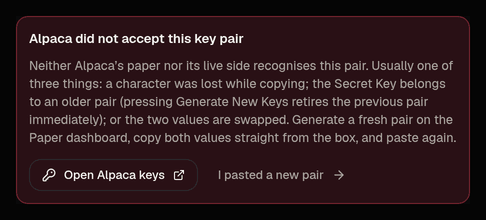
Alpaca did not accept this key pair
- What actually happened
- Bellwether tried the pair against Alpaca's paper side and then its live side, and both answered "not authorized" (or a pair that used to work was refused mid-session). Usually one of three things: a character lost while copying; the Secret Key belongs to an older pair (pressing Regenerate retires the previous pair immediately); or the two values swapped
- About your keys?
- Yes
- Do this
- Open Alpaca keys, generate a fresh pair on the Paper dashboard, copy both values straight from the panel, paste, press I pasted a new pair, then Test connection
One of those keys picked up a stray character
- What actually happened
- A character in the API Key ID or the Secret Key is not a plain letter, digit or symbol, so the pair could not even be sent: nothing reached Alpaca and nothing about your account is known. This is a pair stored before the form learned to catch it, or one caught after the form let it through
- About your keys?
- Yes (the copy, not the account)
- Do this
- Open Alpaca keys, copy each value straight from the API Keys panel (or press Regenerate for a fresh pair), paste without passing it through another app, press I pasted a new pair, then Test connection
These keys belong to a
- What actually happened
- Bellwether asked Alpaca and found a real-money account behind the pair. This desk trades paper accounts only, so the connection was saved but set aside, unused (trading off); nothing was placed and nothing will be. The book's owner also gets an alert saying so
- About your keys?
- Yes
- Do this
- Pick a from Alpaca's account menu (top left), regenerate the pair there (PK…), paste again. Going live is a separate, deliberate procedure, never a paste
Both values are needed, exactly as Alpaca shows them
- What actually happened
- One box was empty when the pair was sent
- About your keys?
- Yes (a paste slip)
- Do this
- Paste the API Key ID and the Secret Key, one in each box; the Key ID is the shorter one and starts with PK
Could not reach Alpaca just now
- What actually happened
- Alpaca did not answer, answered with an error of its own, or asked Bellwether to slow down while it asked for the account
- About your keys?
- No
- Do this
- Wait a moment and press Try again; it re-tests the pair already stored, nothing to paste again
Alpaca turned the request away before checking your account
- What actually happened
- Usually API access is switched off on the Alpaca account; sometimes something between Bellwether and Alpaca blocks the request
- About your keys?
- No
- Do this
- Check that API access is on in Alpaca. If it is, press Email hello@bllwthr.com on the card (there is nothing for you to copy; the detail is in Bellwether's own log) and Try again later once we have looked. Your keys are very probably fine
This one is on Bellwether's side, not yours
- What actually happened
- Bellwether is missing a piece of its own setup (it cannot open or store sealed keys), or it hit an unexpected problem of its own, so it never properly tried Alpaca
- About your keys?
- No
- Do this
- Press Email hello@bllwthr.com on the card; nothing to redo. Try again later re-tests once it is fixed
This book already has a connection
- What actually happened
- A connection is already saved, or a test is still running, and Bellwether refuses a second one rather than silently replacing it
- About your keys?
- No
- Do this
- If you meant to replace it: back on the Broker step press Disconnect (), then paste the new pair. If a test is still running, give it a minute
Try again and Try again later re-run Bellwether's read-only check on the pair that is already sealed and stored (a protected action, so you are asked for your code unless you entered one a moment ago); they never re-send anything from the form, because the secret left the form the moment the pair was stored. If you cancel the code prompt the card stays and says so; press the button again when ready. I pasted a new pair clears the card and puts the cursor in the API Key ID box so the form underneath can be tested; the rejected connection is retired when the new pair is stored.
Connected with Connect with Alpaca (sign-in) rather than keys? The same cards apply, except the three key cards: a token Alpaca no longer accepts reads "Alpaca no longer accepts the token from that sign-in" and the remedy is pressing Connect with Alpaca again (or pasting keys instead). A blip or an operator-side problem on a signed-in connection gets the same Try again as a key pair; no need to sign in again.
If the Test step never finishes (two minutes with no answer means the check is held up on Bellwether's side, not that your keys are wrong), the page offers Continue to the console (the check completes on its own later; reopening Connect your broker puts you back on the Test step) and Start over with a new connection, which retires the stuck one (authenticator code) so you can paste or sign in again.
NoteThere is no "clock skew" card for Alpaca. Alpaca's key authentication is not time-signed, so Bellwether's clock cannot make a good key pair fail. If your code is refused at the step-up prompt, that is your phone's clock, and a different screen.
Coming back to a connection that was set aside
If you leave and come back (or the pair was stored before the form could catch the problem), Connect your broker opens on the Broker step with one notice and one button. A connection that never went through says so: The keys you pasted didn't go through., then the reason in the card's words ("One of those keys picked up a stray character. Nothing was sent to Alpaca.") and what to do; Paste new keys goes straight to the paste card with the matching fix card already showing. A connection that used to work and stopped says Your connection (Alpaca paper) stopped working. instead. When nothing needs pasting again (a blip on the first check), the notice reads The first check of this connection didn't finish. and the button Test it again. Accounts says the same thing in one line under Can it trade now?: for keys that never went through, "the keys pasted for this book could not be used (…), so nothing trades on it until a fresh pair is connected", with Reconnect; no account number or balance is shown for an account Bellwether never got to read.
The account is connected but "not active"
This is not a failed test. Alpaca accepted the keys, so the wizard moves on to Connection works, and the card shows what Alpaca says about the account. A brand-new account is occasionally held for review for a few hours (Alpaca reports it as submitted, onboarding or similar); while it is, Alpaca itself may refuse orders, and a refused order shows up as a rejected order with Alpaca's reason, never as a connection problem. Finish anything Alpaca emailed you about; there is nothing to redo in Bellwether, and the note disappears once Alpaca reports the account active.
Keys that worked yesterday
When Alpaca starts refusing a pair that used to work (almost always because new keys were generated in the Alpaca dashboard, which retires the old pair at once), the halts the book (broker_auth_error, a critical alert on Activity › Alerts) and parks the connection. Connect your broker then opens with Your connection (Alpaca paper) stopped working. on the Broker step, a Paste new keys button straight to the paste card, and the Alpaca did not accept this key pair card already showing there; paste the new pair and Test connection replaces the parked one. If the connection was parked by a blip rather than a refusal (the notice says it could not reach Alpaca just now and there is nothing to re-paste), the button reads Test it again and the card's Try again re-tests the stored pair. Then press Resume in the banner (Risk › Halts) with your code. The longer story, including outages and the circuit breaker, is on broker disconnected.
For the operator
Nothing on the user's screen is meant for you any more; the connection row stores a reason code, not the exception (invalid_credentials, key_has_invalid_characters, broker_unreachable, account_not_paper, permission_denied, unknown), and the API words it. The technical line is in the Executor log, with key material redacted:
- the probe:
connection <book>/alpaca/paper failed verification: <code> (<ExceptionClass>: <message>), for example… failed verification: key_has_invalid_characters (UnicodeEncodeError: non-latin-1 character in the credentials at position 7)(the character is never logged),… invalid_credentials (AuthError: credentials rejected by both the paper and the live endpoint (…)),… permission_denied (AuthError: alpaca forbade GET /v2/account: forbidden (no Alpaca error code: egress proxy / allowlist?)); the last one means the request never reached Alpaca's API proper: check the trading server's egress path; - a verified book that could not be opened:
book <book>/alpaca/paper could not be opened: <code> (<line>), which also raises the owner's "Could not connect to your broker account" alert in plain words (the code rides in the alert's context) and the same line in the process's boot report;unknownwith "no SESSION_SECRET" / "sealed credentials could not be opened" means the Executor and the API do not share the sealing key; - rotated keys mid-session:
book parked after auth error: <book>: invalid_credentials (broker_auth_error: …).
grep 'failed verification: key_has_invalid_characters' executor.log finds every look-alike paste; the user only ever needs to re-copy from the dashboard, never to read a character back to you.