The kill switch
Pause trading is one click from every screen and never asks for a code; the three kinds of stop the banner tells apart, what a stop blocks and still lets out, where its history lives, what Resume trading does, and what Flatten does.
- Who it is for
- Owners & operators
- Reading time
- 12 min read
- Updated
The is the crimson Pause trading button in the top bar (on a narrow window and on a phone it reads Pause). It is on every , it is one click plus a confirm, and it never asks for a code. Stopping must always be easier than starting. While trading is stopped the same button reads Resume trading: the control is always a verb, and the banner under the top bar is the one place that says what state the book is in.
Pause trading
Where to pause: the top bar, on every screen. That button is the control; everything else mirrors it.
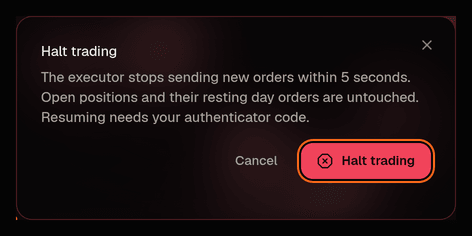
- Click Pause trading in the top bar (or choose "Pause trading" in the search dialog, where it is one of the three actions listed before you type). The strip under the title on Risk carries the same button and opens the same dialog.
- Confirm in the dialog. No is asked for.
Someone signed in read only, or as a , sees the button greyed out; hovering it or reaching it with the keyboard says why ("Owner/operator only"), and a bar under the top bar says "Read only" in words. Only an owner or operator can pause. The kill switch· Halt (top bar) · Risk header has no other home: no agent has a tool that halts or resumes trading; only a person, or the 's own halt rules below, can.
The Executor loops every 5 seconds and caches the halt flag for at most 5 seconds, so a halt is in force within about 5 seconds of your click. It also re-reads the flag without the cache immediately before each it is about to process, so there is no window in which an order slips out after you clicked.
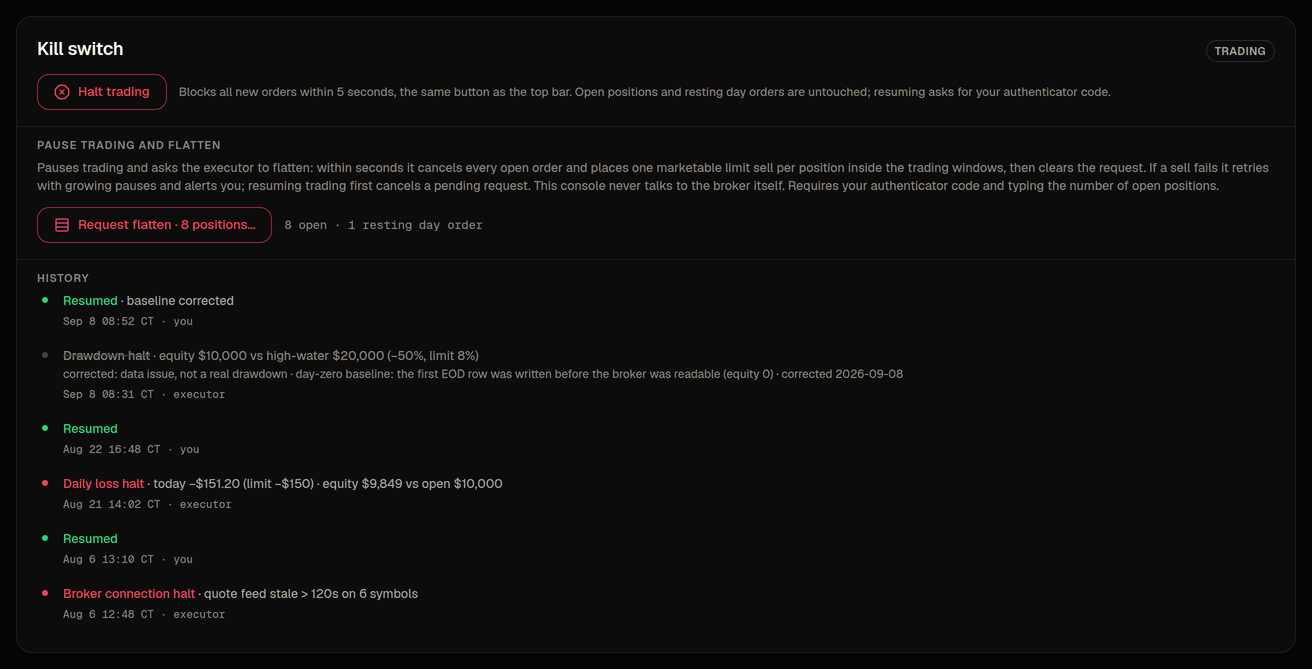
While trading is stopped, a banner sits across the top of every screen, directly under the top bar. It is the one place the console says the state, and it says it once: its first words name the state in bold, one sentence says what that means for your orders, and under it labeled facts say why and since when (Reason, Since). It is amber and calm when a person paused trading ("Paused by you", with your own words as the reason), crimson when a risk rule tripped ("Halted by a risk rule", reason "today's loss of $157.04 passed the $150 limit") or the Executor stopped itself on an error ("Broker problem" when the broker kept failing or refused the keys, otherwise "System problem"; reason "the broker stopped answering after 5 failed calls in a row"). The state keeps one name: a person pauses, a rule halts, and the word never flips between the two. The way back is the top bar's Resume trading button, right above the banner. On a phone the banner is one row (the state and a small arrow that opens the sentence and the facts in place). The market chip goes grey meanwhile: Market open is the exchange session, not your book. On Risk the one Kill switch card shows the same state with who set it and when, the request, and a history of halts, resumes and flatten requests in plain words (" · equity $10,000 vs high-water $20,000 (−50%, limit 8%) · Sep 8 16:56 CT · executor"); a halt that a later data correction explains is struck through and marked corrected: data issue.
Three kinds of halt
Every halt means the same thing to the Executor (reduce-only, below). They do not mean the same thing to you, so the banner tells them apart by colour and wording. The API works out the kind from who set the halt and what the Executor recorded as the cause; you never pick it.

Pause by a person (operator pause)
- Banner
- Amber, with a pause icon. It reads "Paused by you" (or by the person who did it) and that nothing new is bought until you resume, while sales that protect what you own still go out; the facts row shows your reason if you typed one and since when ("Since 14:20 CT").
- Who sets it
- A person: Pause trading in the top bar, an admin pausing the book, or a Flatten request (which halts first)
- Examples
- "end of day", "pausing while I rethink sizing", "flatten requested: …"
- Before you resume
- Nothing to investigate; it is your own pause. Resume when you are ready
Risk-rule halt
- Banner
- Crimson. It reads "Halted by a risk rule" and that nothing new is bought while sales that protect what you own still go out; the reason says the rule in words ("today's loss of $157.04 passed the $150 limit", "equity of $9,390 is 6.1% under its $10,000 high-water mark, past the 6% limit").
- Who sets it
- The Executor, when the (check 14) or the drawdown limit (check 15) trips, or another check returns a halt verdict
- Examples
- Today's loss reached $150; the account fell 8% below its high-water mark
- Before you resume
- Read the numbers on Risk › Halts. If the condition still holds, the same rule halts again on the next loop after you resume
Executor fault
- Banner
- Crimson. The lead names the failure: "Broker problem" (the broker kept failing or refused the keys) or "System problem" (anything else, such as the paper / live setting and the trading service disagreeing); the sentence says that no orders can be sent, not even sales, until the connection is back; the reason says the cause in words ("the broker stopped answering after 5 failed calls in a row", "Alpaca rejected the keys", "this book is set to live while the trading service runs paper").
- Who sets it
- The Executor, when it cannot safely trade: the broker circuit breaker opened, the broker refused its credentials, or the paper/live environment mismatch (check 1)
- Examples
- Five broker calls failed in a row; the API key was revoked; the deployment flag and the process disagree
- Before you resume
- Fix the cause first (broker status, credentials, the environment flag; see paper vs live); resuming into a broken broker only re-opens the breaker
A person's halt is always an operator pause, whatever you type as the reason: typing "daily loss" in the dialog does not make it a risk-rule halt. A halt the Executor set that cannot be classified (an old row from before the cause was recorded, say) is shown as a fault, the louder of the two, on purpose. Whoever set it, only an owner or operator can resume, always with a fresh authenticator code; no halt of any kind clears itself.
One more annotation appears in the history, not the banner: "corrected: data issue, not a real drawdown", muted and struck through, on a halt that turned out to be bad data rather than a loss (the day-zero drawdown halt of Sep 8, when the high-water mark was seeded wrong, is the one example so far). A halt is marked corrected only when a data-fix audit row written within 7 days names it (by its audit id, its calendar day, or the rule that tripped) or when the halt's own record says so. An unrelated correction the same week never mutes a real halt. If you or your operator record a data fix for a spurious halt, put the halt's day or id in it, or the history will keep showing it in crimson.
What a halt does
A halt makes the book reduce-only: nothing that adds risk goes out, anything that takes risk off still can. Your pause, the kill switch a deployment starts with, a halt the Executor raises by itself (below) and the broker circuit breaker all mean the same thing. On the Executor's next loop, and again on every loop while the halt stands:
- No new buys. Buy proposals the PM has queued, and any that arrive while halted, are not run through the checks; they are closed with status
blockedand the halt as the reason. On Desk the pill says Rejected and gives the halt as the reason; the idea was not judged wrong, the system was stopped. Order-management requests from the PM (move a limit, cancel, re-arm a stop) are blocked the same way while halted. - Approval never outranks a halt. A buy you already approved but that had not yet been sent is blocked when the Executor reaches it. A card still waiting for your decision stays in the Inbox until its window ends; approving a buy while halted only gets it blocked.
- Working buy orders are cancelled at the broker. Every buy order still resting at the broker is cancelled in the same loop (never a sell). Its proposal closes as cancelled (or partial, if some shares had already filled) with a note that the halt cancelled it, and an alert line records each cancel under Activity › Alerts. If the broker cannot be reached at that moment, a warning says so and the cancel is retried on every loop until it lands.
- Sells still go out. A sell the PM proposed (a trim, a close), a sell card you approve during the halt, and the exits the Executor writes itself when a stop or target is hit are still evaluated and sent. They run the full ; the daily-loss and drawdown checks pass a sell with a note instead of blocking it, because the halt they would raise is already on record. A protective exit that is already working keeps being re-priced toward the bid while halted (see the Executor).
- Open positions are kept. A halt cancels resting buys and lets sells through; it does not sell anything by itself. Selling everything is Flatten, below.
- One exception: the broker circuit breaker. While the breaker is open nothing can reach the broker at all, so the buy cancels and the sells wait until a person resumes and the broker answers again.
Halts that happen by themselves
The Executor halts on its own, with the cause written as the reason you see on Risk and in the banner, and as a critical alert under Activity › Alerts (posted to Slack too when a webhook is configured). The first two below show as a risk-rule halt, the other three as an executor fault:
- Daily loss: today's loss reached
MAX_DAILY_LOSS_USD($150 by default). - Drawdown: the account fell
MAX_DRAWDOWN_PCT(8% by default) below its high-water mark. - Broker circuit breaker (
broker_circuit_open): five consecutive retryable broker failures. There is no automatic retry probe; a person decides when the broker is back. - Environment mismatch: the environment flag says one of paper or live and the running process says the other (risk check #1,
broker_env_matches_process). See paper vs live. - Broker authentication failure (
broker_auth_error): the credentials stopped working.
The first cause stays on record: a later condition is logged but never overwrites the reason. If the database cannot be reached at the moment a halt is needed, the halt is kept pending and retried every loop, and nothing is processed until it lands.
Resume
- Press Resume trading in the top bar (the same button that paused; on a phone it reads Resume) or in the search dialog. (While trading is stopped the strip under the title on Risk leaves the state to the banner right above it, so "halted" is said once, and the way back is the top bar's button.) Resuming asks for your authenticator code. It is the same action for all three kinds of stop.
- The dialog shows what you are clearing (the state, the reason and since when), then Resume trading asks for your code. The server checks the code itself; a resume without a fresh code is refused. Viewers and reviewers cannot resume.
Confirming clears the halt reason, sets trading enabled, writes an audit row under Activity › Config changes, and resets the broker circuit breaker if it was open. Proposals that were blocked during the halt stay blocked and buy orders the halt cancelled stay cancelled; the PM proposes afresh at its next session, and anything new goes through the risk checks as usual. A halt that was caused by a limit trips again on the next loop if the condition still holds, so read the reason before you resume. If a flatten request was still pending when you resumed (it had not managed to run yet), the Executor drops it with a warning alert rather than sell a book you have just re-opened; request it again if you meant it.
Halt and Flatten
Sell everything and pause (pause trading and flatten) is a panel on Risk › Halts, under the two halt rules. The button is disabled when there are no open positions. Pressing it opens a dialog titled "Sell all N holdings and pause trading" that asks you to type the number of holdings and then for your authenticator code; its button reads Sell everything and pause. Confirming does two things at once: it halts trading (if it was not halted already) and records a flatten request, which is audited and shown as a requested badge on the panel and as a row in the halt history beside it. The console never talks to the broker; the Executor does the selling.
The Executor looks for the request at the start of every loop, so it acts within about 5 seconds. Flatten is the one sanctioned path that bypasses proposal → policy → submit (the risk checks, the no-trade windows and your do not apply to it), so it is deliberately small and loud. It:
- Refuses to touch the broker if the environment flag and the running process disagree (the same rule as risk check #1); the request stays flagged, a critical alert says why, and it is retried every loop.
- Sets the halt again with the flatten as its reason (that is the reason Risk shows from then on), plus an audit row and a critical "flatten started" alert.
- Cancels every open order at the broker, buys and sells alike.
- Submits one limit sell per long position for the whole quantity, priced at the bid minus
MAX_LIMIT_DEVIATION_PCT(1% by default) so it is marketable but still a , and records each order under Activity › Orders.
When every cancel and every sell has been placed, the request is cleared in the same step as a "flatten executed" audit row under Activity › Config changes, the requested badge goes away, and an alert reports how many orders were cancelled and how many sells were placed. Trading stays halted until you resume; the sells are marketable limits, so watch Overview for the fills.
If any step fails (a quote could not be read, the broker refused or did not answer for one symbol), the sells that could be placed are placed, the request stays flagged with what went wrong, a critical alert lists the failed steps, and the whole routine runs again with fresh order ids after a growing pause (30 seconds at first, up to 10 minutes). It never gives up silently: from the third failed attempt the alert tells you to sell the rest by hand at the broker while it keeps retrying. While the broker circuit breaker is open nothing can reach the broker, so the request waits and a critical alert says so on every loop; the breaker itself only closes when you resume (or the Executor process is restarted), and resuming drops a pending request. So once the broker is healthy again, resume and press Flatten a second time, or sell at the broker yourself.
WarningFlatten sells everything and cannot be undone once fills start. Everything else in this article is reversible; Flatten is the one thing that is not.