Keys and safety
Where your Alpaca keys are stored, what a trading key pair can and cannot do, who holds it, and how to rotate or revoke it.
- Who it is for
- Owners & operators
- Reading time
- 5 min read
- Updated
An Alpaca key pair is the only thing Bellwether holds for your account. This page covers where it lives, what it can do, who can use it, and what happens when it stops working.
Where the keys are stored
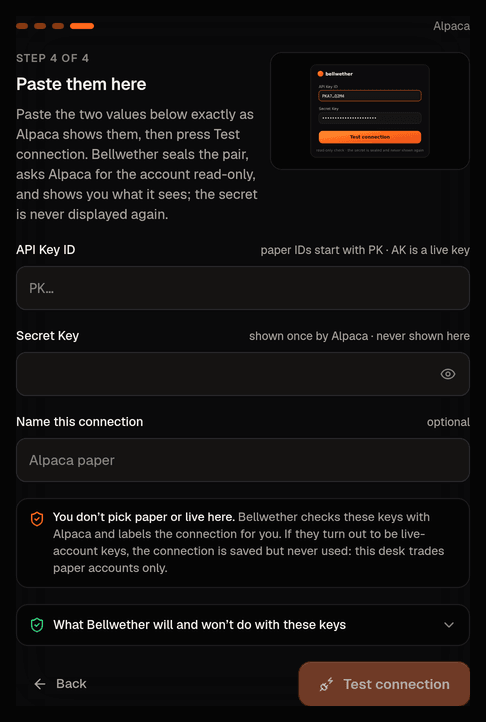
- Your own book (keys pasted on Connect). The API seals the pair with a server-side encryption key the moment you press Test connection, binds the ciphertext to that one connection, and stores nothing else. The secret is never echoed back; the console shows the Key ID and account number masked to their last four characters, as PK••7Q2M. Only the can open the seal; the API that took the keys has no route to the internet and never contacts Alpaca.
- The house book (cloud). Credentials live in Secret Manager as one JSON blob per environment and are handed to the Executor as its broker credentials when the stack starts. The console API never reads Secret Manager. Nothing is in code, image or repository. These server-side credentials are reserved for the house book's one fixed connection: the API will not create another connection that points at them, the database refuses such a row outright, and the Executor refuses to open any other book that claims them (that book is parked with a critical "Could not connect to your broker account" alert; the house book keeps trading). A second book can therefore never trade the house account under its own name.
- Local development. The same blob sits in a .env file that is never committed.
Logs never contain a secret: every log line, alert, report and masks the key id and account number to the last four characters.
What a trading key pair can and cannot do
Read the account, positions, orders and activity
- Cannot
- Deposit, withdraw, link a bank or transfer anything
Place and cancel stock orders in that account
- Cannot
- Read bank details (a different Alpaca API, which Bellwether does not use)
Read quotes, bars and news
- Cannot
- Touch a , when the pair is a paper pair
Paper or live is read from the keys, never chosen
Nobody tells Bellwether whether a key pair is paper or live; the Executor asks Alpaca. When it verifies a new connection, and again every time it opens the book, it presents the keys to the paper endpoint first and to the live endpoint only if paper answers "not my account" (a timeout is never taken to mean live). Whichever accepts them is written down as the connection's environment with the time of the check, and Connect your broker shows it as "Detected from your keys: …" and the Account type fact reads "Paper account, simulated cash". Detection labels; it never switches anything on. This deployment's Executor runs paper, so a live pair is stored as live and refused: the book is parked (trading off, Manual), the connection shows an error asking for the paper pair (paper Key IDs start with PK, live ones with AK), and a critical alert lands under Activity › Alerts. Because the check repeats at every open, swapping the keys behind a verified connection or editing the label by hand cannot slip a live account in as paper either; the open is refused the same way. A live account only ever verifies on a deployment started for live, which is the paper vs live cut-over and nothing you can do from a screen.
Bellwether adds its own limits on top: the Executor only ever sends long-only day in regular hours, each past the . Funding happens on Alpaca's own site, by you; see funding your account.
Who holds the keys
Only the Executor, the ordinary tested Python that talks to the broker. No agent ever holds broker credentials or a broker write method: not the PM, not the , not the , not . Their database role cannot even read the sealed ciphertext column. That is a non-negotiable, not a setting.
The PM's container does need market data, so the operator can give it a separate paper key pair used only for data, as its own market-data credentials: it reads the same quotes, bars and news and is never handed to a broker adapter. On the house book the broker adapter refuses to start if the credentials' paper flag disagrees with the environment flag on the trading machine, so live keys cannot run under paper, or the reverse, by misconfiguration.
Rotate or revoke
Keys are replaced, never edited in place, and a book can hold one active connection at a time. For your own book:
- Press in the top bar so no order is mid-flight; pausing never asks for a code.
- In the Alpaca paper dashboard, regenerate the API key pair. The old pair stops working at once; copy the new Key ID and Secret.
- Wait for the Executor to notice: its next call with the old pair is refused, it marks the connection as needing attention and parks the book. Connect your broker then says the previous connection stopped working and asks for new keys.
- Paste the new pair on Connect your broker. The old connection is disabled and its ciphertext wiped, the new one is verified the same way as the first time.
- Once Accounts shows a fresh sync, press Resume on Risk or in the banner and confirm with your .
For the house book, whose key lives in the deployment rather than in the console, rotation is the operator's job and follows the same shape: halt, create the new key at Alpaca, store it in the deployment's secret store, restart the Executor (it reads the latest version at start), confirm a sync on Accounts, revoke the old key, resume. The console never sees that key and offers no control for it; Accounts › Your account says the house book's keys are not shown or replaced from that screen.
TipRevoking a key at Alpaca while the book is trading is safe: the next call fails, the Executor halts the book, nothing else is sent.
If the keys stop working
When Alpaca rejects the pair (revoked or rotated), the Executor halts the book on that call and raises the alert "Broker connection needs attention". Nothing is retried with bad credentials. A book connected from Connect is also parked until you re-verify from the console, so the halt cannot clear itself. Paste the new pair on Connect your broker, watch the Broker card come back, then Resume.
If Alpaca is unreachable rather than refusing the keys, the Executor retries and, after five failed calls in a row, halts with "Broker connection paused after repeated failures". You clear that halt too, on purpose: an automatic retry would flap in and out during a real outage.
Both cases, and what to look at first: broker disconnected.