Account security
Password plus a mandatory authenticator code, sessions and devices you can see and revoke, a fresh code before anything sensitive, and a sign-in audit you can read.
- Who it is for
- Owners & operators
- Reading time
- 7 min read
- Updated
Bellwether is reachable on the public internet, so it protects itself the way a bank's site does, with a few deliberate choices that are stricter. Nothing on this page touches money: there are no bank links, no card numbers and no way to withdraw.
Where it lives
Everything about your own sign-in is on Settings, on the Account tab, which opens first. Signed in shows your name, email and role, with one line on how you sign in and how long a session lasts. Password and code holds Change password and Move . Devices and sessions is the list of where you are signed in right now, and Passkeys sits under it. The account menu opens the same editors as dialogs over any . Settings used to have a separate Security tab. It is gone, and its old links (the tab, the anchor) open Account. While you look at someone else's book read only, the Account and Display tabs are still yours.
Signing in
You sign in with your email, the password you chose at setup, and a six-digit code from your authenticator app (Google Authenticator, 1Password, Authy or similar). The code is mandatory; there is no way to switch it off, each code works once, and a password reset never bypasses it. Change the password with Change password on Settings › Account (it asks for the current one and a fresh code). Move to a new authenticator with Move authenticator on Settings › Account. Moving it is a critical action: it asks for a code from the last 5 minutes to start, shows the new key to scan, and only switches over when you enter your current password and a code from the new key; until then your old authenticator keeps working. Finishing hands you ten new and voids the old ones. Either change signs out every other device and forgets every .
Five failed attempts from one network address within 15 minutes slow further attempts down; ten on one account lock it for 15 minutes. The sign-in page never says which of email, password or lock was wrong. Both are recorded, and the flags lockouts.
Trouble signing in
- "That didn't work" with the right password. After ten failed attempts on one account it is locked for 15 minutes, and the page will not say so (it never reveals which part was wrong). Wait 15 minutes and try once, carefully; five misses from one network also slow things down for a while, and the page then says how long to wait.
- Lost the phone with your authenticator. Choose Use a recovery code on the code step and sign in with one of the ten codes you saved at setup, then reset the authenticator straight away (below).
- Lost the phone and the recovery codes. Ask the person who invited you (the book's owner) to send a fresh setup link from Admin › People. It lets you choose a new password and enroll a new authenticator. Nobody can read or reset your password for you.
- Forgot the password. Forgot password? on the sign-in page emails a reset link; the reset still asks for an at the end.
- The setup link says it no longer works. Links expire and work once. Ask for a fresh one; it takes the owner one click.
Recovery codes
At setup you saved ten recovery codes. Each works exactly once in place of an authenticator code. If you lose your phone, sign in with a recovery code and reset the authenticator straight away: a full sign-in with a code a fresh step-up, so for the next 5 minutes the reset does not ask for a code from the phone you no longer have (finish the scan and the confirm inside that window, or sign in again with another recovery code). If you have lost both, the owner can send you a fresh setup link from Admin › People. Nobody can read or reset your password for you. Passwords are stored as a slow hash that even the operator cannot reverse.
Passkeys
Signing in with your phone's face or fingerprint is planned as a second method. The Passkeys panel on Settings › Account says so on a real deployment, and the authenticator app stays either way.
Sessions
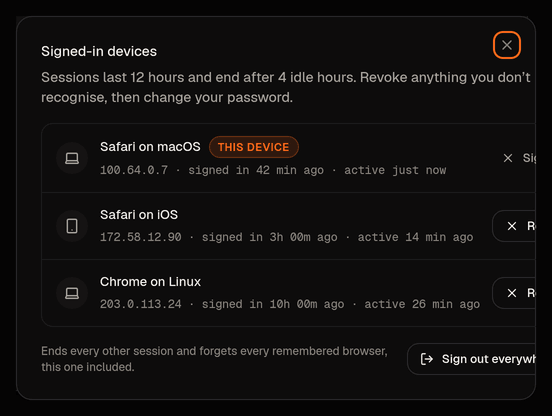
A signed-in device is a session. Sessions end after 12 hours, or after 4 hours of doing nothing; two minutes before the idle limit a banner counts down with a Stay signed in button, and reaching zero returns you to the sign-in page. Both timers are server settings (idle 15 minutes to 12 hours, lifetime 1 to 24 hours) and the console reads the live values, so the line under Signed in on Settings › Account ("Sessions last 12 hours and end after 4 idle hours.") always states the ones in force. The Devices and sessions panel on the same tab lists every device signed in as you, with Sign out on this one and Revoke on the others, plus Sign out everywhere else, which also forgets every remembered browser. The account menu's Signed-in devices item opens the same list over any screen. Revoke anything you do not recognise, then change your password.
Remembering a browser
At sign-in you can tick Remember this browser for 30 days. On that browser, later sign-ins ask only for your password. It is for your own phone or laptop; do not use it on a shared computer. A remembered browser never substitutes for a fresh code: the first sensitive action in each session still asks for one. The token rotates on every use, at most ten browsers are kept, and all are forgotten when you change your password, reset your authenticator, or sign out everywhere else. Forget one, or all, from Remembered browsers in the account menu, or from Show browsers beside Remembered browsers on Settings › Account. The operator can switch the feature off server-wide.
Sensitive actions ask again
Some actions need a code check: a fresh authenticator code, which then stays good for 30 minutes in that session. Settings › Account says it in one line under Password and code ("Risky changes ask for your authenticator code again. One code lasts 30 minutes, or 5 for the riskiest."), and the account menu shows "Verified for risky changes" and the minutes left. Code check is required for, among others:
- resuming trading after a , and flattening,
- loosening any limit, a looser , or taking a name off the ,
- raising or creating a (also when it comes from a card),
- setting an to Required,
- connecting, re-verifying or disabling a broker connection,
- confirming a Consult card that changes a setting in the looser direction,
- changing your password, inviting an operator or viewer, sharing your book.
A few critical actions want a code from the last 5 minutes, even if you verified a moment ago: switching autonomy to Full, resetting your authenticator (which also asks for your current password), reissuing anyone's setup link (the link re-enrols password and authenticator, so it amounts to handing over that account), inviting another owner, disabling or enabling a user, minting an API token, and every owner action on the Admin screen. Halting never asks; stopping should always be easy, from Risk or the top bar.
An open live-update stream re-checks itself about every 30 seconds: if your session has expired or been revoked, or your view of a shared book has been withdrawn, the stream ends and the next request sends you to sign in (or back to your own book).
API tokens
An owner can mint bearer tokens for machine clients; today that means only the cloud ops routines that fetch the readiness and triage packets. Open API tokens from the search box (type "tokens"): the dialog lists each token's name, its first characters, scope, last use and expiry; Create takes a name, the scope and an expiry (30, 90, 180 or 365 days, or never; 90 by default) and asks for a code from the last 5 minutes. The only scope is ops:read: read the two ops packets and nothing else. A token is refused on every other route, and it can never sign in to the console, change a setting or reach the broker. The token itself is shown once, with a copy button and the instruction to store it as the routine's environment variable; only its hash is kept, so a lost token is revoked and re-minted, not recovered. Revoke ends it immediately; an expired or revoked token, or one whose owner is disabled, answers 401. Minting and revoking are both audited.
The sign-in audit
Every login, failure, lockout, code check, session revoke and device change is a row you can read at Activity › Sign-ins. Owners also see it merged with config changes on the Admin screen's audit tab. No app role can delete an auth row.
What is exposed
The console is served over HTTPS on its own domain with only ports 443 and 80 open; SSH reaches the VM through Google's IAP only. The session cookie is HttpOnly, Secure and SameSite Strict, and only its hash is stored. Broker keys live encrypted with the ; the PM has never had them and never will. The console API cannot read the secret store at all.