Funding your account
Bellwether never moves money. Where deposits and withdrawals actually happen, what the Funding panel shows, and how a paper account gets its cash.
- Who it is for
- Owners & operators
- Reading time
- 3 min read
- Updated
Bellwether has no way to move money. There is no code path that initiates a deposit, a withdrawal, a bank link, a journal or a transfer of any kind, and the Alpaca trading keys it holds could not do it anyway. Money goes in and out of your account on Alpaca's own site, by you. Bellwether only reads the result.
Paper accounts come funded
A new Alpaca starts with simulated cash ($100k by default) and has no bank behind it. There is nothing to deposit: the Funding card on Accounts says "This is a paper account: Alpaca simulates its cash, so there is no bank behind it" and that is correct. If you want to start over with a clean balance, create or reset the paper account in the Alpaca dashboard, generate keys for it, and connect those on Connect your broker (keys and safety has the replace-keys steps).
The house book before a broker is configured runs on the built-in simulated broker, whose cash is seeded at start and never wired anywhere. Its Funding card says so in one sentence.
Where funding shows on Accounts
Accounts leads with Your account: the broker, your masked account number, the environment as a word ("Paper: real prices, simulated cash"), equity with cash beside it, whether the book can trade right now and why, and a button only when there is something to do about it there. Buying power and how money moves sit under Details. Below it, the Funding card (marked "Read only" when you are looking at someone else's book) has three parts:
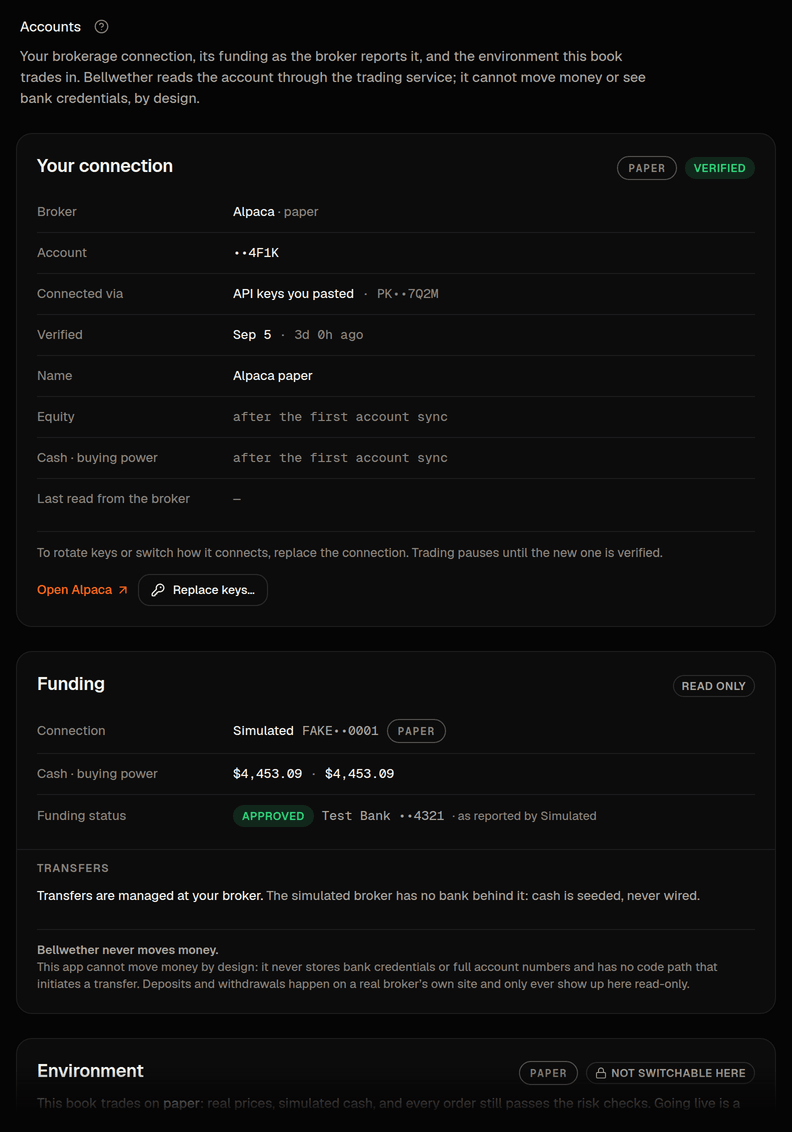
- One sentence for where funding stands as the broker reports it: the status and, when Alpaca reports one, the masked funding source. Bank names and ACH relationships are not readable with trading keys, so nothing about a bank is stored or shown beyond that mask. Buying power (under Details) is Alpaca's non-marginable figure, so it reads as free cash, not a margin headline; the caps below your equity anyway.
- Transfers: "Transfers are managed at your broker", with an Open Alpaca transfers button that opens Alpaca's site in a new tab. This build does not read the broker's transfer history, so no deposits or withdrawals are listed here; where a transfer history is available it is a short list (the date, what it was and the amount) that fits a phone without scrolling sideways.
- One line in bold: Bellwether never moves money. It is said once, on this card, and there is deliberately no button on it that changes anything.
How a deposit shows up
When money does move on a real account, Alpaca records it as an account activity. The Executor reads deposits and withdrawals from that feed and treats them as flows, not profit: a $1,000 deposit raises your equity by $1,000 and your day's P&L by nothing, and the is measured net of it. Equity, cash and buying power on the summary update on the Executor's next sync, about a minute later.
Paper accounts have no deposits, so the first real one, after the paper period and the switch to live, is worth checking by hand: the and the Accounts should agree that the deposit was a flow and not a gain. See paper vs live.
What Bellwether will never do
- Ask you for bank details, or store a full account number.
- Initiate or schedule a transfer, in either direction, on any account.
- Use a bank-level Alpaca API. Only the Trading API and the market-data API are used, and orders only ever by the Executor. See keys and safety.
If cash on the card looks wrong, the broker is the source of truth: open Alpaca from the card and compare. If the two still disagree after a sync or two, that is worth a report through the flag in the top bar.