The universe view
What "the whole US market" means here: the nightly list of every liquid US-listed name, screened with the rules the Executor applies to an order, and the screens the PM can run over it.
- Who it is for
- Everyone on the book
- Reading time
- 4 min read
- Updated
Bellwether can trade any US-listed stock or ETF, not a fixed . What keeps that safe is the 's (check 3): a name must be listed and active, priced above the floor, liquid enough by 20-day dollar volume, have enough daily history, and not be a leveraged or inverse fund unless the deployment allows those. The universe view on Markets › Screens (the old Research › Universe address still opens it) shows that run over the whole market at the last close, so you can see what the PM could realistically buy tomorrow, and why a name is out.
What the page shows
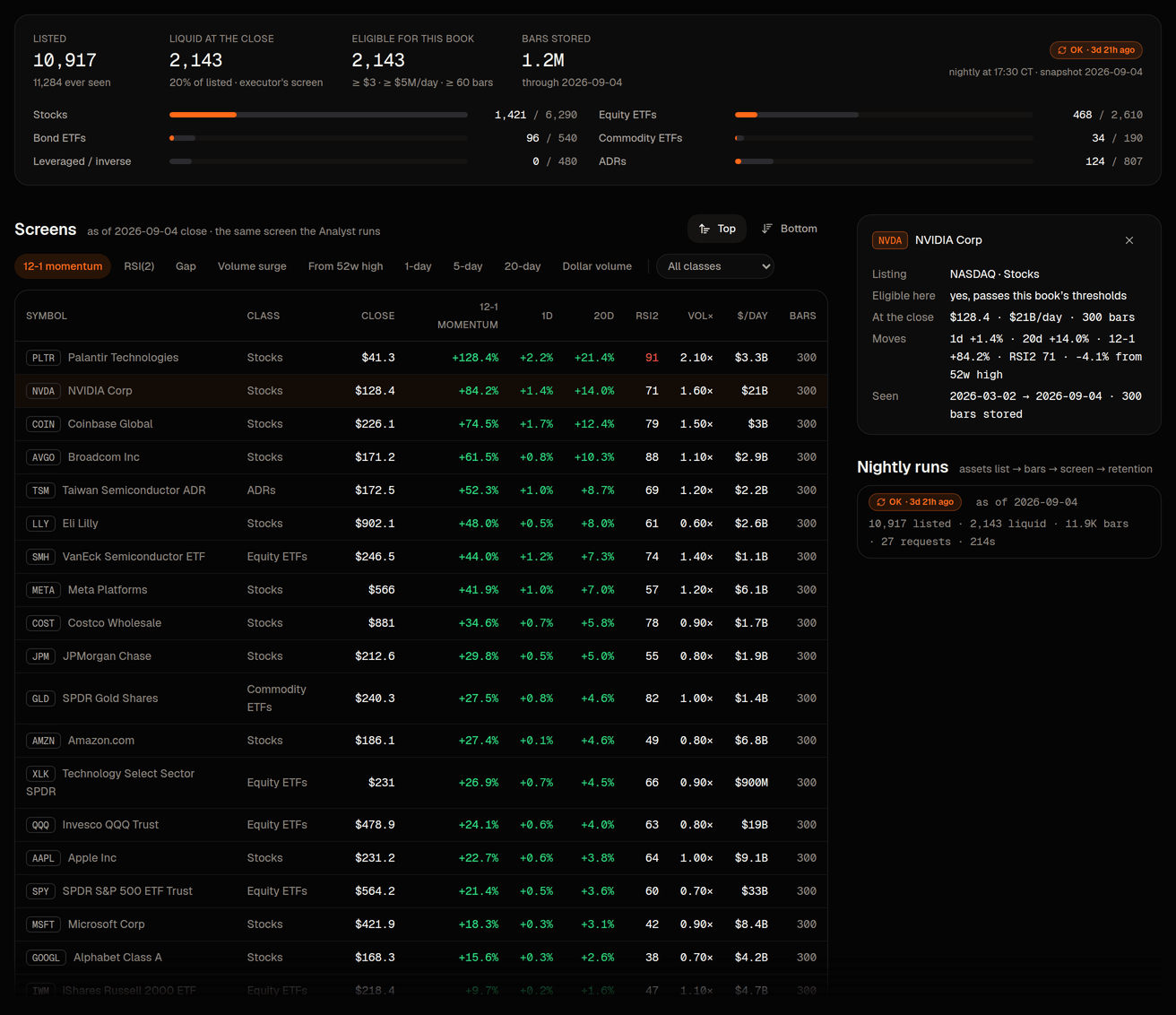
- The strip at the top: how many symbols the market-data vendor lists, how many passed the screen at the last close ("liquid"), how many are eligible for this book once your own thresholds and are applied, how many daily bars are stored, and the last nightly run with its status. A warning appears when the newest snapshot is older than the last completed session (the job has not run yet, or it failed); the numbers are then from the previous good snapshot.
- Classes: the split into stocks, equity ETFs, bond ETFs, commodity ETFs and ADRs. Leveraged and inverse funds never appear here: whether the Executor may buy them is a deployment setting the console cannot see, so the page assumes it may not.
- Screens: the top or bottom names by one metric (12-1 momentum, RSI(2), gap versus the previous close, volume surge versus the 20-session average, distance from the 52-week high, 1-, 5- or 20-day return, or 20-day dollar volume), with a class filter. These are the screens the PM's
screen_universetool runs, over the same eligible set, so what you see is what it would see. - A symbol panel: click any row for the listing facts, the class, the close, average dollar volume and bars stored, recent returns, and, for a name that is out, the failing reasons in the Executor's own words (the same codes as check 3).
Nothing on this page trades or changes a setting. It is read-only market data, shared by every book; only the "eligible for this book" count and the screens' filter depend on your book.
Where the thresholds come from
The nightly screen uses the deployment's floor thresholds; the page then re-applies your book's own tradable-universe thresholds· Risk › Tradable universe (minimum price, minimum 20-day dollar volume, minimum history) and your denylist· Risk › Tradable universe › denylist, so "eligible for this book" already reflects them. Tighten or loosen them on Risk › Universe; the page reflects the change on its next load, without waiting for a re-run. Three things are only knowable at order time and are not part of the nightly screen: the quoted spread, the order's size against average volume, and a trading in the name. The Executor still checks those on every order, so "eligible" here means "passes the listing and liquidity rules", not "guaranteed to fill".
When it refreshes
Once a night at 17:30 CT on trading days, after the day's bars are final, and again immediately after a deploy (the job catches up idempotently). The snapshot date is always the last completed session, so nothing on this page is a forming bar. The first run on a fresh install takes a few minutes because it back-fills history for the liquid-looking names; a normal night is seconds. If the vendor refuses part of a request the run is marked partial or failed, the strip says so, and an alert is written for the operator of the house book.
How the desk uses it
The PM reaches for screen_universe when it wants ideas beyond what it already holds or watches ("the twenty most washed-out liquid names by RSI(2)", "the biggest volume surges among equity ETFs"), and get_movers falls back to the same store when the vendor's own movers list is unavailable. get_signals reads the stored daily bars first, so an vote on an unfamiliar symbol no longer costs a live history fetch. The may cite a screen in the brief. None of this loosens anything: a name that surfaces in a screen still goes through every risk check as a , and your denylist wins over every screen.
Notethe universe is about what could be traded. What the desk actually pays attention to is the Watchlist on Strategy and the pins on Research; a screen result becomes attention only when the PM writes it into a or you pin the item that mentions it.