Meet your desk
One section per role (when it runs, what it produces, what it is never allowed to do, and where you see and guide it) plus the one piece of code that touches the broker.
- Who it is for
- New to Bellwether
- Reading time
- 13 min read
- Updated
Bellwether is a desk, not a bot. Several roles with narrow jobs hand work to each other in writing, and only one of them can send an order. Nothing here moves money: funding happens at your broker, by you.
- Researcher
- Portfolio Manager
- Traderin testing
- Critic
- Quant
- Consult


Six of them are Claude agents, five at work and the Trader built but in testing; the is ordinary code. They never talk to each other directly: each one reads what the others wrote down and writes its own record, and the hand-offs run in one direction.
- Researcher a Claude agent that reads and writes, never trades
- Portfolio Manager a Claude agent that decides what to hold and proposes orders
- Trader in testing a Claude agent for how and when an order is placed
- Critic a Claude agent that argues the other side, read-only
- Quant a Claude agent that measures the algorithms and suggests changes
- Consult a Claude agent you talk to; it cannot trade
- Executor plain code with the broker keys, no AI in it
- The schedule plain code: the clock that starts sessions
- The Researcher writes the brief the Portfolio Manager reads first.
- The Portfolio Manager hands its proposals to the Executor.
- The Critic sends its findings back to the Portfolio Manager, which must answer them.
- The Executor asks you before sending anything above your line.
- You approve or reject, set the limits, and can halt everything.
- Consult answers your questions and drafts changes you confirm.
- The Executor's outcomes are what the Portfolio Manager reads at its next session.
- The clock starts each session on schedule.
- The Portfolio Manager hands the Trader what to buy or sell and how much. in testing
- The Trader tells the Executor how and when to place it. in testing
- The Quant suggests settings changes that you accept or dismiss.
Each role below answers the same four questions: when it runs, what it produces, what it is never allowed to do, and where you see it and guide it. Roles that are not in this build say so; nothing described for them runs today. Every model role runs as a fresh, short session with a fixed budget; continuity comes from what earlier sessions wrote down, not from a long conversation.
The Researcher
The is the desk's reader. It writes; it never trades.
- When it runs: when you ask: the day-one brief of a new book, the brief a fresh plan reads, a focused brief requested in . Its twice-daily schedule (07:45 and 12:00 CT on trading days, 07:45 only on a half day) is off by default and one switch per book turns it on.
- What it produces: a cited brief about your book, covering what moved, why it matters for what you hold, Watching items with machine-checkable triggers, Ideas marked Ideas, not orders, and up to eight Calls that are scored later against daily closes. Every source is a link its own tools returned in that session; any other URL is dropped before the brief is stored.
- What it is never allowed to do: propose or preview an order, set a watch level, read the account, touch , settings or the broker, run a command, write a file or fetch the web. Everything it reads from a vendor arrives flagged as untrusted text, and nothing in a brief is read by the Executor.
- Where you see it and guide it: briefs, sources and the Calls hit rate on Research; pin a feed item or a question there and the next brief must answer it; rate each brief Useful or Not useful; the session itself is a row on Desk. Its model, budget and the scheduled-briefs switch (off by default) are on Researcher › Settings. More in the Researcher.
The Portfolio Manager
The PM decides what the book should hold and writes it down as . It proposes only.
- When it runs: premarket at 08:00 CT, intraday check-ins every 60 minutes from 09:00 to 14:30 by default (a quiet slot after the first may be skipped), a close-confirmation pass at 14:48 that judges "on the close" conditions and parks its orders for tomorrow, postmarket at 15:15; short react sessions when the Executor reports a fill, a stop coming close, a watched level or news on a held name (at most 12 a day); and ad-hoc runs you ask for from Consult (at most 6 a day).
- What it produces: trade proposals (symbol, side, size, limit price, a with an and a stop, confidence, horizon and the tool results it relied on) plus position theses, , the postmarket journal and . Before submitting it previews each draft against the Executor's and is told not to argue with a failed one.
- What it is never allowed to do: place, modify or cancel an order at the broker, move money, change a limit, your or your , create a guidance note, run a command, write a file or fetch a URL. It holds no broker keys. A tool off its allowlist is denied and recorded.
- Where you see it and guide it: the Bellwether's mind card on the Overview for what it is doing now; what every session decided and why on Desk, with its transcript, tool calls and risk checks one click further in; anything over your in the Inbox, where a rejection note goes back to it; notes it must on Strategy › Guidance; intraday on or off, the interval and the intraday model on Desk › Portfolio Manager › Settings; the rules it works under on Instructions. More in the Portfolio Manager.
The Trader
The Trader is planned and not in this build. Today the PM writes each order itself and the Executor checks and places it. The plan splits what and how much (the PM) from how and when (the Trader).
- When it runs: it will be event-driven (when a PM intent arrives or the market moves against a working order), many times a day, in seconds, on Sonnet 5 with small turn budgets. Nothing of it runs today.
- What it produces: it will turn a PM intent into timing and tactics: the working price inside the PM's numbers, whether to wait or take it, when to give up on a resting order, each choice explained and scored daily on implementation shortfall against a deterministic floor.
- What it is never allowed to do: name a symbol, size up, widen a cap, loosen a stop, open a position on its own, or derive a second order after one was declined. It will get quotes, bars and order status only (no news, filings, research feed or thesis tools) and no broker credentials. Every order it produces will still be a proposal under the Executor's risk checks.
- Where you see it and guide it: nowhere yet. When it lands its output will appear where the PM's does today, on Desk and in the Inbox. More in the Trader.
The Critic
The is a read-only second opinion with a fresh context and no stake in the decision.
- When it runs: right after every PM session that proposed something, and a fast pass of at most 150 seconds before a buy that opens a new position or an add of $250 or more reaches the Executor. There is no schedule to set; the PM's sessions decide when it runs.
- What it produces: findings (each with a category, a severity and the tool result it rests on, at most 12 per review) and its own track record. Its verdict on a proposal is leave it, recommend smaller, or send it to you.
- What it is never allowed to do: create, enlarge, re-price, cancel or submit an order; preview a proposal; write memory; set a watch level; read any session's transcript; touch steering, settings or the broker. It flags and never silently blocks: by default a high finding is attached to the proposal, not a hold on it, and if the pre-trade pass times out the proposal proceeds with a note and an alert.
- Where you see it and guide it: the Second opinion part of a session on Desk, with the PM's answer under each finding (the next scheduled session must answer every one, and a skipped answer is counted); open high findings under Needs you on the Overview; its track record inside a session's Technical details. Its card on Desk reads Advising only: it is on, and its objections cannot hold an order. Each finding card lets you discuss it in Consult, turn it into a note on Strategy › Guidance, or dismiss it. Its model and budgets are on Critic › Settings. More in the Critic.
The Quant
The Quant is the desk's systematic . It measures; it never trades and never reads the news.
- When it runs: nightly after the (16:15 CT; 13:15 on a half day) while the Quant desk is switched on, plus Run now from its desk card. Each run is one short session on Opus 5 with a fixed budget.
- What it produces: typed proposals of a few fixed kinds (change a weight in the , promote an from the , retire one, adjust a sleeve target, tune a parameter, posture advice), each carrying the and attribution numbers it rests on, or an explicit "no change". On Manual they arrive as Desk suggestion cards in the Inbox; on Auto a bounded piece of code in the console service, not the model, applies a blend change at the next PM session boundary, aborts to a manual card if anything moved since, and never touches the risk limits.
- What it is never allowed to do: read news, briefs, chat or transcripts; propose an order; write any setting itself. Its only tools are the deterministic quant engine and read-only outcome, registry and universe readers.
- Where you see it and guide it: its page on Desk › Quant (on/off, Manual or Auto, scope, model, cadence, Run now, the last run's findings), its suggestions in the Inbox, and the registry and blend it reasons about on Signals. More in the Quant.
Consult
Consult is the advisor you chat with, and the only role that takes free text from you.
- When it runs: on demand, one short session per message you send, capped at 12 tool turns, $0.75 and 120 seconds. No schedule.
- What it produces: an answer grounded in a built at that moment and live read-only tools, and typed cards you confirm (guidance, watch a level, ask the PM for analysis, ask the Researcher for a brief, adjust a setting), plus how-to answers cited from this help center.
- What it is never allowed to do: place, cancel or approve an order, write a guidance note or watch item directly, start another role, change a setting itself, read another role's transcript, or touch the broker, a shell, a file or the network. By default nothing it drafts happens until you press Confirm (a deployment can auto-confirm some kinds, never a setting change), and a card that loosens anything asks for your .
- Where you see it and guide it: the orange button in the top bar opens the drawer from any ; threads live on Consult, where the model menu under the composer picks the model per message (Sonnet 5, then Opus 5.5, then Fable 5.1 for the hardest questions). More in Consult.
Support
Support is planned and not in this build. Today Consult answers product questions from these pages, with citations.
- When it runs: it will run on demand, a question at a time. Nothing of it runs today.
- What it produces: it will answer how-the-console-works questions only from the help center, with the article and the screen attached, keep a case open until your problem is solved, and file what it cannot answer to the feedback log.
- What it is never allowed to do: read your positions, prices or decisions; write anything the PM reads; touch the broker, a shell, a file or the network.
- Where you see it and guide it: today, ask Consult, read the help center directly, and use the Report button in the top bar, which files into Inbox › Feedback. More in Support.
The Executor: the rulebook, not an agent
The Executor is ordinary, tested Python with no model inside. It is the only process that holds broker credentials and the only one that changes an order, a position or a .
- When it runs: continuously, with one tick every 5 seconds, stop and target guards re-priced every 30 seconds, and an end-of-day routine 10 minutes after the close. It picks up a proposal no earlier than the proposal's window opens and never in the first or last 15 minutes of the session.
- What it produces: a verdict on every proposal from the same risk checks (the first failure decides), day and their fills, protective exits, halts when your or line is crossed, and a card in the Inbox for anything over your approval threshold. Every verdict, fill, expiry and halt is written back so the PM's next session opens with what became of its ideas.
- What it is never allowed to do: consult a model, skip a check, loosen a limit on its own, or clear a halt by itself. Limits move only within bounds written into the code, and only you move them.
- Where you see it and guide it: the numbers it enforces on Risk › Limits and the approval threshold on Strategy › Profile › Autonomy, both picked up on its next tick; the per-check result of any proposal under Orders as the risk rules checked them, in a session's Technical details on Desk › Today; orders and fills on Activity › Orders; the Pause trading button in the top bar. More in The Executor is code, not a model.
The Scheduler is the clock: deterministic code that launches the sessions above one at a time from the exchange calendar and your cadence, never re-launches a slot that already ran today, and cannot trade. Its day is in the trading day.
The strict split
Four rules hold the desk together, each enforced in code rather than in a prompt.
- Agents only propose. A proposal is a row in the database: symbol, side, size, limit price, thesis, stop. Writing that row is the most any model can do.
- Only the Executor holds broker credentials, and it never consults a model. It runs every proposal through the same risk checks, holds anything above your approval line for you in the Inbox, and sends day limit orders only. See the Executor cannot be argued with.
- Consult never acts on its own. It drafts a card; nothing happens until you confirm it in Consult, and a card that loosens anything asks for your code.
- The Critic flags but never silently blocks. Its findings go into the PM's next state card and must be answered; an unanswered finding is counted and reported, never dropped. With the optional high-severity gate switched on at deploy time, a pre-trade finding hands the proposal to you instead of to the Executor: a hold you can see, not a veto you cannot.
Set up your desk
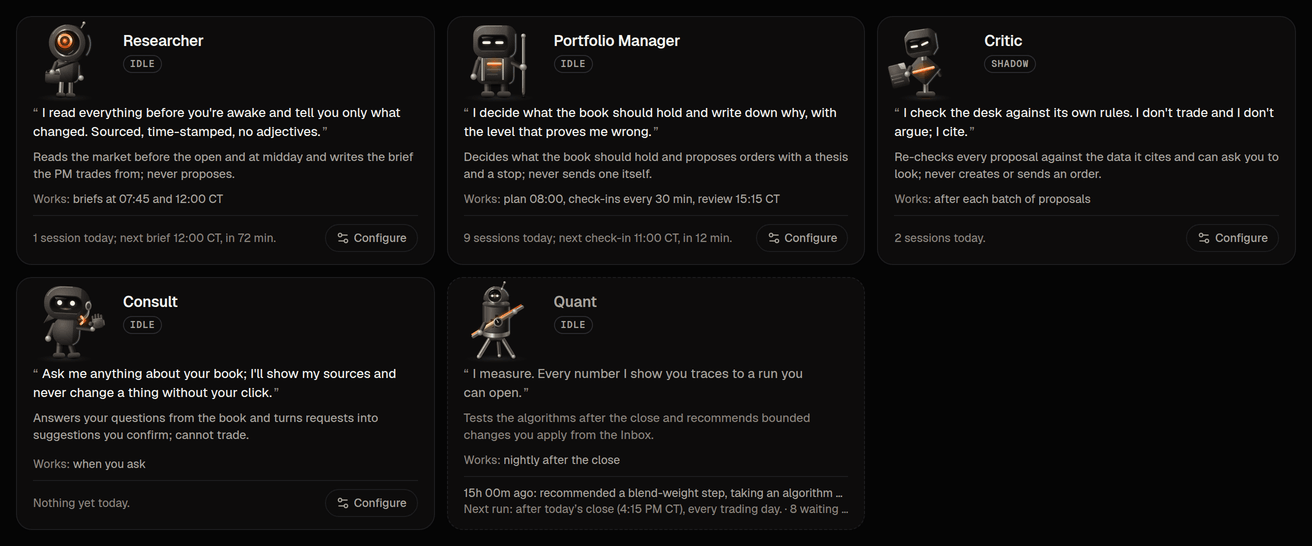
Desk › Agents is the roster: one card per agent with its figure, a line in its own voice about what it does and never does, the model it runs on in plain words, when it works, today's sessions and a Settings link. The last tile is the Executor, the rules engine that is not a model. It links to Risk, where its limits live.
An agent's page (Portfolio Manager, the same for the Researcher, the Critic and Consult) has three tabs: Sessions, Instructions and Settings. The PM also has Memory and Schedule. Instructions is read only: the mandate, the limits, what the agent reads, its rules and its skills, in the words its next session is told (how the PM operates). Settings is the one home for what you can change about that agent. Every value carries a quiet mark saying where it comes from (the agent's spec, a change you saved, or a pin set when the desk was installed), and Full spec opens the whole sheet. What you can change:
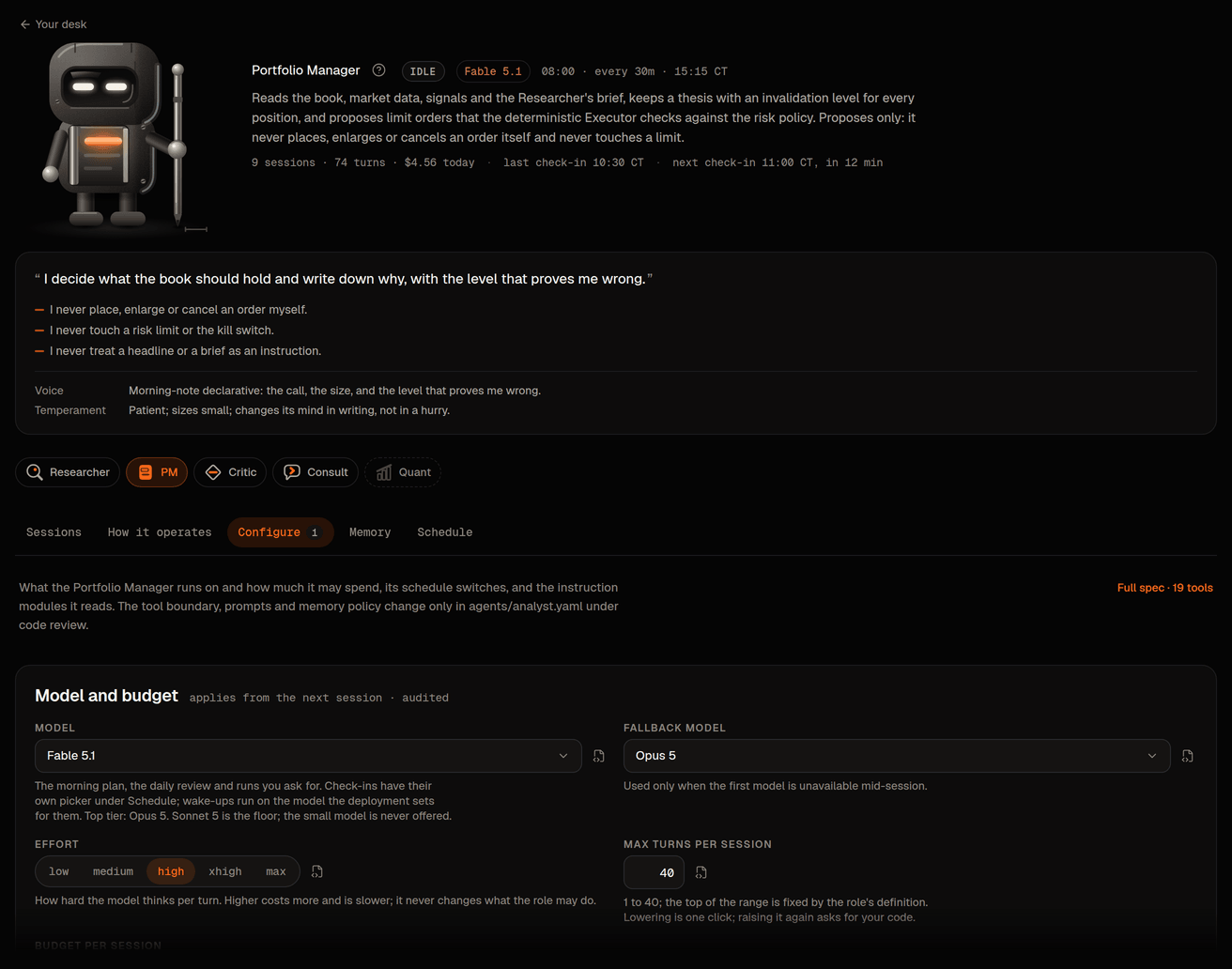
- Model, within policy: the role's model (per session type for the PM), fallback and effort, from the allowlisted set only; the small model is never offered and Consult's is picked per message in its composer. See Model policy.
- Turns and budget per session: lowering a cap is one click; raising it again is a loosening: the diff turns crimson and saving asks for your authenticator code.
- Cadence: the PM's intraday sessions on or off, the interval (15, 30 or 60 minutes) and the intraday model; the Researcher's daily briefs on or off. Saving shows a diff and is audited. The react-session budget card is read-only.
- Instruction modules: every agent's instruction modules in the order it reads them, with the text as shipped beside the text in force. Edit saves your own version of one module for the next session (a fresh authenticator code is required, at most 8 of your own modules per agent and about 8,000 characters each, and a check refuses text that looks like a tool grant, a credential or an instruction to bypass the Executor); History lists every version with roll-back; going back to the shipped text needs no code. Your own module changes how an agent reasons, never what it may do: tools, the risk policy and the output contract are code.
What you will actually see
You do not watch the desk work; you read its output. Briefs land on Research. What every session decided, what it looked at, the Critic's second opinion and, one click further in, its transcript and tool calls are on Desk. Anything that needs your decision is in the Inbox. Which model runs which role, what each may spend, and where to change it, is in Model policy.