Search
The search field at the top of every screen finds symbols, settings and screens, help articles and the research feed, takes you to the exact place, and only ever shows what your access allows.
- Who it is for
- New to Bellwether
- Reading time
- 5 min read
- Updated
There is one search box, at the top of every : Search symbols, settings, help. Type a ticker, a word for a setting ("", "approval", "alpaca", "members") or a plain question, and the results open underneath, grouped by kind; pick one and you land on it, click anywhere else and the list away. On a tablet or phone the box is the magnifier icon in the top bar (and the search pill in the More sheet); it opens the same search full width, with Cancel beside the field to leave it.
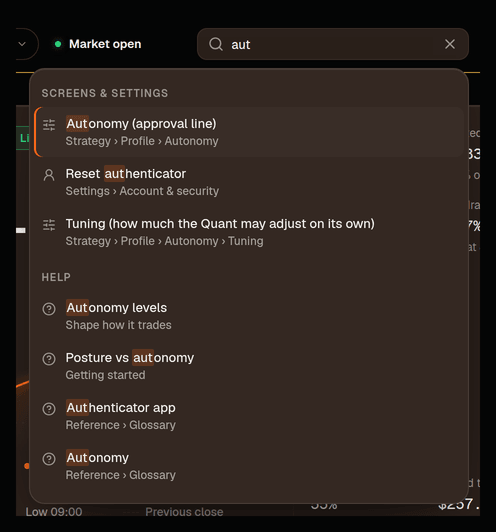
What it finds, and where a result goes
Screens & settings
- Searches
- Every screen by its name and by everyday words for it, and every setting by the words people use ("approval" finds , "risk level" finds Posture, "members" finds People, the entry that opens the People page on Admin or on Settings, "alpaca" finds the broker connection). Each row says where the thing lives, e.g. Strategy › Profile › Autonomy
- Opens
- The screen, scrolled to the exact control with it focused and outlined for a moment. Account rows (password, , sessions) open their dialog
Symbols
- Searches
- Every active listing once the nightly universe run has filled it (ticker, name and common nicknames), plus anything on your . A held name shows the price the console already has on hand
- Opens
- The symbol page: the chart, the desk’s read, and the actions to ask the desk about it, place an order, add or watch it
Help
- Searches
- This help center: every article and every heading inside it
- Opens
- The article, at that heading
Research
- Searches
- The shared feed (headlines, filings, macro events) by title, summary, source and symbols, with your book's mutes applied
- Opens
- The item on Research
A word that looks like a ticker (capitals, up to six letters) lists Symbols first; anything else lists Screens & settings first. Words match from their start (aut finds Autonomy, nvid finds NVIDIA), a few everyday synonyms are built in, symbol and setting names tolerate a typo, and filler such as "where do I" or "how can I" is ignored, so where do I change my posture lands on Posture· Strategy › Profile › Posture. Rows whose name shows the match come first; a row found by a word that is not in its name (typing authentication finds Passkeys) still says where it lives. When nothing matches, the box says so in plain words, offers a couple of words to try (click one and it is typed for you) and one row that asks Consult where the thing is; answers "where is…" questions with the same links.
Clicking into the empty box shows your recent searches (the last five, kept in this browser for your login; Clear forgets them).
The search dialog
The magnifier icon (below laptop width) and the phone's More sheet open the same search as a dialog. It searches everything the field does and the rest of your book: your 's briefs (headline, summary, tickers, and one row per call and per ), each PM session by job and date with its journal line (never the transcript), ("BUY 3 NVDA @ 120" and the ) and the alerts meant for you. With nothing typed it is short on purpose: your recent searches, then three actions (Place an order, or, while trading is stopped, Resume trading, and Send feedback). Nothing is preselected there, so a stray Enter never opens an order ticket; an arrow key picks a row. The other actions (open the Inbox drawer, switch the theme), your books when you have more than one, and every screen by name appear as you type.
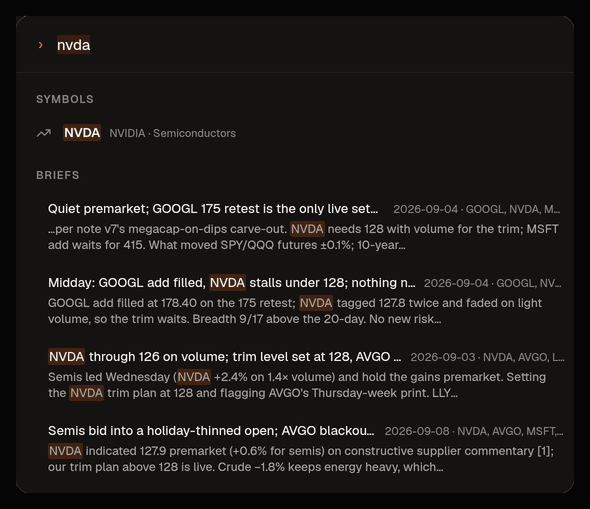
Matches are highlighted in the title and in a snippet, and each group shows its best few matches; type more to narrow them. Snippets from briefs, sessions and proposals are the desk's own words and are marked as such. A brief's line gives its day (Thu Sep 4) and tickers; a feed item's gives its source.
The search box at the top of the Briefs column on Research is the same search narrowed to briefs and the feed: a brief hit selects the brief, a feed hit opens the item.
It respects your access
What you can find is exactly what you may open. Settings you cannot change with your role are not offered: someone with read-only access sees the Risk screen but not "Risk limits", People appears only to those who run the book, and only the house owner sees Admin or the scorecard. While you are looking at a book that is shared with you read only, the settings that would change it, and the screens the console hides in that mode, stay out of the results.
Everything except symbols, screens, help and the shared research feed belongs to one book, and the search answers only from the book you are looking at: your own, one you run, or one shared with you read only. Another book's briefs, sessions, proposals and alerts are never a result, whoever you are; the house owner viewing a book sees that book's results, not the house's. The only global facts are that a symbol exists, what the public feed said, and the product's own words for its screens and settings, the same residual the isolation promise already names. A record becomes searchable the moment it is saved and disappears if the save is rolled back; a nightly pass re-checks every index and raises an internal alert if one has fallen behind.
The desk uses the same search
The Researcher, the PM and the recall earlier briefs, open a whole stored brief, and search the feed by relevance with their own tools, mutes applied and third-party text flagged as untrusted. Consult has one search tool over the same groups for the book you are asking about (it points at screens anyone may read, not at settings), so "did we ever propose AVGO?" or "what did the brief say about capex?" gets pointers you can click. None of them can search a transcript or another book: there is no way to ask for it.
Not in this build
Search over support cases. Ask Consult "where is…" when a word finds nothing; see Where do I…?.
Accessibility
The field is a standard combobox: with the keyboard, the arrow keys move through the results, Enter opens the highlighted one and Escape folds the list; a screen reader announces the highlighted row.