Your first day
From the setup link to the first morning: sign in, connect Alpaca paper, pick a posture and an autonomy level, and what to do the first time a card appears.
- Who it is for
- New to Bellwether
- Reading time
- 5 min read
- Updated
Your first day starts with a setup link and ends with a short journal. Nothing here places a trade.
Sign in
The invite mails you a setup link, good for 30 minutes and for one use. Choose a long passphrase, enrol your , and save the ten before you continue. Sign-in asks for the six-digit code each time unless you tick (30 days, that browser only); anything that loosens a rule asks for a fresh code regardless.
Connect Alpaca paper
You land on Connect your broker. In the Alpaca dashboard switch to Paper, open API Keys and generate a key pair, then paste the Key ID (it starts with PK) and the Secret. Test connection asks for your , the keys are sealed and stored, and the tests them with Alpaca within about 30 seconds; the page moves on to Connected when they pass. Only paper keys can be connected on this build. Connect Alpaca paper walks the wizard and its errors.
Pick a posture, an autonomy level and whether trading starts
The last step of Connect, How should it trade?, asks three questions; the first two you can change later on Strategy.
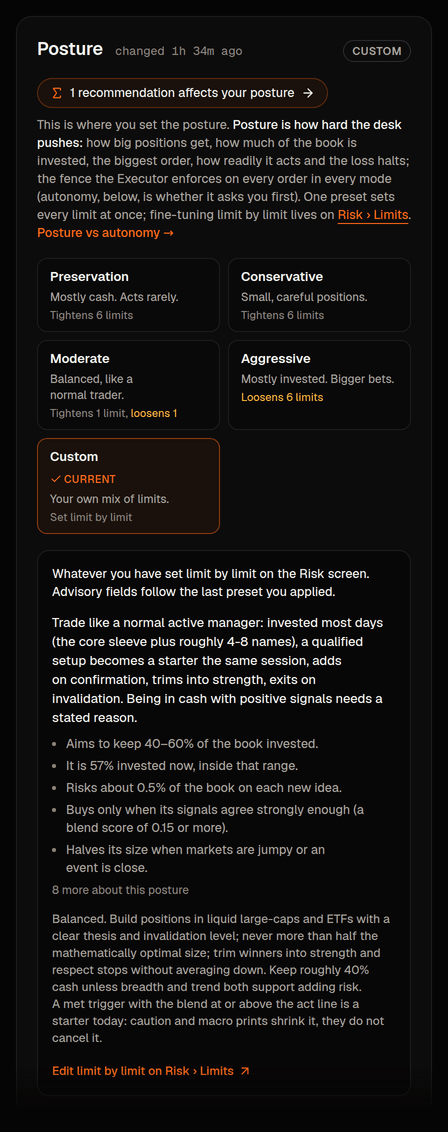
- , later on Strategy › Profile: Conservative, Moderate or Aggressive, each a bundle of limits the Executor enforces (largest order, largest position, , the day's turnover budget, and the and lines that trading). Moderate is preselected because it is where most books start; Conservative is smaller orders, mostly cash and tight loss halts if you would rather begin quieter; Aggressive asks you to type AGGRESSIVE and enter a code. A line under the three says the other postures (Preservation, Speculative, limit by limit) wait on Strategy › Profile.
- , later on Strategy › Profile: how big an order must be before it waits for you. Manual is preselected: the threshold is $0, so every order waits for your yes. Leave it there for the first few days unless you already know you want the desk to act on its own.
- All three modes are offered: Manual (preselected; every order waits for you), Semi-automatic (orders under the go through on their own) and Full (the desk trades on its own inside your limits; every fill notifies you). Semi-automatic and Full ask you to type MORE AUTONOMY and enter a code; Full needs a code entered in the last few minutes.
- Trading: Start trading now is preselected for a (your authenticator code confirms it; the choice is listed under your name in Activity): the desk's orders can go through from its next session, each one through every risk check and the approval choice above. Pick Keep it paused for now if you would rather read what the PM plans before anything is bought or sold; the Overview then keeps a one-line banner until you start it: Trading is paused. The desk is planning but nothing will be bought or sold. A is never switched on here. Risk shows the state and keeps the history; Halt in the top bar pauses trading again in one tap.
How Bellwether works explains the rhythm, the two dials and what to expect on day one.
The timeline
Central time, trading days only: the PM's premarket session at 08:00 (a at 07:45 first, on books that turn briefs on), the open at 08:30, the at 08:45, hourly check-ins from 09:00 to 14:30, the journal at 15:15 and the at 15:45. The trading day has it hour by hour.
What a good first day looks like
Honestly: not much. The day-one brief, a session at 08:00 that may propose nothing at all, a card or two, a journal after the close. The PM is deliberately slow-handed; a day with zero trades and a clear explanation of why is a success. Read the brief, the journal and the 's findings on Desk; all three are short.
What each screen is for
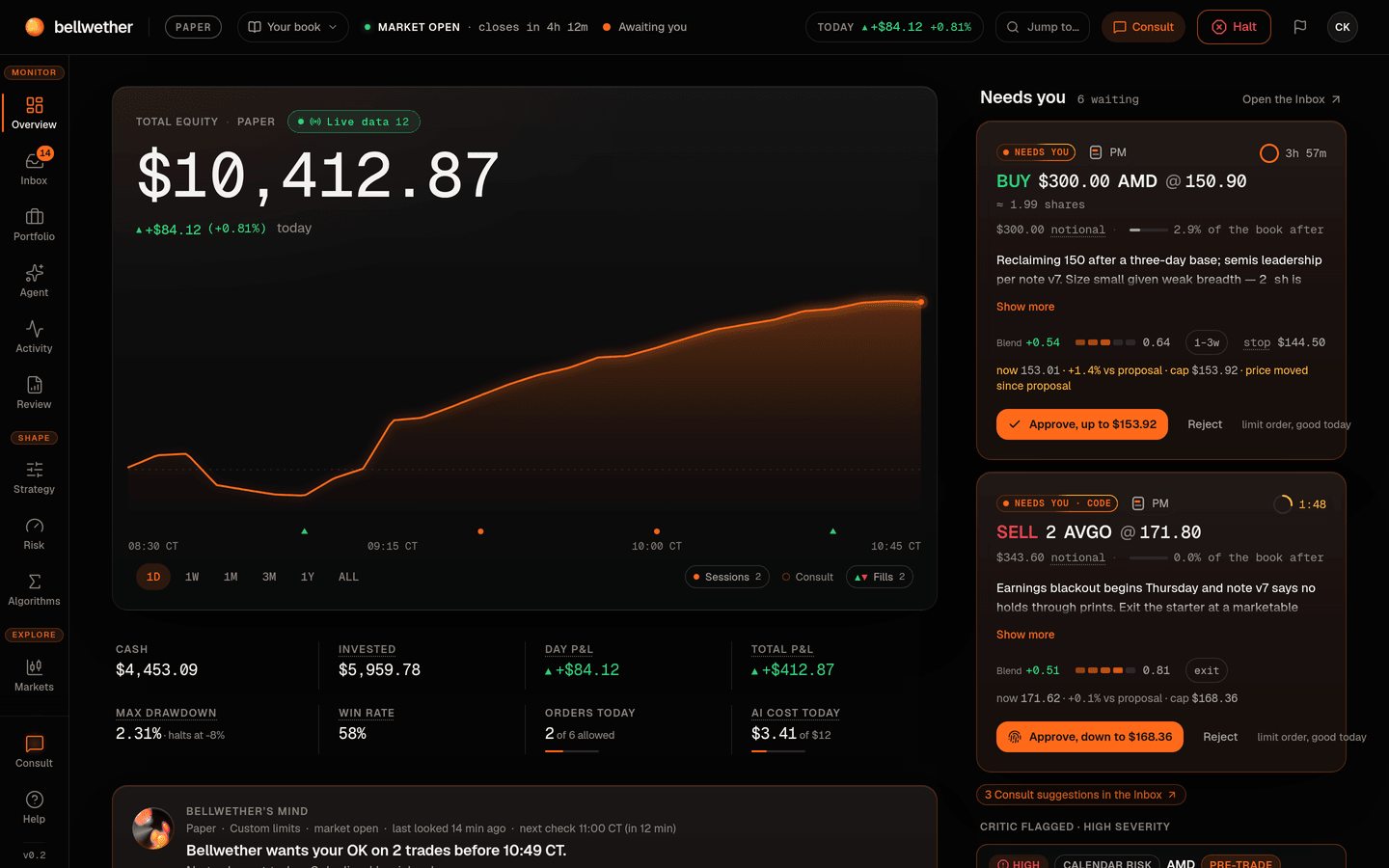
- Overview is home: equity, positions, what needs you, the risk gauges.
- The Inbox holds the cards waiting for your yes or no, and today's decisions.
- Desk is the day's sessions; click a row to read what the PM decided, what it looked at and why.
- Activity is the audit trail: every change, by whom, when.
- Strategy holds your , the and a Summary of every influence.
- Strategy › Guidance tells the PM something for this week or one symbol.
- Signals sets which rule-based count, and whether any is required.
- Risk holds the limits, halt lines, autonomy, the tradable universe, the kill switch (Pause trading: no new buys, sales that protect you still go out) and (sell everything).
- Consult answers a question about your book right now.
- Research has the briefs, the feed, and pins for the next brief.
- Lab runs stress tests and backtests that never touch the book.
- Performance is how the book has actually done against SPY and a 60/40 mix.
- Accounts shows the broker connection and funding, read only. The Broker link at the end of the Settings tab bar opens the book's Connect page.
- Settings is one page with a tab bar. It holds your own sign-in, your alerts and scheduled reports, this book and how the console reads. Admin lists every book and the people on them (house owner only).
The first time a card appears
A card is the PM asking permission for one order. It shows under Needs you on Overview and in the Inbox; an email goes out when mail is set up, and a push notification if you switched it on in Settings.
- Read the , then the ("wrong if below") and the horizon. If the idea does not make sense to you, that is a reason to reject.
- Check the size in dollars and the time. A premarket idea is good until 14:30 CT; there is no need to hurry.
- Press Approve at current price, or Reject with a short note. Approving re-quotes the order and re-runs every risk check before anything is sent; a rejection note is shown to the PM at its next session.
Doing nothing is safe: an unanswered card expires unsent and moves to Decided today. More in Reading a card and Approve or reject.