Markets and the symbol sheet
A Markets screen in four tabs (today's market, the news the desk reads, the Researcher's ratings, stock screens), one sheet for any ticker with our own signals on it, and four typed actions (watchlist, research, ask the PM, trade) the desk answers in the Inbox.
- Who it is for
- Owners & operators
- Reading time
- 9 min read
- Updated
Markets sits in the third group of the navigation, beside Research and Lab (or type "markets" in the search box). The symbol sheet opens from any ticker chip's Open detail, from every Markets and position row, from the command palette (type a ticker) and from ?drawer=NVDA on any address. What each action set in motion is tracked under Your requests at the bottom of the Inbox.
Two surfaces. The Markets view answers "what is the market doing and what is the desk looking at" without opening a brief. A symbol sheet answers "everything Bellwether knows and thinks about this one ticker" from any ticker chip, and carries four actions that turn your interest in a name into something the desk must answer, without giving you, or anyone, a way around the .
The Markets view
One read-only with four tabs, Today, News, Research and Screens; the address carries the tab (/markets?tab=news), so a link lands where you meant, and the old Research addresses (/research, /research?view=coverage, /research?view=universe, a brief or a news item) open the tab that holds them now. Under the title one sentence says what the prices are right now: "Live prices, 10:47 CT." while the market is open, "After the close. Showing today's closes." or "Market closed. Showing Friday's closes." once it is not, and "Live prices are not reaching us right now." when they should be and are not. Where these prices come from opens the feed's own details (the feed, the newest price, the last scan, how old the stock list is).
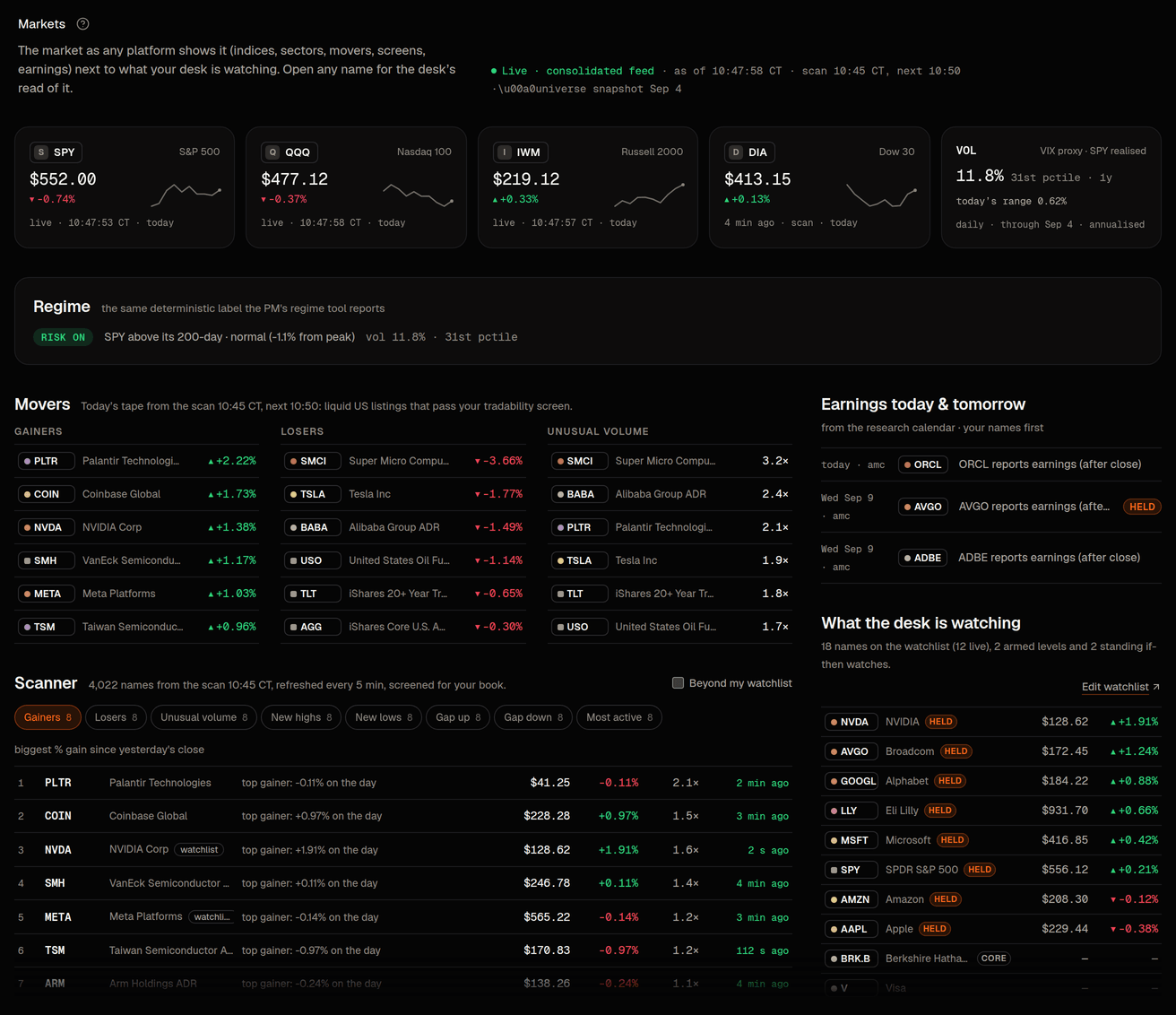
Today, each part in its own panel:
- Indexes: SPY, QQQ, IWM, DIA with the day's change, and under each price what it is: live, or the session it closed in ("Tue close"). Beside them Market swings: how much the S&P 500 has moved day to day lately, as a word (calm, normal, busy, stormy) with the yearly rate and where that sits in the past year. It stands in for the VIX. The sentence under the panel's title is the market label the desk reads before it trades ("Risk on. The S&P 500 is above its long-term average and 1.1% below its high.").
- Movers: one table, said once. Pick the reason (Gainers, Losers, Unusual volume, New highs, or the others under More) and the same table re-lists; it is the list the PM gets from
get_movers, under this book's own thresholds and . While the market is open it comes from the scan that runs every few minutes and says which one; after the close it says when the last scan ran and that scanning resumes at the open, and every price in it carries its session label. Beyond my widens it to every stock the desk may trade. - Sectors: the eleven sector funds as tiles with the day's change and the 5- and 20-day change, so a rotation is visible at a glance.
- Your watchlist with prices, a few names at a time; Alerts you set: your price levels and if-then watches, each as a sentence ("Tells you if it rises past $131.20. It is $128.62 now, 2.0% away."); Earnings today and tomorrow, with your names marked, from the same calendar the reads.
News is the feed of headlines, filings, earnings dates, economic releases and movers the desk reads, fifteen to a page with Newer and Older, and beside it one panel for Briefs, the Calendar, your Watches and your Pins: see pins and the feed and briefs and calls. Research holds the Researcher's ratings on the names it follows, the latest brief and its track record: see analyst coverage. Screens is the screener over every name this book could actually trade, with what is screened and how the nightly refresh went under it: see the universe view.
Every row opens the symbol sheet. Nothing on Markets trades, changes a setting or costs a model session.
The quick look and the symbol page
Click any ticker chip (in the feed, a brief, a , Activity, Markets) and choose Open detail for the quick look or Open full page for the page at /symbol/NVDA. The quick look keeps the price with a plain feed label ("Live, 10:47 CT", or the session it closed in, "Tue close"), a compact chart, one line of the desk's read and three actions; the page, in four tabs, carries the charts over five years, every 's reading with 's setups and prices in their own row (never part of the score), check by check, why it moved, your whole history with the name and its peers. Both are described in the symbol page and the quick look.
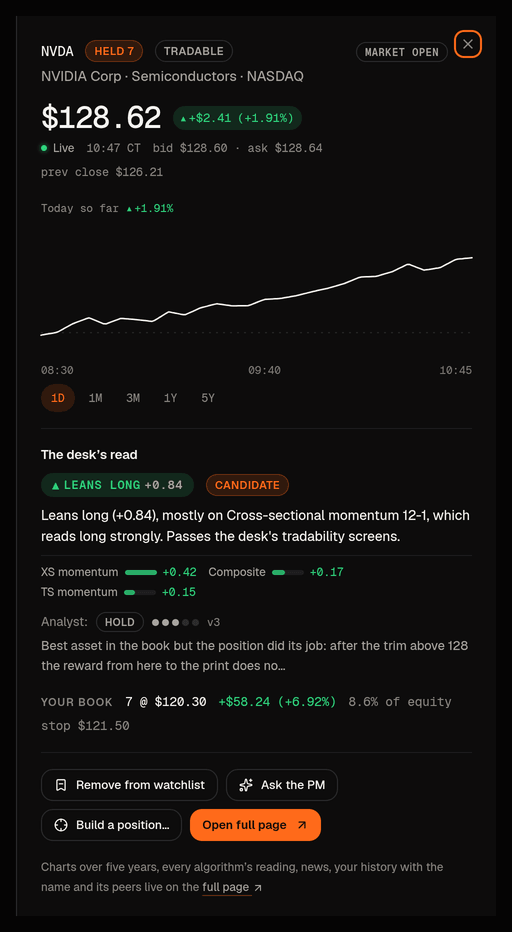
The actions, each a typed intent
The actions on a name do not do the thing; they record a typed ask with you as the author, and the owning role answers it where you can see the answer. This is the same intent layer Consult cards use, so the guards (duplicates refused, daily caps, where it loosens anything) are identical. There are exactly two ways to set something in motion, so nobody has to work out which of three buttons "buys it": Ask the desk (the agents act) and Place an order (you act). The quick look carries Add to watchlist and Ask the desk; the full page adds Research and Place an order.
Add to watchlist
- What it records
- The name joins your Watchlist (tiers and caps stay on Strategy)
- Who answers, and where
- Immediate; the PM's next lists it, and the feed's Watchlist scope includes it
Research
- What it records
- "Look into this name" with an optional note
- Who answers, and where
- The Researcher, not the PM: the next brief must address it, exactly like a pin, and the answer is linked from the Inbox card; nothing trades because of it
Ask the desk › Its view, now
- What it records
- A short PM session with the name and your question at the top of its prompt
- Who answers, and where
- The PM: a session now, at any hour, about a dollar of model time, under the same daily cap as Consult-triggered runs (6 today) and today's model budget (the panel says so when it is spent); its answer and any proposal appear in the Inbox with "asked by you" provenance, and a proposal goes through the , the Inbox and the Executor like any other. After hours the session still runs now, as a read: it answers in Inbox › Requests within minutes, cannot propose or place anything while the market is closed, and its answer opens with "Answered 17:12 with the market closed, so nothing was ordered; the next open is Thu 08:30 CT" and ends with what it would do at the open
Ask the desk › Its view, at the next session
- What it records
- A one-shot note at the top of the next scheduled session's card
- Who answers, and where
- The PM, in that session's summary; no extra session, no extra cost. The panel names the time
Ask the desk › Build a position, at the next session
- What it records
- Typed guidance: a position request with an optional size hint (never above your position cap), how long it stands, and why
- Who answers, and where
- The PM's next scheduled session must propose the entry inside every cap with a stop, or tell you exactly why not; the shows on Strategy ›
Ask the desk › Build a position, now
- What it records
- The same position request, plus the short session so it is acted on right away
- Who answers, and where
- As above, in a session that starts now (one gesture, both records). After hours the session is a read: it tells you in Inbox › Requests the entry it would make; the request stands, the premarket session proposes it and the order goes at the open under your
Place an order
- What it records
- An operator order: side, quantity, limit, stop and target
- Who answers, and where
- The Executor, directly; see below
The last line of the Ask the desk panel always says what happens if the PM decides to buy, from your autonomy setting: the order waits for you in the Inbox (manual), goes on its own up to your and waits above it (semi), or goes on its own inside your limits (full). The button never changes that; Strategy › Profile does.
Provenance is the point: every card that results says who asked (you), when, from which sheet, and what the role did with it, so "the desk ignored my idea" is checkable rather than a feeling.
Place an order is an operator order, not a shortcut
The operator verb (operator decision, 2026-09-09) lets you place, close or reduce a position yourself; Place an order on the symbol page opens the same order sheet as the top bar and the positions list (both say Place an order too), and place a trade yourself has the whole flow. It is disabled, with the reason in words, when the deployment has manual orders switched off or the book is live, and it is not shown to a login without trading rights. Outside market hours the sheet opens and sizes as usual but says the market is closed (and when it opens) and keeps its Buy or Sell button off with that reason: the Executor refuses every order sent outside regular hours, so the sheet does not invite one. The shape:
- Your order becomes a proposal with you as its author, stored next to the PM's. It passes through the unchanged Executor and every one of the : order cap, position cap, , tradability, halts, hours. A check that fails refuses your order with the same reason code it would give the PM.
- There is no approval step (you are the approver), but each order asks for your authenticator code and writes an audit row.
- The stop and target you give arm the same protective exits the Executor manages for PM entries.
- The PM adopts the position at its next session and manages it under its own , unless you tick manage myself, in which case any agent-authored modify or close on that symbol is until you clear the flag.
- The Executor remains the only process that talks to the broker. still cannot place an order; it can draft the same operator-order card for you to confirm with your code.
The Watchlist (formerly Focus list)
The list on Strategy › Watchlist (the old Focus list; the old address and the palette still answer to that name) is linked from Markets ("Edit watchlist →"), the symbol sheet and the command palette. What it does is unchanged: it is the set of names the PM spends attention on: listed in its state card, covered by its earnings-calendar tool, used as the Watchlist scope of the research feed and for headline importance (+1 for a watchlist name). It is not a gate: since the open-universe decision every data tool accepts any US ticker, and the Executor's tradability screen, not this list, decides what may be bought. Turning a row off keeps the name on the list but out of focus. The per-row cap field is recorded and shown to the PM, which must honour it; the Executor sizes against the book-wide position cap only.
Also on a ticker chip
Every ticker chip still opens its small menu first: last price and day change when the console has them, then Open detail (the quick look), Open full page (the symbol page), Ask the (Consult with "What is your current read on NVDA?" filled in), Guidance… (Guidance prefilled for that symbol), Filter activity (Activity on that symbol) and Add if-then watch… (the form on Markets › News, see standing if-then watches). Screens over the whole market with the "why is this name in or out" panel stay on Research › Universe; the PM runs the same screens with screen_universe.