Consult
The advisor you chat with. It reads your book and live data, drafts typed asks you confirm with one click, answers how-to questions from this help center, and never trades.
- Who it is for
- New to Bellwether
- Reading time
- 15 min read
- Updated
is the orange button in the top bar. It opens a chat with an advisor that can see your positions, limits, , the latest brief and the PM's recent decisions, and can read live quotes and news. It advises, and it turns what you want into typed cards you confirm. It cannot trade and it writes nothing on its own.
- Owns
- Your chat threads and the intent cards it drafts
- Reads
- A built now (account, positions, today's and verdicts, , your guidance, the latest brief, flags), the thread summary, live quotes and news, this help center
- Tools
- The PM's read-only set, the intent tools, three help tools, one search tool over this book's briefs, sessions, proposals and alerts plus symbols and the research feed; no order tool, no broker, shell, file or network access, no other role's transcripts
- Model
- Sonnet 5 by default; Opus 5.5 or Fable 5.1 per message (the menu lists them quickest and cheapest first)
- Cadence
- On demand: one short session per message, capped at 12 tool turns, $2.00 and 120 seconds
- Change it at
- The model menu under the composer on Consult: Sonnet 5, then Opus 5.5, then Fable 5.1 for the hardest questions; the caps are set for the whole platform
- Hands off to
- You: every card waits for your Confirm. A confirmed card becomes guidance for the desk (read back in the thread first), a watch item, a queued PM or run, or a setting change
- Judged by
- A 40-question help eval for how-to answers, and the feedback you log when it misses
Where it lives
The drawer opens from any : the top-bar button, the C key, or G then C. The full page is Consult: the conversation takes the page, and your other conversations are behind Conversations in its header (once a book has more than five, the same header offers them as a list on the left that you can away). On a wide window a side column keeps what is waiting for your OK and what it looked at for its latest answer in view; on a smaller one, and on a phone, Details opens the same two panels. Under an answer that looked something up, Used 6 sources (the number varies) opens the list of what that answer read, in plain words; each entry opens exactly what was read. Other screens open it with a message already written to start a conversation about one thing, such as a finding.
In the message box are context chips for what you were looking at: the screen, a selected symbol, a proposal, a session or a finding. Drop any chip you do not want sent; a proposal or session becomes a visible "re:" line at the top of your message, so you see exactly what the model receives.
Under the message box are four buttons. Ask the PM to look now drafts an analysis card from the words in the box without waiting for an answer; it needs a question, so on an empty box it is off, and pressing it says why in the box. Research a name, Explain this and Tell the desk mark your next message as a request for research on a name, for a walk through why the desk did something, or as a rule or note for the desk (see Tell the desk below). On a phone and in the drawer the same four are behind the + in the message box.
Every turn starts fresh
There is no long-lived process. Each message is one short model session assembled from the database: a state card built by code, a snapshot of your book taken that moment (equity, cash, exposure against your band, today's P&L, every position with its weight and armed stop, what is waiting for you), a rolling summary of the thread, the last 12 exchanges verbatim, then your message. The summary is why you can come back to a thread days later.
Answers start appearing within a couple of seconds: first a line or two of what Consult is doing ("Reading positions", "Pulling quotes · NVDA"), then the answer itself as it is written. Figures about your book come from that snapshot and say when they are from ("as of 13:30"); ask it to re-check live and it reads the account and positions again and says it did. Cards, tables and chips appear when the answer is complete.
The tools are the PM's read-only set (account, positions, quotes, bars, calendar, news, movers, filings, fundamentals, the research feed, the universe screen, prior decisions, factor scores, regime, , briefs, the and , the journal and memory lookups) plus the intent and help tools below and a platform search that returns the same grouped hits the console's search shows (see search), always for the book the message is about and never another. The list is fixed in Consult's own definition, and an automated check keeps what is written there, what a session is given and what is recorded identical. A question your book snapshot answers (exposure, cash, holdings, stops, what is waiting, whether trading is on) needs no tool call at all; for live quotes, news, bars, filings, signals or the calendar it reads the tools, several at once when it needs several, and says which calls it made.
Three models
Sonnet is the default: cents per answer, first words in about three seconds, most answers complete in under fifteen. Opus offers more depth for tens of cents an answer; Fable is for the hardest questions, the slowest, and typically costs the most (once a conversation has three answers on a model, the menu shows what an answer on it has usually cost in that conversation. Until then it shows no figure). Pick either per message from the model menu in the message box, headed "Model for this message", which lists the three in that order: quickest and cheapest first. A model this book may not use stays in the list, dimmed, and reads "not available here" with the reason. There is no schedule: each message is one session, capped at $2.00, 12 tool turns and 120 seconds, sharing the daily model budget with the PM. Each answer carries the model that wrote it and what it cost, and every message shows its own time beside it, "17:07 CT"; the day is said once, as a divider, Today, Yesterday or a date such as Sep 6. See Model policy.
Cards you confirm
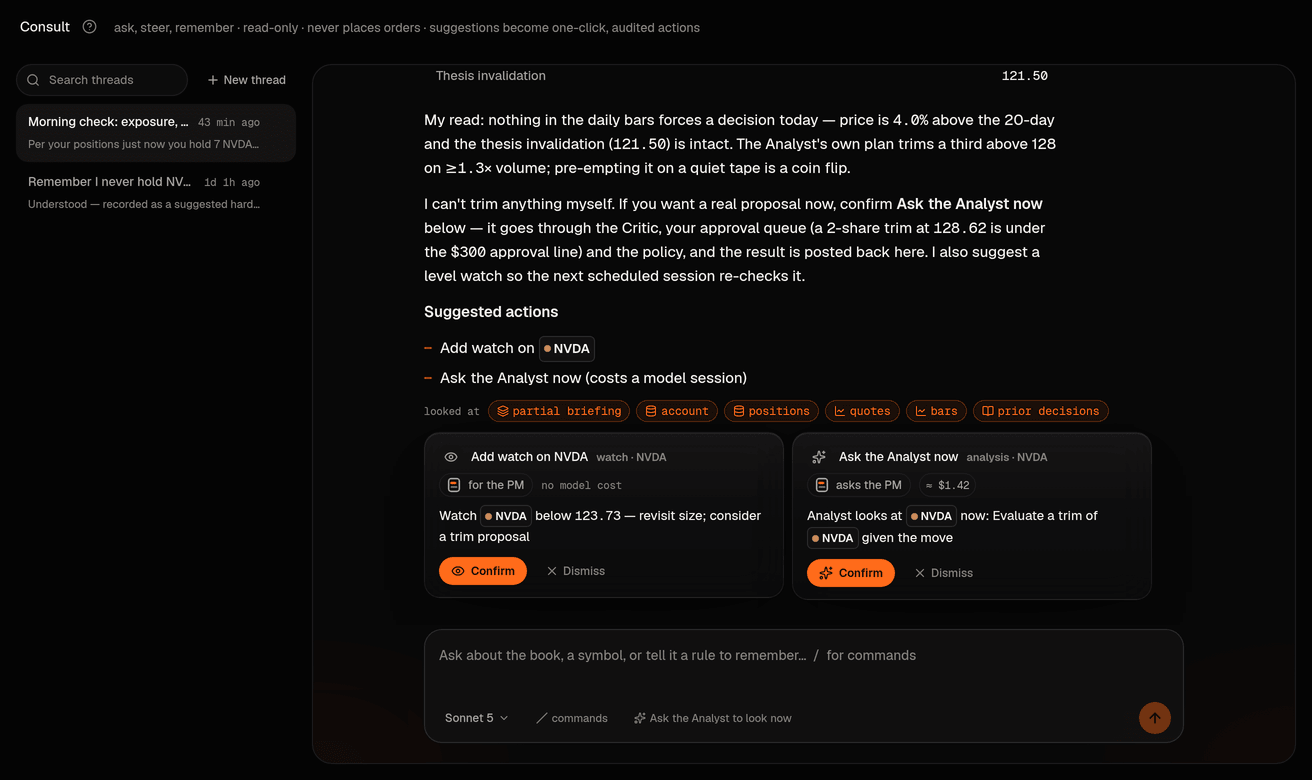
Consult records typed asks with suggest_intent (the older suggest_watch_item and request_adhoc_analysis still work and become the same cards). Each one appears under the reply as a card that says what it will do, what still guards it and what it costs ("about $1.42 of AI time, the estimate for a run like it"). Its button names what it does (Ask the PM, Ask the Researcher, Add the watch, Apply the change), next to Dismiss. With the market closed an Ask the PM now card says so first, says the PM reads and answers now and cannot propose a trade until the open, and its button reads Ask the PM, read only. Nothing is written until you confirm; confirming applies it in the same step and writes one audit line.
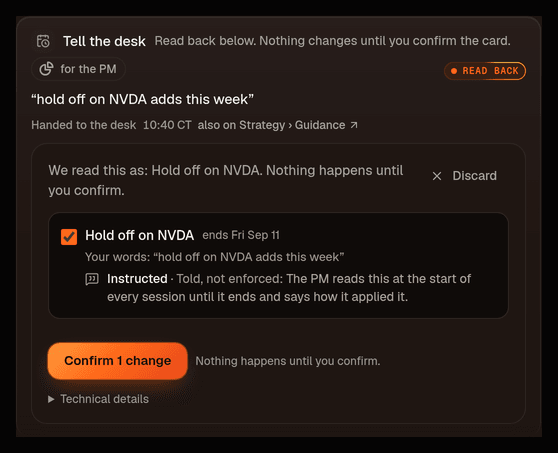
- Tell the desk (the box on Strategy › Guidance is titled Tell your desk: it is the same thing): the one way anything you say about how the desk should trade becomes guidance: a rule ("never buy NVDA"), a nudge ("hold off on NVDA adds this week", "be pickier on entries"), a preference ("I prefer ETFs over single names"), a tilt ("overweight AI infrastructure up to a third of the book"), a goal, a change now or on a date ("go conservative until Friday, then back"), a limit ("cap any position at 5%", " 2k"), or the Speculative posture. The card carries the words your desk will read, quoted from your message. Press Read it back to me (the read-back costs a few cents) and the desk reads them back right there in the thread as a confirmation card, the same card Strategy › Guidance shows: each piece says what the machine will (a limit, a posture, a dated posture step, a hard rule, a do-not-trade entry: the ), what the PM is instructed to do (a note it must every session, a tilt, a goal, a standing preference) and when it ends ("this week" ends Friday; "never" is standing; a schedule lists each dated step and the day the book goes back by itself). A quick reading appears at once and the desk refines it within seconds; if the desk cannot be reached the card says so and the quick reading can still be confirmed. A step that loosens your protection asks for your code and the typed words there; a hard rule asks for your code; Speculative (paper books only) asks for its typed risk acknowledgement. Nothing changes until you confirm that card, and you can take it back afterwards from the same card. When a PM session later reads a note that came from the thread, the thread gets a line: "The PM read this at 09:31 and applied it: …", with the PM's own words for what it understood. See hard constraints for what an enforced rule does to buys already waiting.
- Watch a level: a symbol, above or below a price, and what to reconsider then. It becomes a watch item the next sessions check against fresh quotes; nothing trades because of it.
- Ask for analysis: when the question amounts to "should we buy or sell". Consult gives its read, then offers a PM check: an ad hoc PM run with your question at the top of its prompt. Now runs it immediately at any hour (after hours it answers as a read: it cannot trade until the open, so it says what it would do then); next session puts the question in front of the next scheduled session, which must answer it. Any proposal that run makes goes through the Critic, the Inbox and the Executor like a scheduled one, and "PM check ran …" is posted back into the thread with a link.
- Ask for research: a focused Researcher brief on names or a theme. It lands on Research and "Brief ready …" is posted back into the thread.
- Adjust a setting: , cadence or an 's mode: desk plumbing rather than trading behaviour. It is applied with exactly the bounds, and of the settings screen; loosening always asks for your code. Posture is not adjusted this way any more: a posture change is how the desk trades, so it is read back through Tell your desk (same checks, same code and typed words when it loosens, and the day it reverts when you gave one). One exception on this build: a move to Full autonomy cannot be confirmed from a card (it needs the 5-minute critical code, which the card cannot carry); make that change on Strategy › Profile › Autonomy itself.
Why one path for guidance: the same words used to have three doors with three lifetimes ("never buy NVDA" as a ten-day note, a ten-day hard constraint, or a standing rule). Now there is one, and the read-back tells you which it is before anything applies. Older threads may still show the earlier kinds of card (a note for the next session to acknowledge, a posture adjustment); they still confirm as they always did.
Guards: the same card confirmed twice within 30 minutes is refused with a pointer to the first; Consult-triggered runs are capped at 6 a day; a run costs a model session and the card shows the estimate. A refusal is final: the card shows the reason at once, one "A confirmed request was not carried out" alert is written under Activity › Alerts, and nothing retries it later behind your back: a capped "look at NVDA now" does not quietly fire tomorrow morning. Ask again when it makes sense. Only a request that failed for a technical reason is retried, up to five times with growing pauses (about eight minutes in all), before it is parked the same way. If you ask Consult to place an order, it says plainly that it cannot and offers one of these paths instead.
Nothing confirms itself
Every card waits for your click; there is no setting that makes Consult confirm a card on its own, and the platform refuses to start if one is forced. A card that needs your code (a hard rule, a loosening) asks for it when you confirm, never before.
Richer replies (planned)
Decided, not in this build yet: Consult will be able to show a small interactive block inside a reply (a picker, a table, a confirm list) chosen from a fixed, versioned registry of console components, never markup or code the model wrote. What you select is validated against the block's declared answer shape and handed back to Consult as its tool result, and both sides are kept in the transcript. Such a block only collects input or displays data; anything it leads to still becomes one of the cards above, with the same confirm and step-up rules. Today a reply is text, the display cards described in the next section and the typed cards, and none of them takes input from you.
When it shows instead of tells
Some answers come with a small card under the words: the price you asked about with its change on the day, your positions side by side, a ladder of the levels it just talked through, the shape of the last month, a checklist of what has to be true before it would act, a pointer to the one screen where a setting lives, or a link to the thing already waiting in your Inbox. These are drawn by the console from numbers Consult read with its own tools a moment ago. Consult cannot put buttons, links to the outside, or styling of its own on the page, and a card it gets wrong simply does not appear. A watch card shows one level the desk is waiting on against the last price it has (after hours it says market closed · last … rather than pretending to a live quote); the desk radar lines every armed level up per symbol. The same cards make up the Watching section of Bellwether's mind on the Overview. A card captioned Sketch · not an order is exactly that: a picture of what a proposal could look like, never something queued; if you want the PM to actually look, confirm the card beneath it.
How-to questions
Three read-only help tools (help_search, help_open and where_is) answer a product question ("where do I change autonomy?") only from the help center, with numbered source chips under the answer that link to the article or the screen. where_is maps a setting or a verb to the one place it is edited. A citation the tools did not actually return is dropped before the answer is stored.
If the help center has nothing on your question, Consult says so and offers to log it as feedback (Inbox › Feedback). It does not guess at how the console works.
What it will not do
- Place, propose, size, price or approve an order. No tool it holds can, and it has no broker credentials, shell, file or network access.
- Write guidance, a watch item, a job or a setting by itself. Every card waits for your click; the ones that need your code ask for it then.
- Read other roles' transcripts.
Owners, operators and reviewers can ask; a Viewer-role login can read threads but not post. Only the owner and operators can confirm a card. Someone looking at your book through a read-only share is different again: see the next section.
Asking about a book you only view
While you look at a book that was shared with you read-only (the lock in the book switcher, the "Viewing … read-only" bar), Consult still opens and you may ask about that book, in conversations of your own. Your list there holds only the conversations you started on that book; the book's own conversations and Consult's transcripts are not shown to you, and a conversation you open is marked "‹you› · visitor" in the owner's list. The message box says "Ask about ‹book›, a holding or a stock", offers only Research a name and Explain this, and has no Ask the PM to look now and no Tell the desk. Answers come from the read tools and the default model (the model menu is ignored), and never carry a card: no guidance, watch item, run or setting can come out of a visitor's question, confirmed or not. You get 12 questions per book per day, counted against that book's model budget; after that Consult answers "You have used today's questions on this shared book. It resets tomorrow." The owner can read your conversation but cannot post into it (their message box explains why); they answer in a conversation of their own. On a book you run through a membership none of this applies: Consult behaves exactly as on your home book.
How it is judged
On its how-to answers: a fixed set of 40 operator questions must cite the right article and route, and at least 38 of the 40 must land for the check to pass. On everything else, by you: the feedback you log from a miss is read the next morning.
Failure modes you might see
- A polite refusal: the daily model budget is spent; sessions resume tomorrow.
- Timed out: an answer that needs more than 120 seconds or 12 tool turns ends with an error reply; ask a narrower question or switch models.
- Duplicate / capped: a second identical confirm within 30 minutes, or a seventh triggered run today, is refused with the reason.
- Asked after hours: the PM answers now, as a read. It cannot propose a trade until the open. The card says when that is; on a wide window the line under the message box says it too, and on a phone the + menu's row does.
- "The help has nothing on that": an honest miss, with an offer to log it.