The blend and the bench
Fifteen registered signals, the weights that make your blend and the share that really counts, signals and screens, the act line, what "No view yet" means, the bench, the suggested weighting, and switching to blend v2.
- Who it is for
- Owners & operators
- Reading time
- 23 min read
- Updated
An is a rule-based computed from one symbol's daily bars, with no opinion and no news. Each one returns a view on a name (for it, against it, or when it lacks data) and a score between −1 and +1. The PM is shown these views to keep its honest: a momentum reading that says "down" is hard to argue with.
What is in the registry
Algorithms are code. Fifteen live in the registry today and every one appears on Signals as its own row:
- What it measures
- The average-value line, three-bar pivots and a weekly bias
Cross-sectional (XS) momentum, Time-series (TS) momentum
- What it measures
- A stock versus its peers; a stock versus its own past
RSI(2) reversion, IBS reversion
- What it measures
- Short, sharp dips that tend to bounce
Composite
- What it measures
- A low-volatility and recent-dip ; its momentum leg is off by default because XS momentum already carries it
Post-earnings drift
- What it measures
- Drift after an earnings gap
Sector rotation, 52-week high, Low-vol quality
- What it measures
- Monthly ranking systems
Pairs reversion, Trend (vol-targeted), Turn of month, Squeeze breakout
- What it measures
- Pairs, asset-class trend, calendar windows, volatility breakouts
Gap fade
- What it measures
- An intraday opening-gap fade; the daily-bar backtest engine cannot express it, so it has no backtest card
Jim's method is the only contributed one; the rest are built in.
The blend, in one paragraph
For each name on your , every signal that is switched on says how it reads that name today, from strongly against to strongly for. The blend is those readings combined into one number between −1 and +1, each counting as much as the weight you gave it. A signal with nothing to say about a name is left out of that name's blend rather than counted as a zero. The PM reads the blend as a prior, not an order: it says when it goes against it, but it may. Nothing here places, sizes or times an order by itself.
Three tabs, one page
Signals (the was called Algorithms until September 2026; old links still open it) has three tabs under one header. The tab you are on is part of the address, so a link or the back button lands on the same tab.
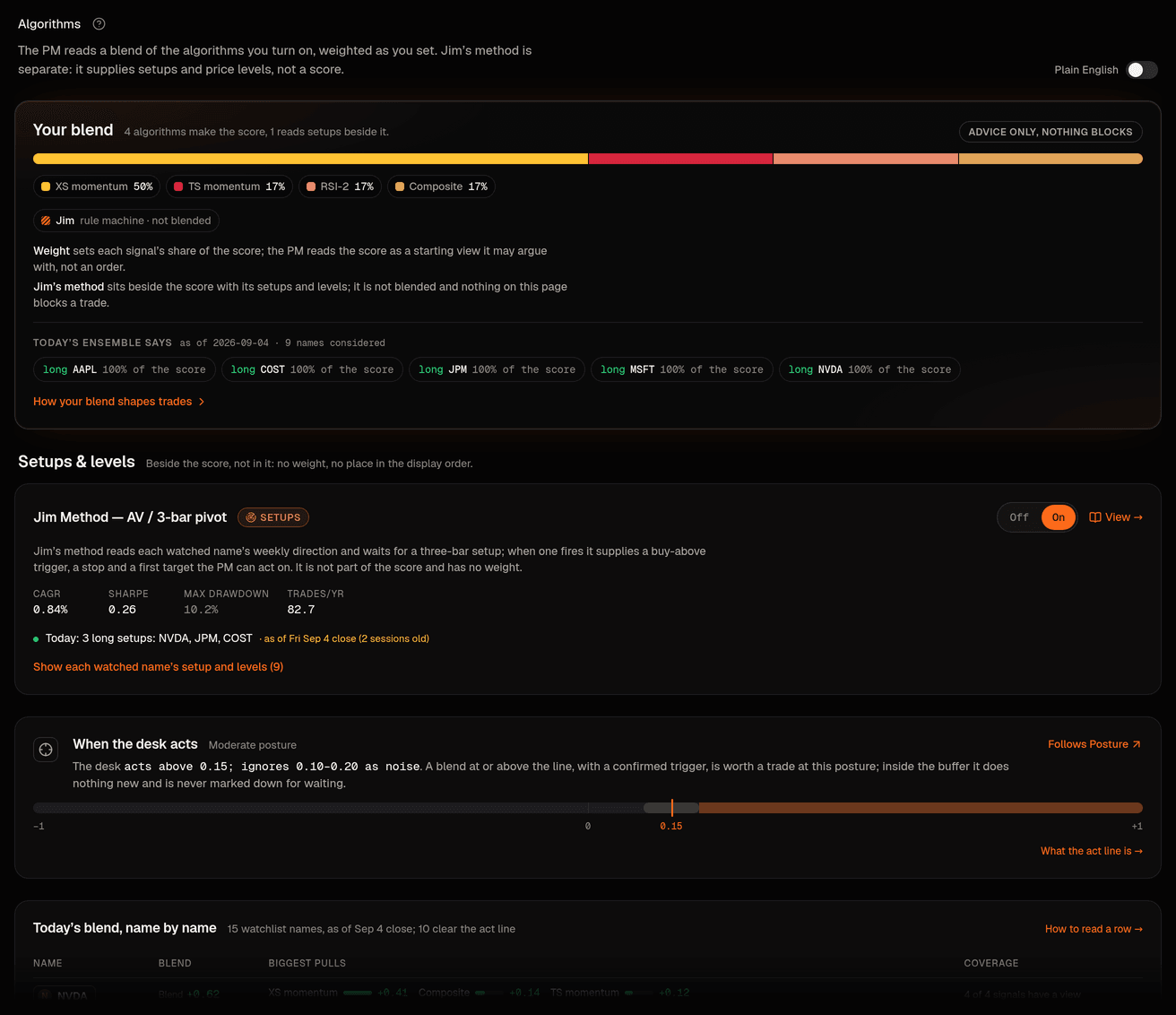
- Blend is the score the PM reads, and it fits in two laptop screens. Your blend opens with a sentence that says what the blend reads today ("Today 9 of your 15 watchlist names score at or above the line the desk acts on, led by NVDA, AVGO and PLTR"), then the blend bar with its legend (each signal's spelled-out name there says what it does when you point at it) and one sentence that counts the signals in the score, and off. When the desk acts sits beside it: the for this book's in one sentence, drawn on a small scale. Name by name is today's blend score for every watchlist name, strongest first: six at rest and the rest one tap away, with a thin line where the act line falls in the list. Beside each score a Reads as column says it in words (neutral, mildly for, for, strongly for, and the same against), and the biggest pulls are the parts of that score. Signals is one row per signal. Every row leads with what that signal says today ("XS momentum likes 10 of your 15 watchlist names today, most of all NVDA, PLTR and AVGO. It is against four."); its name, what kind of signal it is and its place in the score sit on the line under it, and that line opens what it does and its backtest record. The weight slider, the on/off switch and Open its page are at the end of the row. The grips and arrows that change the come out with Change the order in the panel's header and go away again with Done. How the score is made, the small formula with a worked example, at the foot of that panel. When the Quant's suggested weights differ from what you set, a small Quant suggests a change pill in the blend header opens the Suggestions tab; nothing else from the recommender appears here.
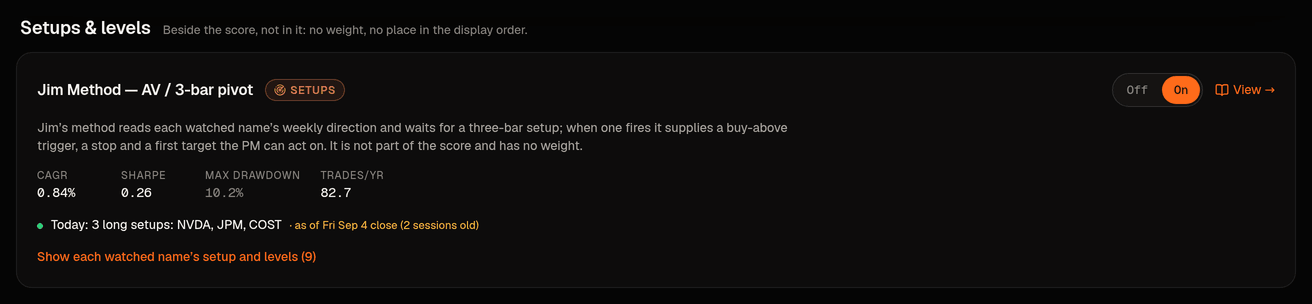
- Setups is Jim's method on its own. It opens with what the method sees today ("Jim's method sees a buy setup on 3 of your 9 watchlist names today"), then its switch. At rest it shows the names with a live buy setup (fired first, then forming): the state, the price it closed at beside the buy-above trigger and the stop, and one sentence on what the method would do next. Every other name sits behind one line that says them ("No buy setup on AAPL and XOM. AMZN and GOOGL are on the short side, which this desk never trades. TSLA has no reading yet."); opening it shows each with its state in the same words the name's own page uses (No setup, Not traded here, No reading yet), which way the week points and what would change it. A name on the short side shows its trigger as a sell-below level, never as something to buy. On a wide screen the names sit two to a row. It never has a weight and never enters the score.
- Suggestions is what the Quant would set the weights to, drawn against your blend as it is now, with the reason and the evidence behind it; beside it, what you can do about it: the steps waiting for you in the Inbox, or Run the Quant now. One sentence at the top says so: nothing on that tab changes your blend.
There is one current weighting on the page. The bar called Your blend now on the Suggestions tab is the blend bar from the first tab, member for member and share for share; Jim's method and any screen are never a weighted row in either. The count in the blend's opening sentence and the rows of Name by name come from one read, with one test for "at or above the line", so the two cannot disagree. A score that rounds to zero prints as 0.00, never as a direction.
One date, said once. The signals are read after each close. From the opening bell on a trading day, a read of the latest close is spoken of as today and nothing on the page prints a date. Before the bell, at the weekend, on a holiday and over a read that is a session behind, nothing says "today": the tab carries one small label in its first panel ("As of Tue’s close" on a trading morning, "As of Fri Sep 11’s close" on a Saturday) and no sentence or row carries a date. Two or more sessions behind, one banner at the top of the tab says which close the read is from and how many sessions ago, in place of the label. Holidays are not counted as sessions.
The controls on each row
Three things on each signal's row shape the blend· Signals (Jim's method is not one of these rows; it lives on the Setups tab with an on/off switch only):
- On or off: a signal that is off has no view and no effect; the PM does not see it. On with weight 0 is the bench: read, not counted. See On, on the bench, or off.
- Weight: a slider from 0 to 100. Weights are shared out over the signals that are on, so the share shown next to the slider is what actually counts. Release the slider to save. Every algorithm's score is scaled to the same typical size before blending, so the weight, not one algorithm's habit of shouting louder, decides its pull. See How each algorithm votes.
- Display order: choose Change the order in the panel's header, then drag a handle, use the up and down arrows, or press the arrow keys on a focused handle. Order only changes how signals are listed. It does not affect scores or which trades happen. When more names qualify than the desk's pace allows, the PM prefers the stronger blend, then the name that overlaps least with what the book already holds, then the name more signals have a view on; never the position of a row in this list.
Signal, Screen, Setups
Each row says in a word or two what the algorithm is (its state pill reads In the score, On the bench or Off, and a screen or a rule machine says Never part of the score). This is declared by the algorithm itself, not chosen per book; you only decide whether it is on and, for a signal, how much it weighs.
- Signal: its view counts toward the blend score with the weight you set. All the momentum and reversal algorithms are signals.
- Screen: it never moves the score. A screen could block a buy in a name that fails it and say why everywhere the name appears ("Blocked by Low-vol quality: its 20-day volatility is above the screen's ceiling"); sells are never blocked. No book has a screen today: the buy block was retired on September 11 after the evidence showed no blocking rule added value and two cost money, and the server refuses to give any algorithm that role until a later decision brings it back. The word stays in this list so the page can explain it the day it returns.
- Setups: Jim's method answers a different question than the blend. The blend says how much the signals like a name today; Jim's method says whether the name has a setup today and at what prices: the buy-above trigger, the stop and the first target. It is never averaged into the score; when its bias agrees with the blend it can nudge a position a little larger or smaller inside the posture's limits. It has its own tab, Setups: one switch (on or off), no weight, no place in the display order, and for every watchlist name what it reads in a sentence: whether a buy setup has fired or is forming, which way the week points, the buy-above trigger and the stop. A pullback only counts toward a buy setup in an up week, because the method only buys in the direction of the week.
On a server that does not declare these words yet, no row says Signal or Screen and no screen exists; Jim's method still sits on its own Setups tab (a setup today, and at what prices) rather than in the score, and nothing else on the page changes.
The weight you set and the share that counts
Next to each weight the row shows the share of the score that weight buys ("50% of the score"). Once a book acts on (below) two things sit between the weight you set and the share that counts, and the row says both in words: "You set 30%. It counts 22% of the score.", with a Why? beside it. While blend v2 only previews, the desk still acts on the plain average of the weights you set, so the bar, the legend and every row show what you set; the preview's shares are listed under Why the preview differs, beside the Preview column.
First, weights are pulled halfway toward equal shares across groups of signals that tend to agree with each other, so three look-alike momentum signals cannot crowd out the one reversal signal between them. Second, once eight or more signals are on, no single one may count for more than a fifth of the blend. What is left is shared out again over the signals that have a view on each name. Your weight still decides the direction of every difference; the two rules only stop the blend from quietly becoming one signal's opinion.
Reading the blend on one name
Wherever a name's blend appears (the table on Signals, the symbol sheet and page, cards, the rows on Portfolio) it reads the same way:

- The number, signed, with what it reads as in words: +0.31 is for the name, −0.20 is mildly against it.
- The biggest pulls: up to three small labeled bars, for example XS momentum +0.21, Composite +0.08 and RSI(2) reversion −0.05. Each is that signal's share of the number: its weight times its reading. They are named as the cards name them, never by id.
- Coverage: "7 of 9 signals have a view". A signal with no view on the name is missing, not a zero, so a thin blend says it is thin.
- No view yet instead of a number when fewer than two signals have a view (today's blend shows a number from a single signal; blend v2 waits for two). The line under it says why: "Only one signal has a view on this name. The blend waits for at least two."
- Blocked by a screen, with the screen's reason, instead of the name silently disappearing from a list (only on a book that has a screen; none does while the buy block is retired).
There is one blend behind all of those places, worked out once and read by everything. It is measured on the last completed daily bars, and today's unfinished bar never replaces it. The act line is always measured against that settled number.
The act line and the buffer

The panel beside the blend says when a blend is strong enough to act on at this book's posture, in two sentences built from the line and the buffer around it: "The desk starts to consider buying a name when its blend score reaches 0.15. It usually waits until the score is clear of that line, at 0.20 or more." The scale under them draws the line and the band around it with both ends labeled. What happens near the line opens the rest: between 0.10 and 0.20 the desk is never marked down for waiting, and below 0.10 it opens a new trade only with a stated reason, such as your , or when a buy setup has fired. A blend at or above the line, with a confirmed trigger, is worth a trade; inside the buffer around the line waiting is always acceptable, so a name hovering at the line does not flip the desk in and out; below the buffer the PM may only go in under a short list of named exceptions that the grades. The line follows Posture (a cautious posture asks for a stronger blend) and is shown here, not edited here. With blend v2 it is recalibrated monthly from how blends on your names have actually been distributed, and each recalibration arrives as a change card you can revert.
How the score is made
The section of the same name at the foot of the Signals panel on Signals shows this with today's numbers. For one name, every signal that is on gives a score s between −1 (strongly against) and +1 (strongly for), and you gave each a weight w. Today's blend is their weighted average:
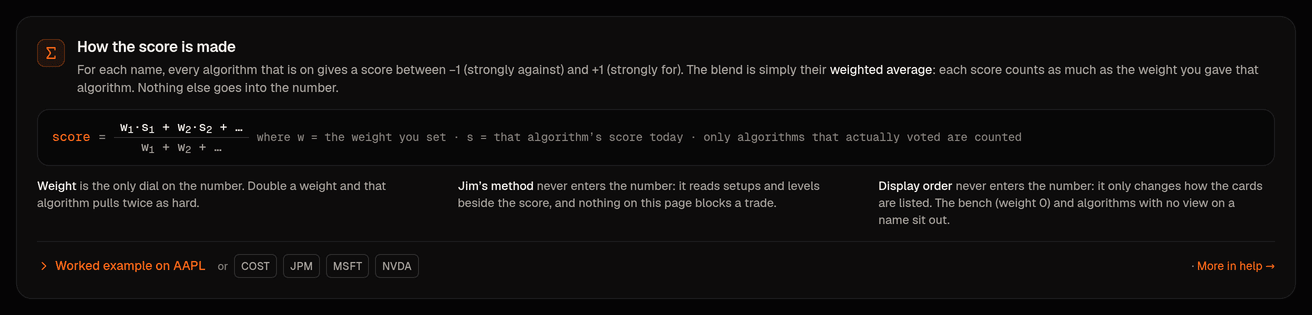
score = (w₁×s₁ + w₂×s₂ + …) ÷ (w₁ + w₂ + …)
counted only over the signals that actually have a view on that name today. A worked example: cross-sectional momentum (weight 0.30) says +0.60 and the composite (weight 0.10) says +0.20, while RSI(2) has no data for the name. The top is 0.30 × 0.60 + 0.10 × 0.20 = 0.20; the bottom is 0.30 + 0.10 = 0.40 (RSI sits out, so its weight is not counted); the score is 0.20 ÷ 0.40 = +0.50, which reads long. Open Worked example there to see the same sum for a real name from today's blend, next to the number the desk shows.
Three things never change the number: a screen only lets the refuse a buy and Jim's method only says whether there is a setup and at what prices; display order only changes how the rows are listed; a signal on the bench (weight 0) or with no view on the name is simply left out. So "why did the blend say long?" is always answerable from the weights and the readings alone, and the biggest-pulls bars show exactly that answer.
Blend v2, the preview, and cutting over
Blend v2 keeps the weighted average and fixes three things the plain average gets wrong: each signal is first put on a common scale (so a signal that only ever says −1 or +1 cannot drown out one that speaks softly), the weights are pulled toward equal and capped as described above, and the result is scaled back up so that adding more signals does not quietly shrink every blend toward zero and change what the act line means.
It arrives in three steps, and nothing changes what the desk trades until you say so:
- Preview. Blend v2 is computed beside today's blend. Name by name on Signals gains one quiet Preview column next to the Blend column the desk acts on, and one sentence beside the table says which is which. Why the preview differs opens the share each signal has in the preview beside what you set, how many signals it reads, and its pulls name by name. While there is nothing to decide, the switch itself stays folded there under "What switching would change, and the evidence so far".
- Evidence. A measurement over your book's names (for the house book, more than a decade of daily sessions) checks whether the strongest tenth of names by blend v2 earned at least as much over the next 21 sessions as the strongest tenth by today's blend, by equal weights, and by the best single signal on its own; whether stronger blends earned more than weaker ones; and what each signal adds when it is left out. The Evidence link on the card opens those results: one row per rung, a bar per rung for how well it sorts names, what each signal adds in points, and the list of bars with a tick or a cross. Until every bar is cleared the card says so and offers nothing to press; the same rule holds on the server, so nothing can switch a book early.
- Cutover. When the evidence passes, the card offers Switch to blend v2. It is the same kind of change card as a weight change: it lists what changes (the number every screen shows and the act line is measured against) and what does not (weights, display order, which algorithms are on), it needs the typed word CUTOVER and your code, and it is logged in Strategy › History. Go back to today's blend on the same card undoes it, with the same typed word and code, also logged.
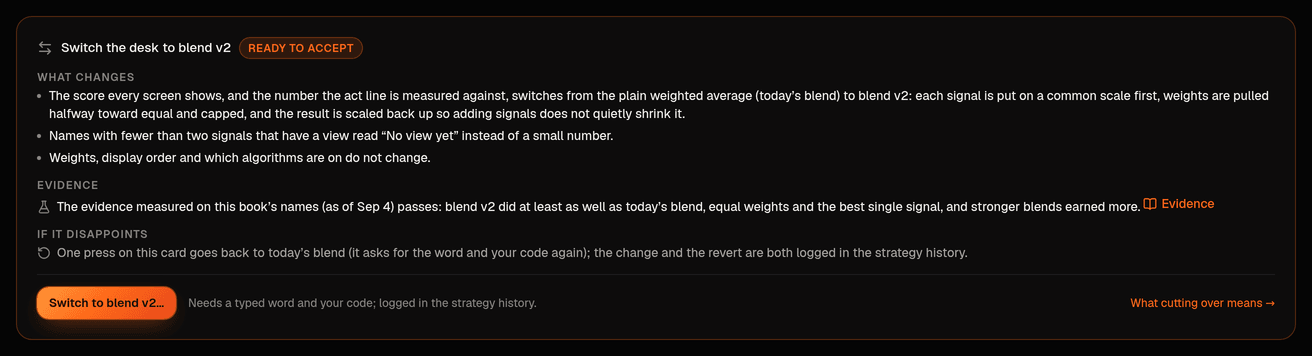
Every new book starts on today's blend with blend v2 in preview, and switches only through its own cutover card once its own evidence passes.
The bench
Registered is not the same as weighted. A signal that is on but has weight 0 is on the bench: the PM sees its view, the blend ignores it. New residents join the bench by default so a newcomer never dilutes the blend you chose; a few unproven ones (the gap fade, the vol-targeted trend follower and the squeeze breakout) start Off until you opt in with one click. The Your blend panel at the top counts them in one sentence ("3 signals make the score, 8 more sit on the bench (seen, not scored). 3 are off." on a new book; a book opened before September 11 that still weights Composite reads 4 and 7); each count is a button that filters the rows below to that group, and every row carries the same words as a state pill (In the score, On the bench, Off). The numbers always add up to the rows you can count. The score is a stacked bar: one labelled segment per signal in it, sized by the share that counts. A screen sits under the bar in words, because it is never part of the number; Jim's method is not on this panel at all; it has its own tab, Setups.
How the PM sees signals
When the PM asks for a symbol's signals it gets every algorithm that is not Off with its view and score, the blend with its biggest pulls and coverage, any screen that blocks the name and why, Jim's setups and levels, and the act line with its buffer. It must name the pulls it leaned on when it proposes a trade, it may always pass or go smaller with a one-line reason, and it may only go in below the act line under a short list of named exceptions that the Critic grades. Open a session on Desk to see which signals it read. The same weighting is written as one line at the top of the PM's next , so the PM always knows what you chose.
The suggested weights
The Suggestions tab holds the Suggested weights card. It opens with two sentences worked out from the suggestion's own numbers ("The Quant suggests equal weights, 25% for each of the four signals in your blend. The biggest change from what you set is cross-sectional momentum, from 50% to 25%."), then shows what a deterministic recommender (no model) would set the weights to, as a bar above your blend now (the same bar the Blend tab draws; once the book acts on blend v2, the legend prints both numbers, "you set 50%, counts 33%"), one line saying whether your blend is at the suggested weights, the Quant's own reasoning with its statistics under The Quant's note, as written, and a "Why these numbers?" expander: three candidate methods (equal weight, risk parity, max-Sharpe with shrinkage) scored by walk-forward, per-algorithm statistics with a You set column, and a correlation matrix. It weighs only the signals that make the score: on, weighted, and not a rule machine or a screen. Everything else is listed under Not weighted with the reason in words: Jim's method answers a different question than the score and never takes a weight; a benched signal waits for a weight on the Blend tab; a signal that is off is off. Until 20 days exist the basis reads "backtest only" and the confidence is never high. The numbers are worked out on request against today's weights. If the Quant last saved a suggestion against weights you have since changed, the line under the bars says so: the "moved since" comparison uses those older weights, everything else on the card uses the weights you have now. When recommendation steps are waiting that were worked out before your blend last changed, the card says they start from the older weights and offers to run the Quant again.
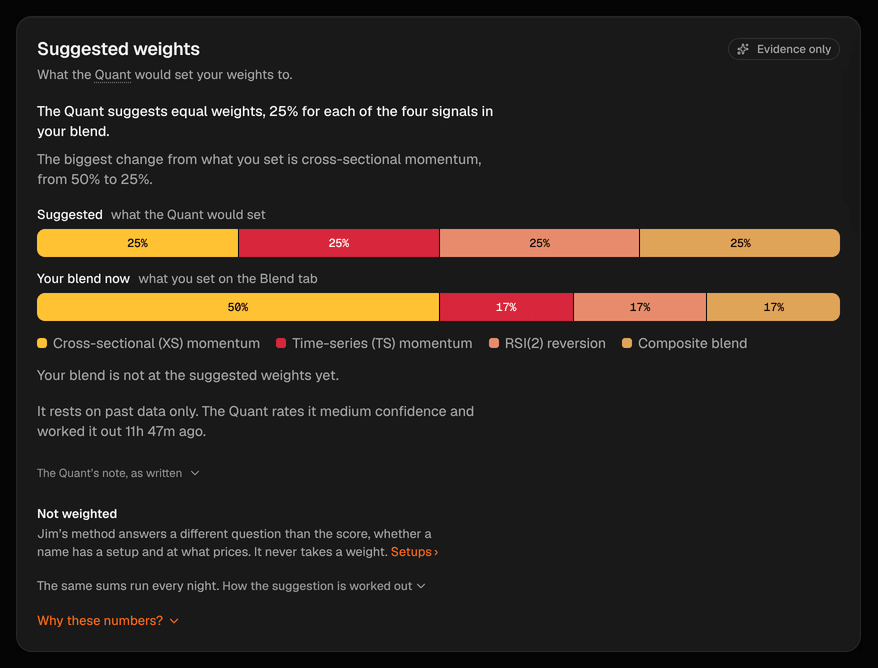
After the close the Quant runs the same calculation and turns the suggestion into bounded, revertible steps that arrive in the Inbox under Recommendations, under a stricter rule: a recommendation has to beat both your current weights and plain equal weights on held-out history after costs, may move any one weight by at most a quarter at a time, and says why it abstains when it cannot clear that bar. The panel beside the card says how many suggested steps are waiting (with Review them), or offers Run the Quant now when none are. It states once, in one sentence, what the Quant may do on its own, with a link to change it, and how far your blend is from the suggested weights.
A signal's own page
Click Open its page on any row, for example Jim's method. The title block says in one line what kind of thing the signal is for this book, and the page is four tabs, each its own address:
- Overview opens with what the signal says today, beside its on/off switch and its weight, and under them Name by name: what it reads on every watchlist name (for a rule machine the week, the setup, the trigger and the stop; for a scoring signal whether it is for the name, neutral or against it, and its score). Beside them, How it works says what it does in a sentence and what it never does, with the step-by-step, the registry entry, the written rules and the formulas one click away, and How a trade from it runs sets what the rules allow against what the backtest measured.
- Backtest leads with the verdict in two sentences (what it grew or lost a year after costs over the backtest's span under the production limits, and how that compares with holding the same names in equal amounts), then eight labeled figures (Grew per year, Smoothness, Worst dip, Trades that won and so on) with what they are compared with beside them. The equity curve with an optional SPY overlay has its own panel, and under it a by-year table (newest first, eight years shown and the rest one click away) sits beside the table by market mood. The statistics (the Sharpe interval, the cost columns, the sensitivity readings, the "Read with care" list) sit behind folds.
- Your book is what the signal has actually done here: the proposals that cited it, their fills and the closed trades' result.
- Settings holds the same switch and weight, the settings its rules run with (fixed for now, as one sentence with the registry's own table under Technical details) and, for Jim's method, the desk's notes on where his written rules left a choice open, folded for the person they are addressed to.
An older link to a section of the page opens the tab that now holds it.
Strategies, their history and adherence
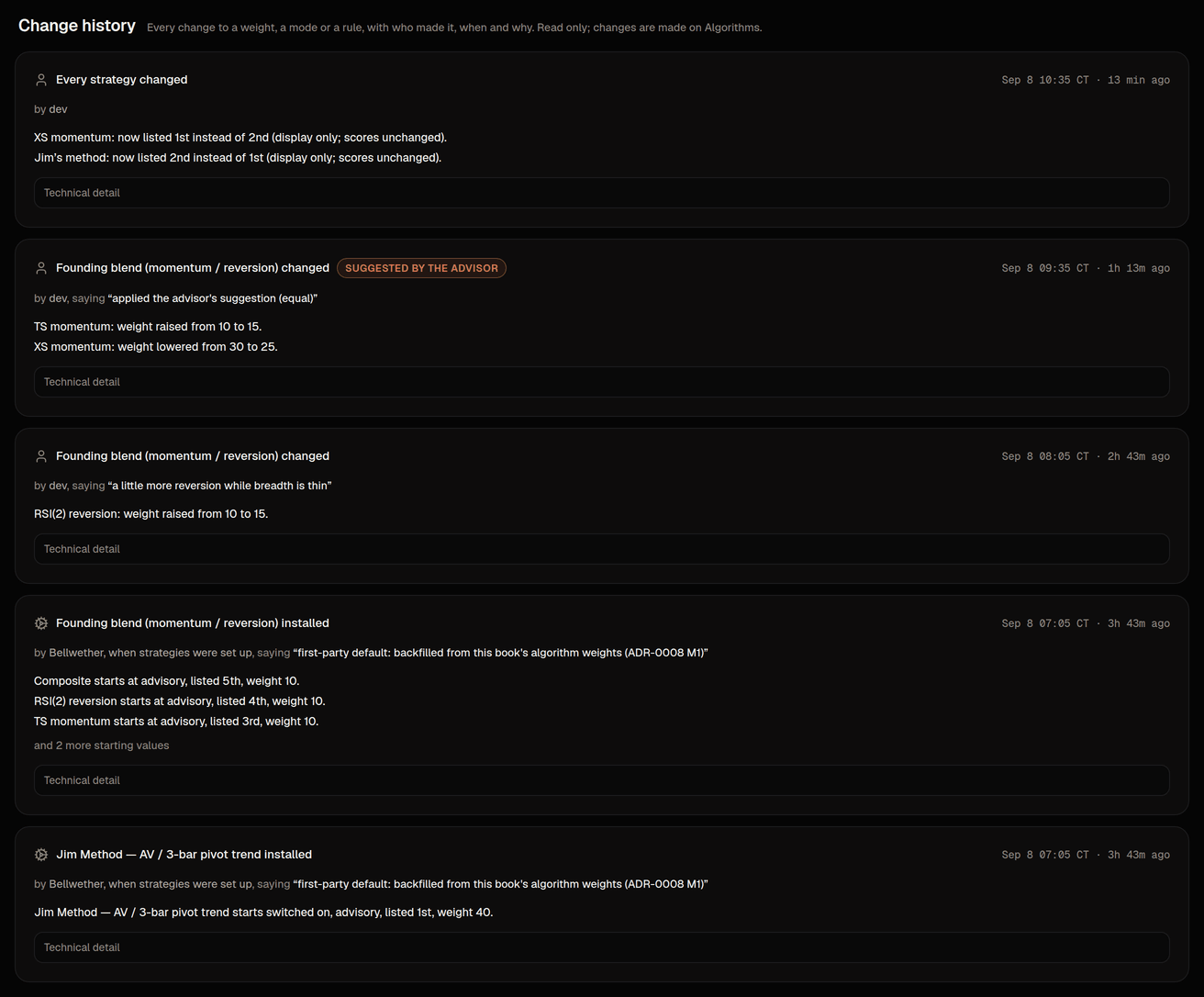
Where the strategy model is switched on, Strategy › Strategies shows what the desk actually runs, read-only: Jim's method as a rule machine (its entry, stop, exit and sizing rules spelled out, plus the handful of readings Jim has not yet confirmed, each limited to the alternatives already measured) and the founding blend of the other algorithms, with every member's weight and its share of the blend, listed in display order. The two shares (Jim about 44% and the blend about 56% on a new book; 40% and 60% on a book that still weights Composite) are your algorithm weights seen as strategies; the only place to edit a weight or switch a signal on is still this screen. History is the change ledger: every weight change, every switch and the cutover as a card with who made it, when, the note they left, the engine run behind it when the advisor suggested it, and a before-and-after table of exactly the values that moved. A change of display order is recorded too, and its card says in words that scores did not change.
With strategy snapshots on, every PM session opens with a Candidates table worked out by code from those strategies (the blend's strongest names first, Jim's armed and fired setups with their levels), and the PM must answer every row: propose, decline or defer, with a reason from a short list the system can check. After the session, code grades what happened (offered, acted, declined with a reason that held, declined without one, deferred, ignored, and whether it said which signal it sided with when they disagreed), and the Adherence block on Strategy › Strategies shows those counts per strategy next to the number of rows they are over, with "insufficient sample" until there are enough. The same five-line summary goes to the Critic. None of it is the PM's own account of itself, and the latest snapshot's time and data date sit in the block's header.
Who can change what, where
Weights, on/off and display order change only on Signals, and only for an owner or operator; a viewer sees everything and the API refuses their edits. Every change is audited; find it under Activity › Config changes. Strategy › Summary shows one read-only line ("5 algorithms are on; nothing here can block a trade. The score: …") that links back here. The Executor never reads the blend and never sees a weight; the only thing it asks of this page is whether a screen blocks the name.