Posture, autonomy and allocation
The three dials that set how hard the book trades, the one place they are edited (Strategy › Profile), and why loosening asks for more than tightening.
- Who it is for
- Owners & operators
- Reading time
- 14 min read
- Updated
Three settings decide how hard your book trades: (how big the numbers are), (how much happens without you) and allocation (how the book is split into sleeves). All three are edited in one place, Profile, the first tab of Strategy, and every other that mentions them (the Risk header, the Inbox header, the Overview mind card) shows a read-only summary that links back there. Posture is set on Strategy, not on Risk: Risk › Limits is where you fine-tune the individual limits a posture set, and the strip under its title shows the posture in force as a chip that links back to Strategy › Posture. Allocation follows the posture unless you override a sleeve. The Autonomy card has a second row, Tuning: what the Quant may change on its own.
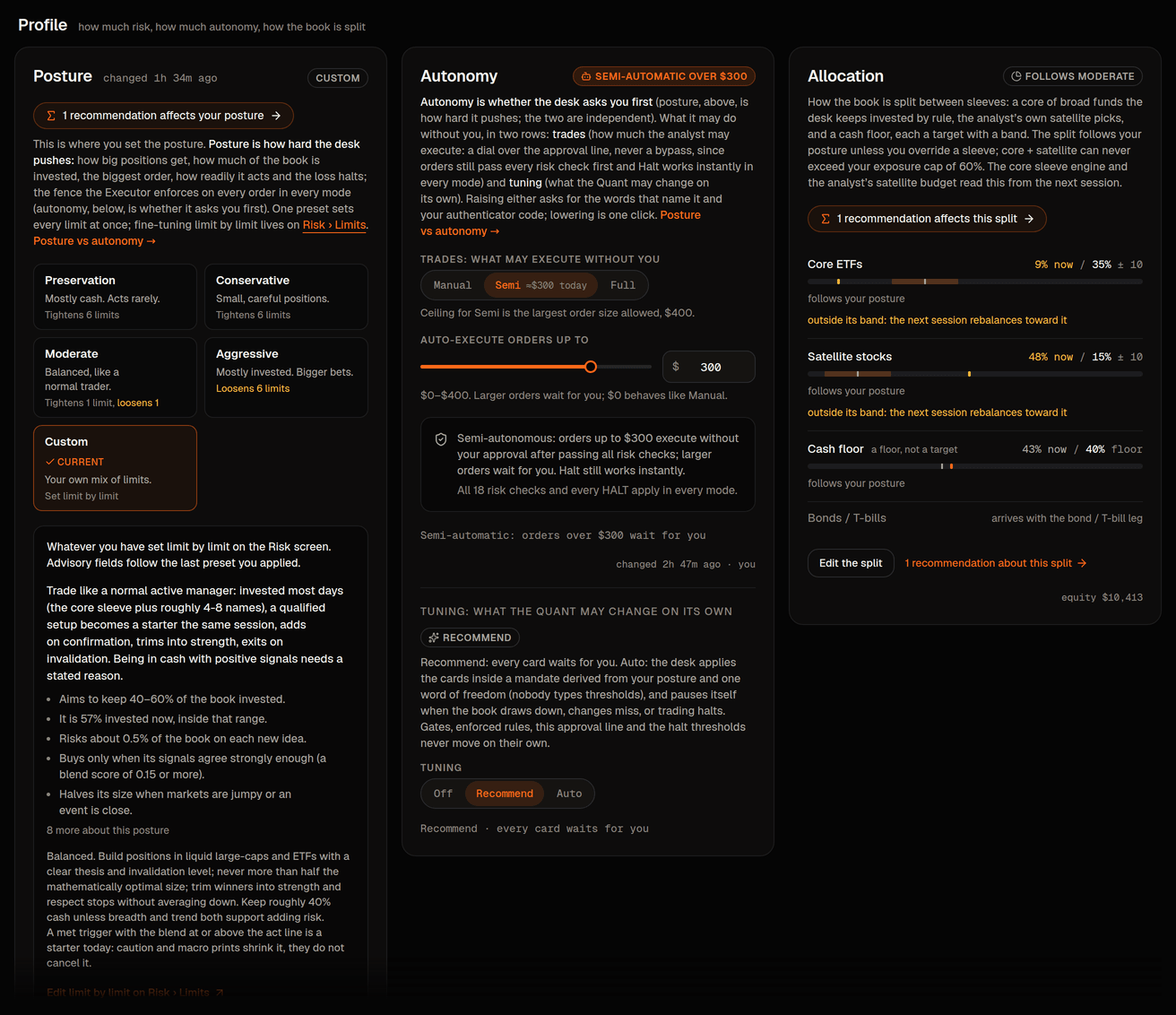
Posture
In one line: posture is how hard the desk pushes; autonomy (next section) is whether it asks you first. The side-by-side example is in Posture vs autonomy.
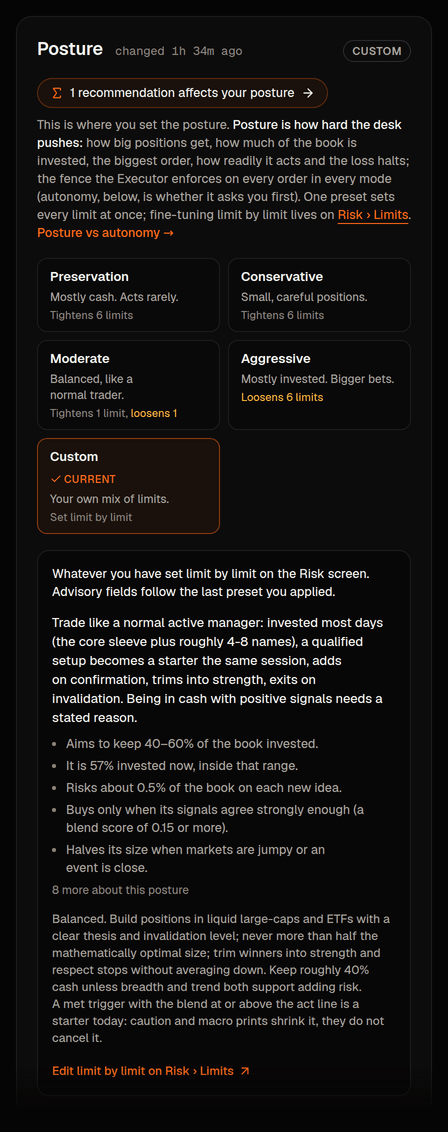
A posture is a named bundle of seven of the limits the enforces, applied as one audited action, plus the temperament the Portfolio Manager trades with. Moderate is exactly the code defaults, the numbers the rest of this help quotes, and what a new book starts on. Speculative is a paper-only preset you unlock by typing an of its risks. When you change single limits by hand on Risk › Limits the book keeps the name and the temperament of the preset you last applied and says how many limits differ ("Moderate, 2 limits changed by hand"); a book with no preset behind it reads "Your own limits".
A posture is a starting set of limits, not a fence around what you may ask for. Every number it sets can be typed over on Risk, lower in one click, higher with your code and the words MORE RISK. And when you tell the desk on Strategy › Guidance to take more risk ("get risky", "I need to double my money") it uses the room those limits give on whatever posture you are on, Conservative included: bigger positions, more of the book invested, no half-size first buys, holding through more of a fall. It never goes past the limits in force. If your goal needs more room than they give, the card lists the exact limits that would have to change and to what, and changing them is your call (Tell your desk).
Largest single position (share of account)
- Preservation
- 3%
- Conservative
- 5%
- Moderate
- 10%
- Aggressive
- 20%
- Speculative
- 100%
Most of the account invested at once
- Preservation
- 25%
- Conservative
- 40%
- Moderate
- 60%
- Aggressive
- 90%
- Speculative
- 100%
Largest single order
- Preservation
- $150
- Conservative
- $250
- Moderate
- $500
- Aggressive
- $1,000
- Speculative
- the whole book
that halts trading
- Preservation
- $50
- Conservative
- $75
- Moderate
- $150
- Aggressive
- $300
- Speculative
- the whole book (only a day that has lost about half of it)
from the high point that halts trading
- Preservation
- 3%
- Conservative
- 5%
- Moderate
- 8%
- Aggressive
- 15%
- Speculative
- 100% (never reached)
Daily order ceiling (a runaway rail, not a pace)
- Preservation
- 200
- Conservative
- 200
- Moderate
- 200
- Aggressive
- 200
- Speculative
- 200
Turnover a day (share of the account)
- Preservation
- 25%
- Conservative
- 50%
- Moderate
- 75%
- Aggressive
- 100%
- Speculative
- 200%
Speculative is the posture for a book you can lose all of. Every limit is the book's size: one order or one name may be the whole book, the whole book may be invested, and the daily loss stop and the drawdown brake are both set to the book's whole value, so they do not protect it (the brake is never reached, and the daily stop only ends a day that has already lost about half the book). The dollar columns above are smallest values on the other four postures (the order size and the daily loss stop grow with the account, see Limits and halts); on Speculative they are simply the book. What stays on every posture, this one included: nothing is sold short, a sell is never larger than what you hold, a stop rests at the broker behind every managed exit, your is yours, and the works. The full statement is in Speculative mandate.
The temperament is what changed after the first three days of sessions produced no at all: Conservative, Moderate and Aggressive are built to act. When a watched level is met and the desk's is behind the name (at or above the posture's ), the PM proposes a starter that session. A caution regime or a macro release the next day makes the starter smaller (each halves it, and the halving always shows: it is applied after the caps); it does not cancel it. A risk-sized starter under the posture's floor is lifted to the floor, so "too small to bother" is not an outcome; the one exception is a stop so far away that even the floor would risk more than a whole risk unit, which the desk reports as a stop too wide for a starter rather than sizing up through it. Preservation is the one posture where standing aside is the design: tiny risk per idea, caution or a pending macro print is a reason to skip, what little is invested sits in T-bill, bond and broad-index funds, and most days end with no trade. Choose it when that is what you want.
Mandate (the first thing the PM reads)
- Preservation
- protect capital; act rarely
- Conservative
- steady, small, high-conviction
- Moderate
- a normal active trader: invested most days, 4–8 names plus the core sleeve
- Aggressive
- maximise return over ~2 months; take qualified risk
- Speculative
- the return you asked for, as an absolute-return mandate: fully invested, up to 8 new names a session, adds the same day
Target share of the account invested (outside risk-off)
- Preservation
- 0–20%
- Conservative
- 20–40%
- Moderate
- 40–60%
- Aggressive
- 70–90%
- Speculative
- 90–100%
Risk per idea (of equity, at the stop; a starter risks half)
- Preservation
- 0.10%
- Conservative
- 0.25%
- Moderate
- 0.50%
- Aggressive
- 0.75%
- Speculative
- 1.00%, all of it at entry
Acts when the blend score is at least
- Preservation
- 0.35
- Conservative
- 0.25
- Moderate
- 0.15
- Aggressive
- 0.10
- Speculative
- 0.05
Smallest starter (share of equity)
- Preservation
- none
- Conservative
- 2%
- Moderate
- 3%
- Aggressive
- 5%
- Speculative
- 10% (the full position)
In a caution regime, or on a day with a macro release
- Preservation
- stand aside
- Conservative
- halve the size for either (stand aside when both apply)
- Moderate
- halve the size for either
- Aggressive
- size × 0.75 for either
- Speculative
- no change for either
Adds to a winning position
- Preservation
- no
- Conservative
- no
- Moderate
- one add on confirmation
- Aggressive
- yes
- Speculative
- yes, the same day
Holding period
- Preservation
- weeks, mostly cash
- Conservative
- 2–6 weeks
- Moderate
- 1–4 weeks
- Aggressive
- days to ~2 months
- Speculative
- minutes to weeks
How invested (what the desk works toward, share of the account)
- Preservation
- ~10%
- Conservative
- ~30%
- Moderate
- ~50%
- Aggressive
- ~80%
- Speculative
- 90–100%
Broad ETFs vs picked stocks (of what is invested)
- Preservation
- 100% / 0% (T-bills, bonds, a little index)
- Conservative
- 80% / 20% (T-bills, bonds, index)
- Moderate
- 70% / 30% (index funds)
- Aggressive
- 55% / 45% (growth-tilted index funds)
- Speculative
- 10% / 90% (a token growth-index core)
New names per week (at most)
- Preservation
- 1
- Conservative
- 2
- Moderate
- 4
- Aggressive
- 8
- Speculative
- 25
Intraday look every
- Preservation
- 120 min
- Conservative
- 120 min
- Moderate
- 60 min
- Aggressive
- 30 min
- Speculative
- 15 min
"At the stop" means the loss if the position is sold at its stop. On a stops are checked on the closing price (Risk › Halts › Protective stops): during the day only the wide disaster stop sells, so an idea can lose up to about 1.6 times its stated risk before anything sells, and a day that closes under the stop is sold at the next open, which can be lower still. Going back to stops that rest all day restores "at the stop" as the most a position loses short of a gap.
What each row does to a session is spelled out in How your posture changes what the desk does.
A posture also carries a volatility target and a paragraph of style the PM reads. One part is more than advice: the intraday cadence is what the Scheduler runs unless you have set your own interval on Desk › Portfolio Manager › Settings. Edit any single limit afterwards and the posture reads as the preset you last applied plus the count of limits changed by hand, the same words on Strategy and on Risk; the PM keeps that preset’s temperament, and applying the preset again puts the changed limits back.
The cadence also has a running cost. The platform estimates a typical daily AI cost for each cadence: the median cost of one of your book's recent intraday sessions times the number of sessions a regular day plans at that cadence (a look every 15 minutes is 24 sessions including the end-of-day check; every 30 minutes is 13; hourly is 7; every two hours is 4). It is an estimate, never a cap, and it is not shown on the posture card yet; a book with no sessions of its own has no estimate until it has run.
When the budget runs out
Each book has a daily AI budget, and the platform's ceiling grows with the number of active books. If a book does spend its day's budget, the desk pauses until midnight CT and says so. The Overview mind card reads "I am paused until midnight CT because today's AI budget is spent" with an amber "Paused until 00:00 CT" pill and the time it stopped in its status line, the top bar reads "Desk paused", you get one alert (and a notification if you have them on), and the day's report counts the sessions that were skipped for budget. The pause never touches your positions: open orders and stops stay in place, the Executor keeps protecting them, and the end-of-day check keeps money set aside that briefs, chat and routine check-ins cannot spend. Only the platform owner can raise the budget (their Admin › Usage page shows today's spend per book against the ceiling); everyone else's desk resumes on its own at the reset.
Posture has one editor: the Risk posture· Strategy › Profile › Posture card in Strategy › Profile. Each preset tile shows its per-limit difference from today; Apply opens a dialog listing every change. The Executor picks the new limits up within 5 seconds; the reaches the PM at its next session. Risk › Limits shows the posture in force as a read-only chip and still lets you fine-tune any single limit.
After you change posture, autonomy, allocation or guidance, the PM's next session opens with a short note of what changed, and it acknowledges the change before it trades. A change that tightens the book lists the dollars to trim, and new buys the tighter posture forbids are refused until the book is back inside its band. The change is read at the next scheduled session; it does not wake the desk on its own.
Two side effects. Changing the largest single order moves the ceiling of the autonomy dial: Full re-pegs to the new ceiling (still Full), a Semi threshold above the new ceiling is clamped down to it, and a Semi threshold never moves up on its own. A limit marked was tightened at install; a posture that would loosen it writes the value but the Executor keeps the stricter pinned number.
Autonomy
Autonomy answers one question: how big does an order have to be before it waits for you in the Inbox? Manual means every order waits, Semi means orders up to a dollar amount go through on their own (an amount you pick, or an automatic line of roughly 5% of equity that always stays below the largest single order), Full means nothing waits. It is edited on Strategy › Profile › Autonomy and takes effect within 5 seconds. Every order still passes every risk check in every mode, and Halt works the same everywhere. Autonomy levels covers the dial in detail.
How big is a starter position
The PM sizes in dollars, and code turns the dollars into shares. The arithmetic is the same every session and the PM reads its inputs off its own briefing card, so it cannot drift: start from the posture's risk per idea at today's equity (a starter risks half of it) divided by the distance to the stop; halve it once if the market regime reads caution and once more if a macro release or company event falls inside the next day; never go below the posture's floor; never go above the largest single order or the room left under the position and exposure caps (with a little headroom). On a $10,000 Moderate book that is a risk unit of $50, a starter risk of $25, a floor of $300 and a ceiling of $475 per new name, so a starter is a few hundred dollars, whatever the share price.
Fractions of a share are normal. When the broker allows fractional trading in a name (most liquid stocks and index ETFs), the dollars become a fraction (0.9634 shares of a $493 stock is a $475 starter), shown with up to four decimals on approval cards and position lists. When it does not, the dollars become whole shares rounded down (one share if rounding gives zero and one share fits the caps). The Executor checks fractional orders like any other and refuses a fractional buy of a name the broker does not mark fractionable. The first-buy line in the Posture panel on Strategy › Profile shows the numbers at today's equity (how they are worked out sits under "How these numbers are worked out"); approval cards say when a starter lands above your line and mark fractional quantities. The Executor enforces the caps and the approval line exactly as before; sizing decides what is proposed, never what is allowed.
Allocation and the core sleeve
The Allocation card splits the book into sleeves, each a target share of equity with a band around it: Core ETFs (broad funds the desk keeps invested by rule), Satellite stocks (everything the Portfolio Manager picks itself) and a Cash floor (a floor, not a target to trade toward). The split is derived from your posture from two plain numbers: how invested the desk works toward (Preservation about 10% of the account, Conservative 30%, Moderate 50%, Aggressive 80%) and how much of what is invested sits in broad funds rather than picked stocks (Preservation all of it, Conservative 80%, Moderate 70%, Aggressive 55%). That gives roughly Preservation 10 / 0 / 75, Conservative 24 / 6 / 60, Moderate 35 / 15 / 40 and Aggressive 44 / 36 / 10 (core / satellite / cash floor, percent of equity), and core plus satellite never exceed the posture's exposure cap. The diversified share falls as the posture gets bolder: a cautious book is mostly T-bill, bond and broad-index funds, a bold book is mostly the desk's own picks over a growth-tilted index core, which is how core-and-satellite portfolios are built everywhere from robo-advisers to private banks. Change the posture and every sleeve you have not touched re-derives. Override one (Edit the split) and that sleeve is stored, tagged overridden with "your posture would set N%" beside it and a Reset link, and survives posture changes until you reset it. Lowering an invested sleeve or raising the cash floor is one click; anything that raises invested exposure asks for your code and the words MORE RISK; a split past the exposure cap is refused whatever you type. Every change is a row in the strategy change history and the audit log. The Quant's Allocation recommendations nudge the same targets inside your bands and land through this card's own path; the card links to them.
Two things read the split from the next session. The core sleeve is systematic, and what it holds follows the posture: Preservation and Conservative hold a T-bill fund (SGOV), a broad bond fund (AGG) and a little S&P 500 (SPY); Moderate holds SPY, QQQ and IWM; Aggressive tilts to QQQ and IWM. Each stock or bond fund is held while it is in an uptrend by the desk's own trend rules; when it is not, its share waits in the T-bill fund (or in cash where the posture's core has none), and when the regime turns risk-off every stock and bond leg does. Once a day, at the last look before the close, code works out what the sleeve should hold and writes any rebalance as ordinary proposals parked for the next morning's open, so they wait in the Inbox above your line, pass every risk check, respect the position cap per fund (the rest stays cash and the plan says so), buy at most one largest-single-order per fund per day, and stop on a halt like anything else. They carry a core sleeve mark on the card. The satellite budget is the satellite target plus its band: the sizing the manager sees clips a new position to the room left in it and says sleeve as the binding cap when it does, one more cap inside the limit, never a way around it.
Loosening asks more than tightening
For both dials, a change that lets the system take more risk or act with less of you is a loosening; the other direction is a tightening.
- Tightening is one click. Picking a stricter posture applies on confirm; lowering autonomy is a single button.
- Loosening shows you the exact change first (each limit by name with its old and new value; the setting keys sit behind a Details disclosure), asks you to type a phrase that says what you are doing (the preset's name, for example AGGRESSIVE, for a posture; MORE AUTONOMY for the dial; MORE RISK when loosening single limits on Risk), then asks for your . Nothing is written until both are accepted; the change takes effect within seconds and is recorded in the audit log. A code keeps ordinary loosening unlocked for 30 minutes; moving to Full is stricter and wants a code entered in the last 5 minutes.
- Every change, in either direction, is written to the audit log and shows under Activity › Config changes with before and after values and who made it.
The system will not loosen anything by itself. A posture never raises autonomy, an autonomy change never touches a limit, and no agent can change either.
Where you see them without editing
The strip beside Strategy's title says the three settings in a few words on every tab: the posture in force, the approval line ("Asks you before every order", "Asks you above $300" or "Never asks you") and the split, each a link to its panel on Profile. The strip under Risk's title repeats the posture and the approval line as two chips marked "Set on Strategy", and the Inbox header repeats them too. None of these places has controls; there is never a second editor.