People and access
One page for everyone who can reach the books you run. Answer a request for access, invite someone new, give someone who already signs in a role or read-only access, see and resend a pending setup link, change a role, remove access or disable a login.
- Who it is for
- Owners & operators
- Reading time
- 9 min read
- Updated
People is a page, and it has two homes that share one list. The house owner (the owner of this installation, called the owner below) finds it at Admin › People, together with the requests for access and the mail log. An operator of their own book has no Admin and finds the same list at Settings › People, scoped to the books they run. A search for "people", "invite" or "share" opens whichever of the two is yours. You need to be an owner or operator, on a book you act on. While you are looking at someone else's book read only the entry is not offered.
Requests for access
On Admin › People the first panel is Requests for access, the people who asked on the landing page. The chips in the panel header filter them (Waiting, Approved, Declined, All) and the list shows five at a time. Each row says who asked, the note they left, when they asked and where they came from in words such as "Hacker News, post". Approve creates their login and sends a one-time setup link. You choose whether they get Their own book or Read only on a book. Decline keeps your reason with the request and emails nothing unless you tick the box for a short, polite note. A request whose address already signs in says "Already has an account" and offers Give access in place of Approve, because there is nothing to approve. On a phone each request is a card with Decline and Approve side by side.
One list, a chip per book
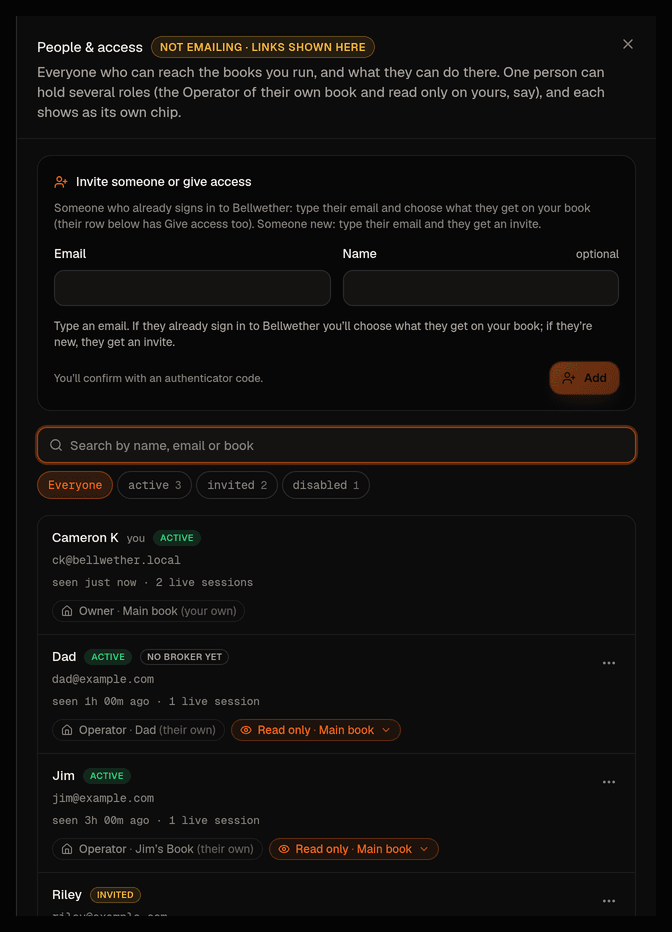
Under the requests, People with access lists every person who has anything to do with a book you run, twelve at a time. A row carries the name, the email, when they were last seen, a status (Active, Invited or Disabled) and then one chip per book and role.
- A gray chip with a house glyph is their own book and the role their login carries there (Owner, Operator, Read only). That one travels with their login and is not yours to change.
- An orange chip is a book of yours they reach, naming their role and the book. Operator means they run it with you. Read only means they can look and send feedback and never act. Orange means you can click it, and a small menu offers Let them trade this book or Make read only, and Remove access.
Books are called by their own name everywhere on this page, the name the book menu shows. A book you named "House" reads "House" here too. Someone who is not on one of your books shows one more line under the chips, for example "Not in House", with Give access beside it.
So one person can hold several roles at once and the row shows all of them. Jim can be the Operator of Jim's book and Read only on yours, and that is two chips on one row, not two people in two dialogs. The owner administers every login and therefore sees everyone and every chip. Anyone else sees only the people of the books they run, and never learns who reaches a book they do not.
Search matches name, email or book. The status chips filter to active, invited or disabled with counts.
Every button and menu item that asks for your wears a small shield, and one line under the list says so ("Asks for your authenticator code."). Anything without the shield asks for no code.
Add someone
Add someone sits beside the list (under it on a phone). It takes an email and, optionally, a name. Bellwether decides what happens and says so in one sentence under the fields before you press anything. The button appears once there is something it can do, and it reads Send invite or Give access.
- They already sign in to Bellwether (the list knows them). You choose what they get on your book, Read only or Operator, and the button reads Give access. No invite, no second login, and the access lands on their next request. An Operator role on your book is capped by their own login's role, so a read-only login never writes anywhere.
- They are new (owner only). The button reads Send invite and the default is Their own book, a completely separate book (own broker account, own agents, own settings) that they run as its Operator. Your books are not involved. After setup they land on Connect your broker for their own keys. You can name their book, and left empty it becomes "‹Name›'s book".
- Choose One of my books instead and the form asks which book (when you run more than one, and nothing is pre-picked) and how they get in. The choices are Read only, plus a book of their own (they look at your book and run a separate one, and one invite does both), Read only, on this book and Operator, on this book (their login lives on your book with that role).
- You are an operator, not the owner, and the email is unknown. The sentence says so (only the owner invites new people) and nothing is created. For you the panel is titled Give someone access.
If you run more than one book (a second book of your own, or one you were made operator of), the Which of your books picker appears only when it matters. That is when the person already signs in (it starts on the book you are in), or after you chose to give someone new access to one of your books (it starts empty). The access is written and audited in that book.
Adding someone asks for your authenticator code (one from the last 30 minutes counts). The answer under the form repeats what happened in a sentence and, for an invite, shows the one-time setup link with Copy link and whether it was emailed. The same link then stays under the person's row.
Pending people keep their setup link
An invited person's row carries the setup link until they use it. It reads "Setup link, expires in 25 minutes", says Emailed to them or Not emailed, and offers Copy link and Send a fresh link (a fresh link stops the old one working and is emailed again). Because that link is what lets someone set the account's password and , it is only put on next to a recent authenticator code of yours. Right after inviting (that code counts for 30 minutes) it is simply there. Later the row keeps the link hidden and offers Show link, which asks for a code and then reveals it. When the link's own 30 minutes are up the row says Setup link expired with a one-click Send a new link. A row invited before links were kept here says so and offers the same button. Only the owner ever holds a link. An operator sees that the person is invited and has not finished setting up yet. While email is off on this server, one sentence above the list says so and asks you to copy each link and send it yourself.
Changing and removing access, disabling a login
The row's ⋯ menu lists what you can do in this order, the routine first and taking things away last.
- Send a setup link again (for someone pending, Send a new setup link). Owner only.
- Give access to ‹book›, one entry per book of yours they are not in, plus Give access to your books when there are several. One code covers all of them and each book logs its own change.
- Open ‹their book› as read only, when you may look at their book (the owner always may). It jumps straight into its read-only view.
- Let them trade ‹book› makes them an Operator there, someone who approves orders and changes limits. Make read only on ‹book› does the opposite. Both ask for a code. The previous access row is closed and a new one opened, so the history stays in the audit log.
- Remove access to ‹book› is a tightening, so it asks for no code. It takes effect on their next request and a live screen they have open on your book closes within about 30 seconds. Their own book and login are untouched.
- Disable login and Enable login. Owner only. These, and sending a setup link, ask for a code from the last 5 minutes, because a fresh link re-enrolls that person's password and authenticator and a disable signs them out everywhere at once. Nothing is deleted by a disable.
Two things this page deliberately will not do. It will not change or remove the chip through which a book's owner reaches their own second book, and it will not change your own access to a book (someone else does that). Changing the role a login carries on its own book (turning a read-only colleague on your book into an operator) is not here yet either. Today that is a change made outside the console.
Every action on this page writes an audit row in the affected book, visible under Activity with the config filter, and notes whether a code was presented.
The mail log
Beside the list on Admin › People, Mail log shows every email this server recorded (alerts, invites, password resets), five at a time. While email is off on this server its state reads Saved, not sent, and each saved mail shows its link with Copy link so you can hand it over yourself. With email on, the state reads Sending and the log is the record of what went out. Settings › Notifications points here with "See the saved emails". The old Outbox entry in the account menu is gone: an old link to it opens this Mail log.
Where the old screens went
People used to be a sheet that slid out from the account menu, and before that two separate places called Users & invites and Sharing · ‹book›. All of them are gone, and their links still land. The old links for people, users and sharing, the search entries "people", "invite" and "share", and the Share read-only button on the track record open Admin › People for the house owner and Settings › People for an operator of their own book. Anything else the link carried is kept. The house owner has no People tab on Settings, so the Settings › People link sends them to Admin › People. The old Admin › Waitlist tab is now Admin › People, with the requests at the top, and its old link lands there too. API tokens stays its own owner-only entry, reached from the search box ("tokens"). What a read-only visitor actually sees, and how a role on a book you run is capped by your login, is unchanged and described in sharing and viewers.
Coming next
Groups (naming a set of people once, "family" or "desk", and giving the group a role on a book) are the next layer on top of this list. Passkeys as a second sign-in method and changing a login's own role from the console come after.