Limits and halts
The Risk screen's three tabs, what each per-order limit means, the two rules that stop everything, what may be traded and the never-trade list, and why tightening is one confirmation while loosening is a ceremony.
- Who it is for
- Owners & operators
- Reading time
- 14 min read
- Updated
Risk is a short list of numbers the will not cross. The PM proposes inside them; the Executor enforces them on every order, in code, and picks up a change within seconds. Where things are set: the (the preset that sets all six headline limits at once) is chosen on Strategy › Posture; the individual limits are fine-tuned here, one by one. The strip under Risk's title always shows which posture the limits below come from, as a chip marked "Set on Strategy" that links back there to change it; Risk sits right after Strategy in the navigation for that reason.
The three tabs
Risk opens on Limits. The tabs are:
- Limits: per-order rules (size, price sanity, timing). A miss rejects one order and tells the PM why; nothing here halts the system. The posture in force shows as a read-only chip; postures are picked on Strategy › Profile.
- Halts: the two rules that stop everything, and how protective stops are checked.
- Universe: liquidity and price floors, listing rules, the never-trade list.
(which orders wait for your approval) is not a Risk tab: it is set on Strategy › Profile and shown under Risk's title as a read-only chip; see autonomy levels.
The strip under the title is the same on every tab: whether the book is trading, with the one button that pauses trading (while trading is stopped the banner above the page says why and the top bar carries Resume trading), and three meters (how much is invested, how much was lost today, the largest holding, each against its limit). A meter turns amber once nine tenths of its limit are used and crimson at the limit. The history and "Sell everything and pause" are on the Halts tab; see the kill switch.
Per-order limits
Each row on per-order limits· Risk › Limits shows the rule's everyday name, the value in force in its field with a slider beside it, and one caption only when there is something to say: what your posture would set (with Reset) when you chose your own value, or the old value and the allowed range while you are editing. Who last changed a rule, its check number and its setting key are one hover away on the rule's name. How saving works is said once, in the bar that appears when you change something: tightening saves on one confirmation; loosening asks for MORE RISK and your code. The defaults below are the Moderate posture, which is exactly the code defaults:
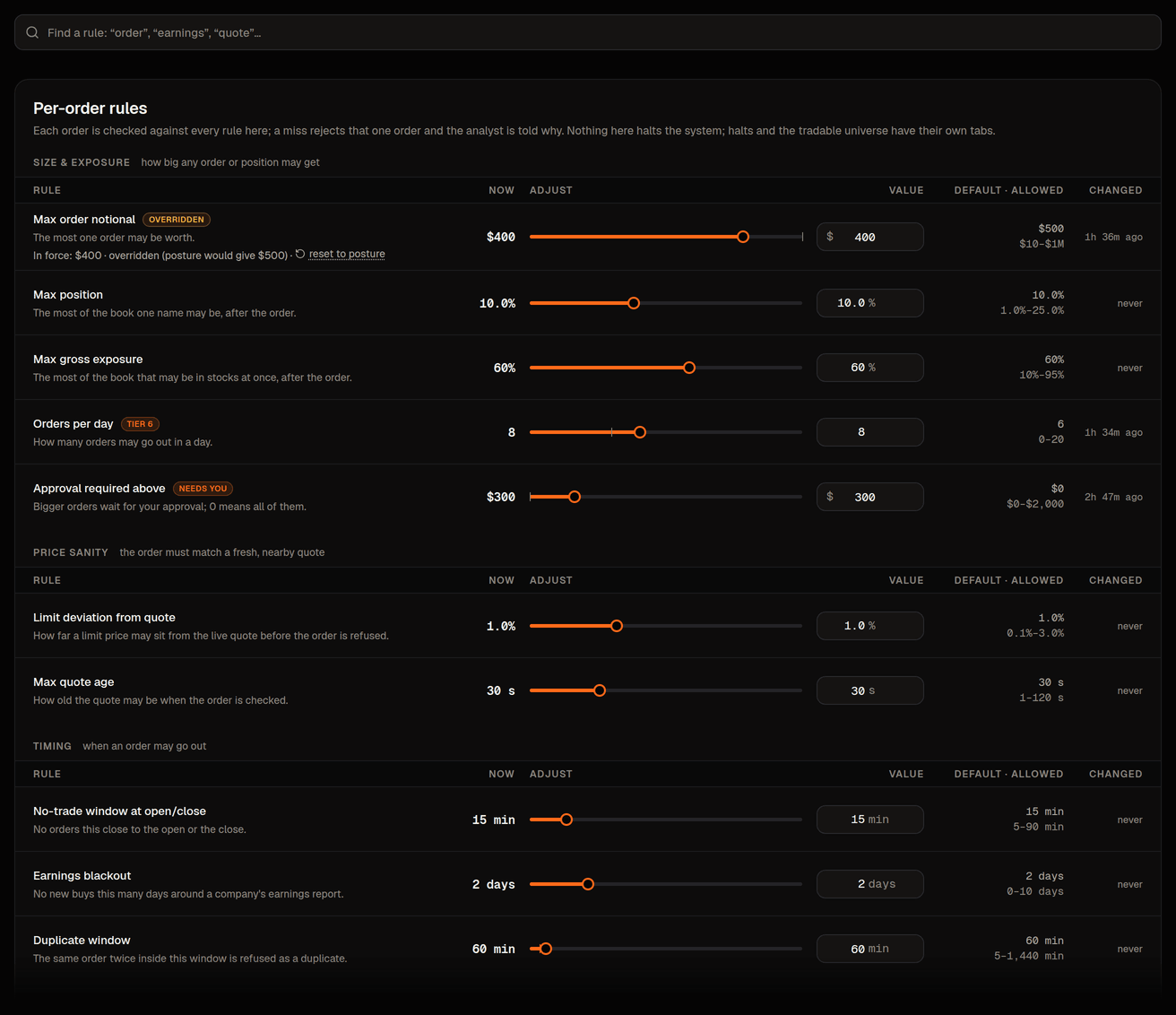
MAX_ORDER_NOTIONAL_USD
- Default
- $500
- What it means
- The most one buy order may be worth. It grows with the account: your posture sets it as a share of equity (Conservative 3%, Moderate 5%, Aggressive 10%) but never below the posture's dollar floor ($250 / $500 / $1,000); on a book too small for that floor the account-size band trims it to 40% of equity and the row says so (see below). A sell of shares you hold is never held back by it. The stop on Halts grows the same way (Conservative 0.75%, Moderate 1.5%, Aggressive 3%, never below $75 / $150 / $300, trimmed to 10% of equity on a very small book).
MAX_POSITION_PCT
- Default
- 10%
- What it means
- The most of the book one name may be, after the order (1–100%; anything above your posture's number needs your code and the words MORE RISK).
MAX_GROSS_EXPOSURE_PCT
- Default
- 60%
- What it means
- The most of the book in stocks at once (10–100% of equity; up to 200% only on an account with margin).
MAX_DAILY_TURNOVER_PCT
- Default
- 75%
- What it means
- The turnover budget: how much of the book may change hands in one session, buys and sells together, as a share of equity (Preservation 25%, Conservative 50%, Moderate 75%, Aggressive 100%, Speculative 200%; you may type 10–400%). A buy that would pass it is refused, or trimmed to the room left when clamping is on; a sell never is. This, not a count, is what paces the desk. See order pacing.
MAX_ORDERS_PER_DAY
- Default
- 200
- What it means
- The runaway ceiling on order decisions a day: a safety rail set where no normal day reaches it (200 on every posture, the most the code allows), beside a second ceiling of 36 decisions in any rolling hour fixed in code. A corrected resubmit or a re-priced protective exit the same decision, and a protective stop resting at the broker is not a decision at all. Either ceiling only ever refuses the next buy; a sell still goes out. Type a lower number if you want a hard daily count; it is enforced as typed.
MAX_LIMIT_DEVIATION_PCT
- Default
- 1%
- What it means
- How far a limit price may sit from the live quote (0.1–3%).
MAX_QUOTE_AGE_S
- Default
- 30 s
- What it means
- How old the quote may be when the order is checked (1–120 s).
NO_TRADE_MINUTES
- Default
- 15 min
- What it means
- No orders this close to the open or the close (5–90 min). The Executor's own stop and target exits use a 1-minute window instead, so a stop hit at 08:31 or 14:50 CT still exits.
EARNINGS_BLACKOUT_DAYS
- Default
- 2 days
- What it means
- No new buys this close to an earnings report (0–10 days).
DUP_WINDOW_MIN
- Default
- 60 min
- What it means
- A second buy of the same symbol inside this window is refused (5–1,440 min). Sells of a held position are never treated as duplicates.
A posture· Strategy › Profile › Posture (Conservative, Moderate or Aggressive) sets seven headline limits at once: the largest single order, the largest holding, the most that may be invested, the most that may change hands a day (the turnover budget), the daily order ceiling, and the two stops (the daily loss stop and the fall-from-peak stop). They carry the same names here, in the posture preview on Strategy and in the ceremony that applies a posture. Conservative is $250 / 5% / 40% / 50% / $75 / 5%; Aggressive is $1,000 / 20% / 90% / 100% / $300 / 15%; the daily order ceiling is 200 on every posture. Edit any one of them afterwards and the posture reads, for example, Moderate, 1 limit changed by hand on every (see profile); applying Moderate again puts it back. A looser posture is a loosening like any other.
The largest single order grows with the account
The order-size limit is one of two numbers in that list that are worked out rather than fixed (the other is the daily loss stop, below). The Max order row on Limits shows the value the Executor enforces right now and where it comes from, in one sentence, for example "$10,000 · from posture (10% of $100,000)" on a $100,000 Aggressive book, "$500 · from posture (5% of $6,000 is under the floor)" on a small Moderate book, or "In force $360 · Held lower while the account is small. Your posture alone would set $500" when the account is too small for the posture's floor. The rule:
- your posture's share of equity: Conservative 3%, Moderate 5%, Aggressive 10% (Preservation 2%);
- never less than the posture's dollar floor ($250 / $500 / $1,000; Preservation $150), so a small account is never held tighter than before;
- never more than the account-size ceiling: under $250,000 of equity that ceiling is 40% of equity (well above the share any of these four postures sets, so a number that follows your posture is never cut above its floor; only a floor bigger than 40% of a very small book is trimmed, and the row then says it is held lower while the account is small); from $250k to $1m it is $100,000 an order, from $1m to $10m $500,000, and above $10m 2% of equity (at least $500,000) up to $1 million an order, where the platform's per-order ceiling stops: a very large book trades in more, smaller orders relative to its size;
- before the account has reported any equity, the floor applies (and the band's old dollar value stands in for the ceiling).
Speculative is the exception, on purpose. Its owner said they can lose the whole book, so its largest order is simply the book's value ("From your posture, 100% of $10,413"), with no dollar floor and no account-size ceiling, whatever the book's size. The platform's own ceiling of $1 million an order still stands. Type a lower number and that number is enforced as typed. One amount is refused on each row ($4,000 here, $1,000 on the daily loss stop): it is what this posture stores to mean follow the posture, so the row asks for another amount, for example $3,990. Reset to posture follows the posture again.
If you type your own number into the row it becomes your own value: the row says "In force $400 · You set this yourself", the Executor uses your number as typed, and under the field it says "Your Moderate posture would set $500" with a Reset link that puts the worked-out value back, through the same review-and-save as any other change, so if going back to the posture value raises the limit it asks for your like any loosening. Strategy › Profile repeats the same sentence next to the starter size. Nothing else about sizing changed: position and exposure limits, the , the and every Executor check apply exactly as before.
The daily loss stop grows with the account too
The daily loss stop follows the same pattern, so a larger account is not stopped out by a move that is small for its size and a small account keeps exactly the protection it had:
- your posture's share of equity: Preservation 0.5%, Conservative 0.75%, Moderate 1.5%, Aggressive 3% (roughly a 2.5–5% down day in the market at the amount each posture keeps invested);
- never less than the posture's dollar floor ($50 / $75 / $150 / $300), so a $10,000 account halts at exactly the same number as before;
- never more than the account-size ceiling, which for the loss stop stays in dollars per band: $50 under $2,000, $150 under $10,000, $750 under $25,000, $1,500 under $50,000, $7,500 under $250,000, $30,000 to $1m and $100,000 at $1m and above (3% of equity above $10m). Where the band holds your posture's stop lower (a $1,500 Aggressive book's $300 stop is held at $50) the row says it is held lower while the account is small and what the posture alone would set;
- always inside the drawdown halt (3 / 5 / 8 / 15%), which remains the multi-day stop.
A $100,000 Moderate book therefore reads "Stops trading after losing $1,500 today", with "In force $1,500" and "1.5% of your $100,000 book" under it, on Halts; typing your own number makes it an override with a Reset link, exactly like the order cap.
The two halt rules
On Halts the two rules read as sentences with the number inline:
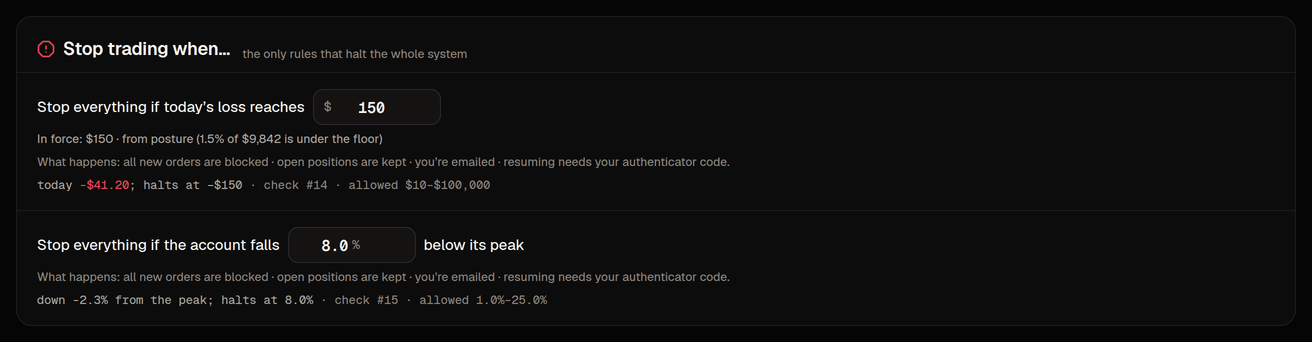
- Stops trading after losing $150 today (
MAX_DAILY_LOSS_USD; worked out from your posture and equity as above, shown with an "In force …" line; you may type an override), with where the day stands beside it ("Now: $0 of $150 lost today"). - Stops trading if the account falls 8% below its peak (
MAX_DRAWDOWN_PCT, measured from the high-water mark, allowed 1–100%; loosening it needs your code and MORE RISK), with "Now: 1.5% below its peak".
On a Speculative book the two stops do not protect the book. Its daily loss stop is the book's whole value and its drawdown brake is 100% from the peak, with no account-size ceiling. A brake at 100% can never be reached, and a daily stop the size of the book only ends a day that has already lost about half of it, because the stop follows the book's value down. Both rows say so in words. For a real stop, type one. Any drawdown number under 100% is a real brake, in one click. On the daily loss stop only a number under about half the book ends a day earlier than the posture does ($5,206 on a $10,413 book, shown on the row). A larger number ends the day later, so it counts as loosening and asks for your code and the words MORE RISK.
When either trips the Executor halts itself and the book becomes reduce-only: new buys are blocked, buy orders still resting at the broker are cancelled, open positions are kept, and sells, including the Executor's own stop and target exits, still go out (the two halt checks pass a sell with a note, since the halt is already on record). A critical alert is raised (and posted to Slack if a webhook is configured), and resuming needs your authenticator code; see the kill switch. Change the numbers on the daily loss and drawdown halts· Risk › Halts.
How protective stops are checked
The Protective stops card on the Halts tab says, in one sentence, how every position's protective stop is judged, and carries the one control that changes it.
- Checked on the closing price (the default on a ). A position whose day closes at or under its stop is sold at the next open. A dip through the stop during the day that recovers by the close sells nothing. During the day only a wide disaster stop can sell the position: a stop order that rests at your broker about four typical daily moves under the entry price (the card's sentence names the exact multiple) and works even when Bellwether is offline. One limit to know: that order carries a floor 2% under its trigger, so if the price opens far below it while Bellwether is offline it may not sell until Bellwether is back and sells it itself. When the desk raises a position's stop, the disaster stop follows it up by the same distance, and it never moves down: a position whose stop had already been raised when the book switched keeps the same distance between the two. Our research on the desk's own entries found that the old stop, resting all day at 2.5 daily moves, cost return because it sold dips that had recovered by the close. Two cautions travel with that finding: the most recent decade alone only just cleared zero, and 2026 so far went the other way. That is why it starts on paper books only and stays one step from going back.
- Resting all day. Every stop rests at your broker during the day and sells on the first confirmed touch, as stops worked before. A real-money book always uses this. A trailing stop keeps resting all day on either setting, because following the price during the day is what it is for.
Go back to stops that rest all day is one confirmation. Check stops on the closing price leaves a wider stop during the day, so it asks for your authenticator code, like every loosening on this page. Either way the Executor switches every open position within seconds, each open position keeps a broker-side stop the whole time, and going back returns each stop to exactly the level it had. Each change is one card in the list of changes under Strategy › What runs, and a card that goes back names the change it undid.
The tradable universe
There is no fixed list of allowed stocks. Any US exchange-listed stock, ADR or ETF may be proposed; the Executor screens every order against the tradability thresholds· Risk › Tradable universe on the Universe tab:
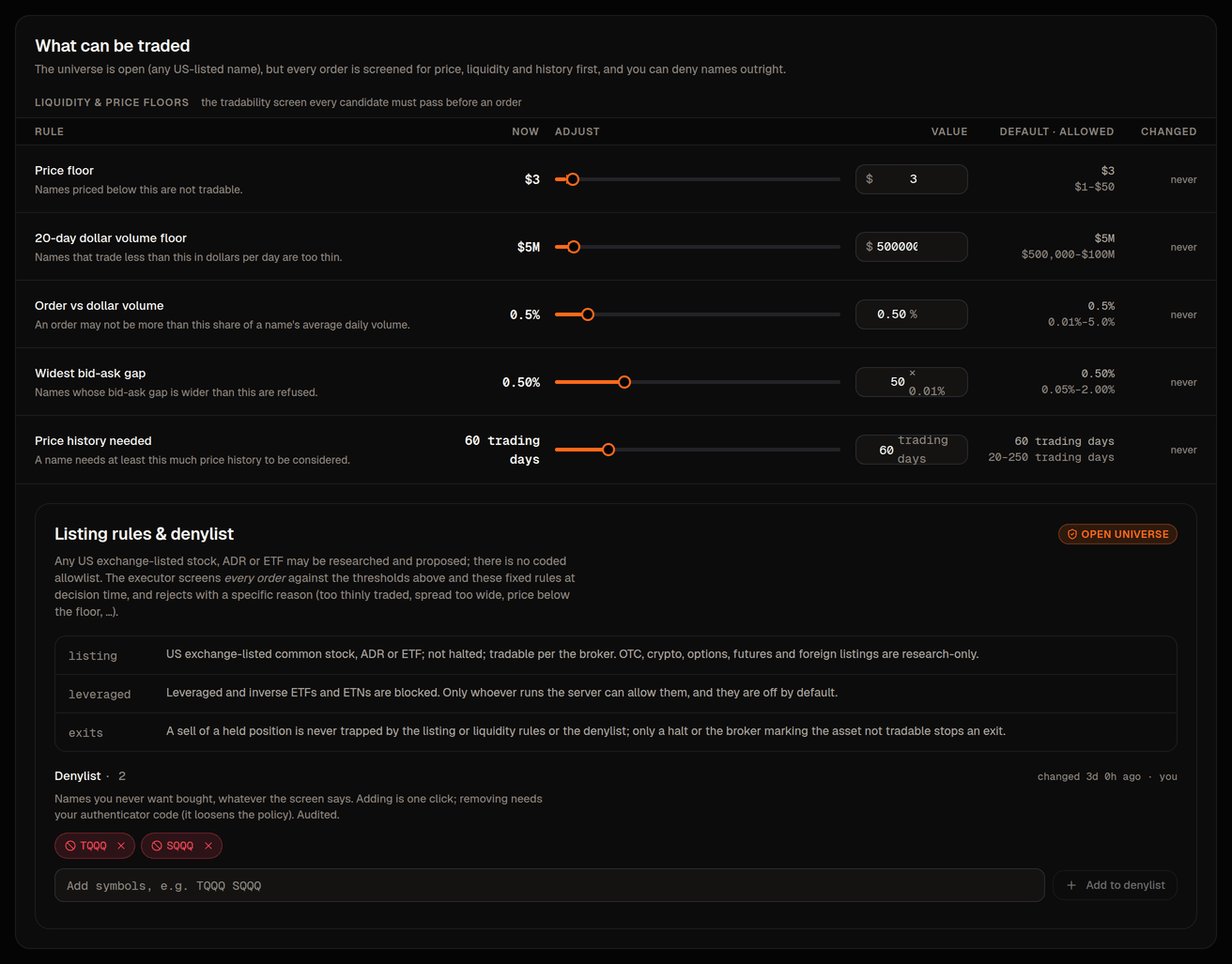
- price at least $3 (
MIN_PRICE_USD, allowed $1–$50) - 20-day average dollar volume at least $5 million (
MIN_ADV20_USD, allowed from $500,000 up; larger books raise it automatically) - the order at most 0.5% of that volume (
MAX_ORDER_ADV_PCT, allowed 0.01–5%) - quoted spread no wider than 0.50% of the price (
MAX_SPREAD_BPS, 50 basis points; allowed 0.05–2.00%, and the field is typed as a percentage) - at least 60 clean daily bars of history (
MIN_DAILY_BARS, allowed 20–200)
The fixed rules below them are not editable: OTC, crypto, options, futures and foreign listings are research-only; a name the exchange has halted or the broker marks not tradable is refused; leveraged and inverse ETFs are blocked unless the deployment sets ALLOW_LEVERAGED_ETFS; a symbol with no profile is refused (profile_unavailable) rather than waved through. A rejection names the sub-check that failed (illiquid_adv, spread_too_wide, denylisted and so on). A sell of a held position is never trapped by the listing or liquidity rules or the ; only a halt or the broker marking the asset not tradable stops an exit.
The never-trade list· Risk › Tradable universe › denylist (the denylist) is names the Executor must never buy, whatever the screen says. Type one or more tickers and add them; no code is asked for, the change is audited, and the Executor rejects buys of those names from its next loop.
WarningRemoving a name from the denylist is a loosening. A dialog shows the before and after and asks for your authenticator code.
Tighten freely, loosen deliberately
Edits on any tab collect in a sticky "Review N changes" bar. Making rules stricter saves with one click and takes effect within seconds. If any change makes a rule looser, the review dialog warns in red, shows each change as the rule's name with its old and new value (the setting key and the number of the check that enforces it sit behind a small Details disclosure), notes each against its default and allowed range, asks you to type MORE RISK, then asks for your authenticator code (a code entered in the last 30 minutes still counts). The server checks the code and the phrase itself; a loosening sent without the code is refused. Every change is recorded in the audit log.
Every limit has a floor and a ceiling in code. The console cannot set a value outside them, the API refuses one, and a stored value that is somehow outside them is ignored in favour of the code default. A deployment can pin a limit tighter than its default: that row says so in its "In force" line ("Pinned tighter than your stored value by the platform’s own settings"), you can tighten it further, and it cannot be loosened from the console at all. A deployment that starts with a limit looser than the code default refuses to start unless the operator explicitly allows it at deploy time.
Every save (tighten, loosen, posture, denylist) writes an audit row under Activity › Config changes; the Audit log link in the Risk header goes there too.