Notifications
What Bellwether tells you about (orders that need you, fills, halts, briefs, the day report, sign-ins), by email, phone notification or text, with quiet hours, a daily digest, scheduled report emails and a list of recent deliveries, and why nothing is ever approved from a notification.
- Who it is for
- Owners & operators
- Reading time
- 8 min read
- Updated
Bellwether tells you when an order needs you, what became of it, and when something about your money or your account changed; the rest waits in the console. A notification only ever points you at a . Approving, resuming or loosening happens in the console, signed in, and often after a fresh .
What it can tell you about
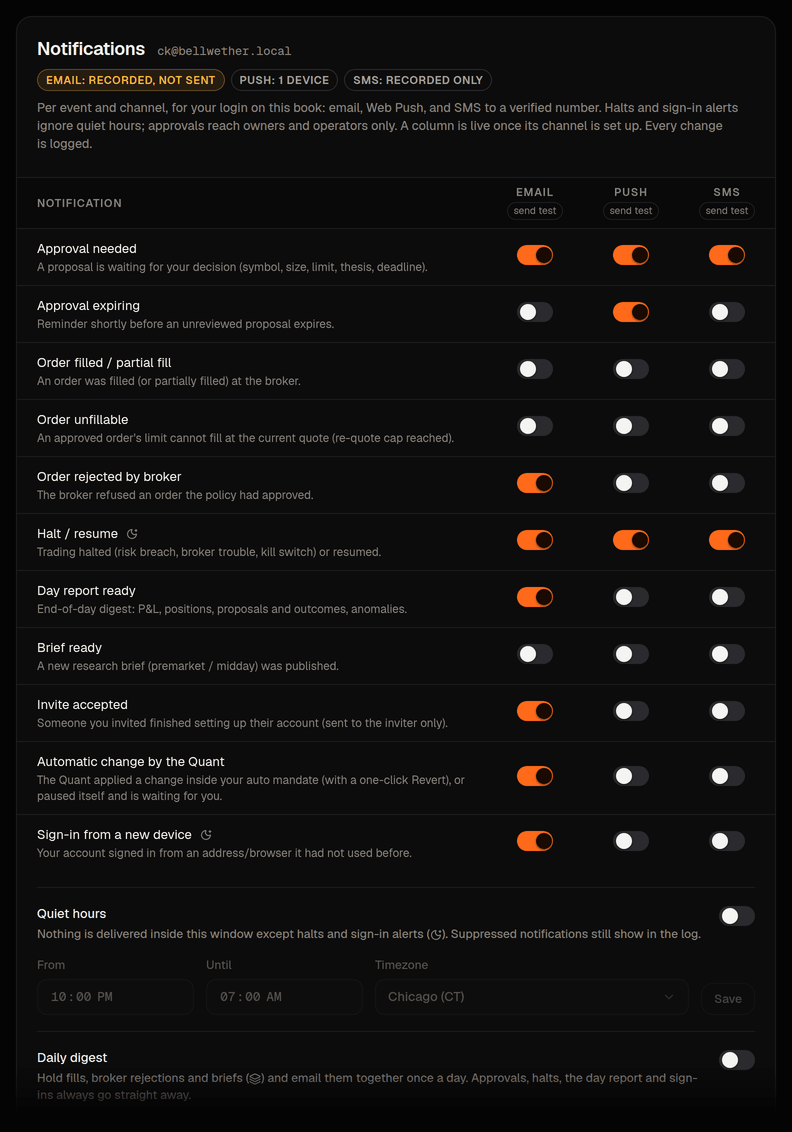
Every notification is about one book and reaches only the people who sign in to that book. Each alert has a default. You change yours on Settings › Notifications, in the Alerts panel. It has one row per alert, named in plain words, and one switch per channel that is set up. A switch saves as soon as you flip it.
An order needs your OK
- Sent when
- A above your line starts waiting for you; the message carries symbol, size, limit, the , the deadline and the most a buy will pay after the re-quote
- On by default (email)
- yes, owner and operator
- Opens
- Inbox
An order is about to expire
- Sent when
- Shortly before an unreviewed card runs out (15 minutes before, or half its window if that is shorter)
- On by default (email)
- no
- Opens
- Inbox
An order was filled
- Sent when
- The broker filled an order, fully or partly
- On by default (email)
- no; can go into the daily digest
- Opens
- Activity
An order could not be filled
- Sent when
- You approved, but the fresh quote was already past the cap, so nothing was placed
- On by default (email)
- yes
- Opens
- Inbox
Your broker refused an order
- Sent when
- The broker refused an order the policy had passed
- On by default (email)
- no; can go into the daily digest
- Opens
- Activity
Trading stopped or started again
- Sent when
- Trading was (a risk rule, broker trouble, the kill switch) or resumed
- On by default (email)
- yes, and it ignores quiet hours
- Opens
- Risk
The is ready
- Sent when
- The end-of-day report is written
- On by default (email)
- no
- Opens
- Overview, the day in words
A is ready
- Sent when
- The Researcher published a premarket or midday brief
- On by default (email)
- no; can go into the daily digest
- Opens
- Research
Someone you invited joined
- Sent when
- Someone you invited finished setting up; sent to the inviter only
- On by default (email)
- yes
- Opens
- Settings
The desk tuned its own settings
- Sent when
- The desk changed a setting within what you allowed, or paused itself and is waiting for you; you can undo it
- On by default (email)
- yes, owner and operator; can go into the daily digest
A sign-in from a new device
- Sent when
- Your account signed in from an address and browser it had never used
- On by default (email)
- yes, for every role, and it ignores quiet hours
- Opens
- Settings
A few rarer alerts sit in the same list (a new book's first plan, the desk pausing because the day's model budget is spent). Alerts that ignore quiet hours wear an Ignores quiet hours tag. Two alerts say what silence costs: switch "Trading stopped or started again" or "An order needs your OK" off on every channel you have set up and the row tells you what you will no longer hear. With the daily digest on, the alerts it holds wear In the daily digest.
The alerts about orders that wait for you only ever go to people who can act on them (owners and operators), whatever a viewer's switches say. Things about the platform rather than your book (a failed session, the model budget, a finding) are not notifications. They are alerts under Activity › Alerts, and on a deployment with a Slack webhook the operator's channel gets a line for each.
Three channels
Beside the alerts, the panel Where alerts go lists the three channels. Each has a state word, one sentence and the action that is possible.
- Email always has a column. Its state reads On when this server sends mail and Saved, not sent while email is off on this server. In that case every message is saved instead of sent, which is how invites and password resets work before a mail service is set up. Send a test email sends one message so you can see the path work before it matters. While email is off the owner also gets a link, "See the saved emails", to the Mail log on Admin › People, where each saved invite or reset shows its link with Copy link. The owner's mail log is not on this tab any more. A broken mail service never stops trading. The message stays queued, is retried with a back-off (30 seconds up to 2 hours) and is then marked Not delivered.
- This phone or browser is per device. Press Notify this device. The browser asks for permission, the device appears in the list with when it was last reached, and Remove takes it off again. Send a test appears once a device is listed. On an iPhone add Bellwether to your Home Screen first (Share, then Add to Home Screen) and switch it on from that app. Android and desktop browsers ask directly. If this server cannot send to devices yet, the row says so in one sentence and offers no button. A notification only opens the console. Nothing can be approved from one, by design.
- Text messages are offered only when this server can send texts. A confirmed number on a server that only saves texts reads Saved, not sent, like Email, never On. Enter your mobile number with its country code, press Text me a code, type the 6 digits and press Confirm number. A text is one short line (the symbol, the size, the price and a link), never a thesis, an address or a secret. At most 20 texts an hour, and replying STOP ends them until you confirm a number again. On a server that cannot send texts the row reads "Text messages are not switched on for this server yet." and asks for nothing.
A channel gets a column in the Alerts panel only once it exists (a device you switched on, a number you confirmed). Email always has one. Device notifications and texts are off for every alert until you switch them on.
Quiet hours and the daily digest
The panel Quiet hours and digest holds both. Times are typed on a 24-hour clock, such as 22:00. A Save button appears only when something changed, with Undo beside it.
Quiet hours are a local window in your own time zone (it may wrap midnight). Inside it, notifications are held back for good, not delivered late. A ten-minute approval is worthless at 07:00, and Recent deliveries still shows what was skipped and why. Halts and new-device sign-ins ignore quiet hours.
The daily digest collects the alerts that can wait (fills, broker refusals, briefs) into one email at the local time you pick instead of one mail each. Everything else is still sent as it happens.
Scheduled reports
The panel Scheduled reports is on the same tab now. The weekly letter goes out on Fridays at 16:30 CT, after the market closes, and the monthly statement on the 1st of each month at 07:00 CT. The field for who gets them (up to ten addresses) appears once a report is on. Adding an address asks for your authenticator code, because it widens who sees the book's numbers. Save appears when something changed. Scheduled reports used to have a Settings tab of their own. That tab is gone, and its old link and Scheduled reports both open this panel.
Recent deliveries
The panel Recent deliveries lists what was sent to you, five at a time ("Showing 5 of 7 messages", then "Show 2 more"). Each row says one word for what happened, on which channel and when: Sent, Not sent (it arrived inside your quiet hours), In the digest (it goes out with your daily digest), Skipped (a copy of a message just sent), Not delivered or Waiting to send. While email or text messages are not switched on yet, a row on that channel reads Saved, not sent, never Sent. A row that did not reach you adds one sentence why, such as "It arrived inside your quiet hours, so it was not sent.", "The same message had just been sent, so this copy was skipped." or "The mail service was down. Tried 5 times." The list is the record. A phone that never buzzed is a row here with a reason.
The approval email in detail
When the moves a proposal to awaiting approval, the owner and operator accounts of that book get one mail each (subject: the order in a line plus how long it stays valid; body: the thesis, the valid-until time and the cap the re-quote will honour). When the deployment knows its own public address the mail carries an Open the Inbox link; it never carries an Approve button. A card that is still unsent 45 minutes later is not mailed at all: it would arrive stale. If the price has moved past the cap by the time you approve, An order could not be filled follows and the PM re-proposes on its next session if the thesis still holds.
Where to change each
- Which alerts reach you on which channel, quiet hours, the digest time, the scheduled reports, your phone number and your devices are all on Settings › Notifications (the older notifications link still lands there). It is per person and per book, and nobody else's switches change what you get.
- Whether this server sends email, device notifications and texts at all is set up once by whoever runs it. Each channel's state word under Where alerts go says whether it is on.
- Slack is the deployment's operator webhook for platform alerts, not a personal channel, and it has no console switch.
- You cannot silence a halt or a new-device sign-in, and you cannot approve, resume or loosen anything from a message.