The day report and feedback
The day report is a deterministic digest of the trading day, profit net of AI cost included; Overview says it in words, the full log sits under that day's sessions, and the Report button is how you say something is off.
- Who it is for
- Everyone on the book
- Reading time
- 7 min read
- Updated
Three things used to share one and now each lives where you already look: the 's read-out is a block on Overview, the Advisor's suggestions about your settings are in the Inbox with everything else the desk suggests, and the feedback log that the writes to is a tab in the Inbox. None of them changes anything on its own. Old links to the screen that held them forward to the right place.
The day report
At 15:45 CT (12:45 on early-close days) the scheduler writes a report on the day, one row per date. It is a deterministic read of what the PM, the , the , the and the scheduler already recorded. No model writes it, so it costs nothing and is reproducible. Re-running a date replaces the row; if the build fails, a warning lands on Activity › Alerts instead of a report.
The day in words
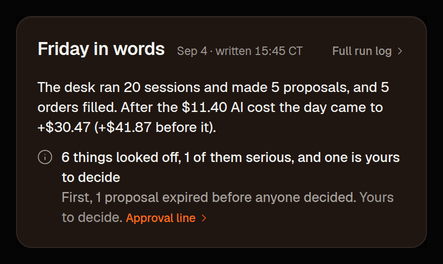
Overview carries the newest report as a few sentences in its side column, between Alerts and the Advisor. The heading names the day the words are about: Today in words once today's report is written, otherwise the last trading day (Yesterday in words, Friday in words on a Monday morning or over a weekend), with the date and the time it was written beside it.
- What ran and what the desk decided: how many sessions, how many , how many orders filled.
- How the day came out after the AI cost: the day's result net of what the models cost, with the result before that cost in brackets. Net is the number that matters; a strategy that earns less than it spends on thinking is not a strategy.
- Anything that looked off, in one line: how many things, how many of them serious, whether any of them are yours to decide, then the first one to read in plain words, who handles it, and a link to where it is handled. A clean day says "Nothing looked off" once and nothing more.
- Full run log opens the day's log, below.
What can look off, in plain terms:
- Serious: a today, a still unacknowledged after sessions ran, or a session whose output could not be read. Look the same day.
- Warning: a timed-out or errored session, a scheduled run that was skipped or failed to launch, a successful session that left no handoff, a Critic finding ignored by two or more sessions, three or more rejections on the same check, three or more failed data lookups, fills that landed well away from the decision price, sessions re-reading material they had already seen, AI spend at 80% or more of the daily budget, sign-in lockouts, or the end-of-day book not written.
- Note: expired proposals, a trading day with no proposals at all, AI cost above $2 per fill, or spend without any decision. Worth knowing; rarely urgent.
Each of these also raised an alert when it happened, so the Alerts list stays the full record; the line on Overview names only the first thing to read.
The full run log

The report's long form sits on Desk: pick the day on the day strip and the Full run log is folded under that day's sessions. It is the engineering view, identifiers as written:
- Header: trading day or holiday, broker and environment, the , and in force, whether trading was halted and why, and the models used.
- : everything that looked off, each with its severity.
- Runs: every session that ran, its model, whether it finished cleanly, turns, cost and duration; plus any scheduled run that was skipped, timed out or failed to launch, with the reason.
- Cost: spend by role for the day and the month so far, tokens, and how much of the reading was served from the prompt cache (higher is cheaper).
- Decisions: how many proposals and in which state, fills, how many expired, were deferred or are still waiting for you, how many you approved or rejected yourself, which check rejected the rest, and how far fills landed from the limit and from the quote at decision time (slippage).
- P&L: gross for the day, then net of AI cost, and the day's return.
- Critic: findings written today by severity and category, whether the PM answered, disagreed with or ignored them, and the Critic's track record against outcomes when there is one.
- Reactions and Research briefs, when there were any: event-driven sessions and what woke them; briefs and whether their calls were read.
- Guidance and Memory: notes still waiting for an ; handoffs, , and the PM wrote for itself.
- Alerts & errors: alerts by severity and kind, tool-call errors, denied tools, halts, sign-in lockouts, and the sessions that ended in error.
The Advisor
The Advisor's advice lives in the Inbox: the Advice panel on the Waiting tab, under the Quant's recommendations, shows the newest digest (one line and Show it while decisions wait above it), and Decided › Past advice keeps every day's. It is a second deterministic digest per day: suggestions about your settings computed from the last 10 trading days (a limit pinned tighter than the default that keeps blocking proposals, for example), each with its evidence and a link to the screen that owns the setting, prefilled. It sits in the Inbox, beside the Quant's recommendations, because both are things the desk suggests and you take or leave. It never applies anything. You decide on the owning screen. Overview shows the newest digest's top two lines with a link to the rest.
The Report button
The small flag in the top bar opens a short form; on a phone the same form opens from the More sheet (More › Send feedback), and the search dialog lists Send feedback as one of its three actions before you type. Pick a kind (Bug, Confusing, Wrong call, Idea or Other), write a sentence or two (up to 4,000 characters), choose a severity of Low, Med or High, and send. The screen you were on is attached automatically: the route, the selected session, proposal, symbol or day's run log, the if you were on one, and your viewport. The toast says "Logged, thanks".
Notenothing you write here reaches the PM. Reports go to a feedback log that is triaged the next morning.
Owners, operators and reviewers can send reports, and so can someone viewing your book through a read-only share (their row is tagged with the book they were viewing). A plain viewer account is read-only and cannot. Every help article also ends with Was this article helpful?; those thumbs land in the same log.
The feedback log
Inbox › Feedback shows everything sent from this book, newest first: who logged it and their role (), the kind, the severity, the time, the route they were on with the session, proposal, symbol, day or algorithm as clickable chips, and a status of new, triaged or done. Filter by status, or press From others to see only rows logged by other accounts. A badge on the tab counts new items. It is the Inbox's second tab because it is the other queue a person works through: what the desk asks of you on one tab, what you and your reviewers flagged on the other.
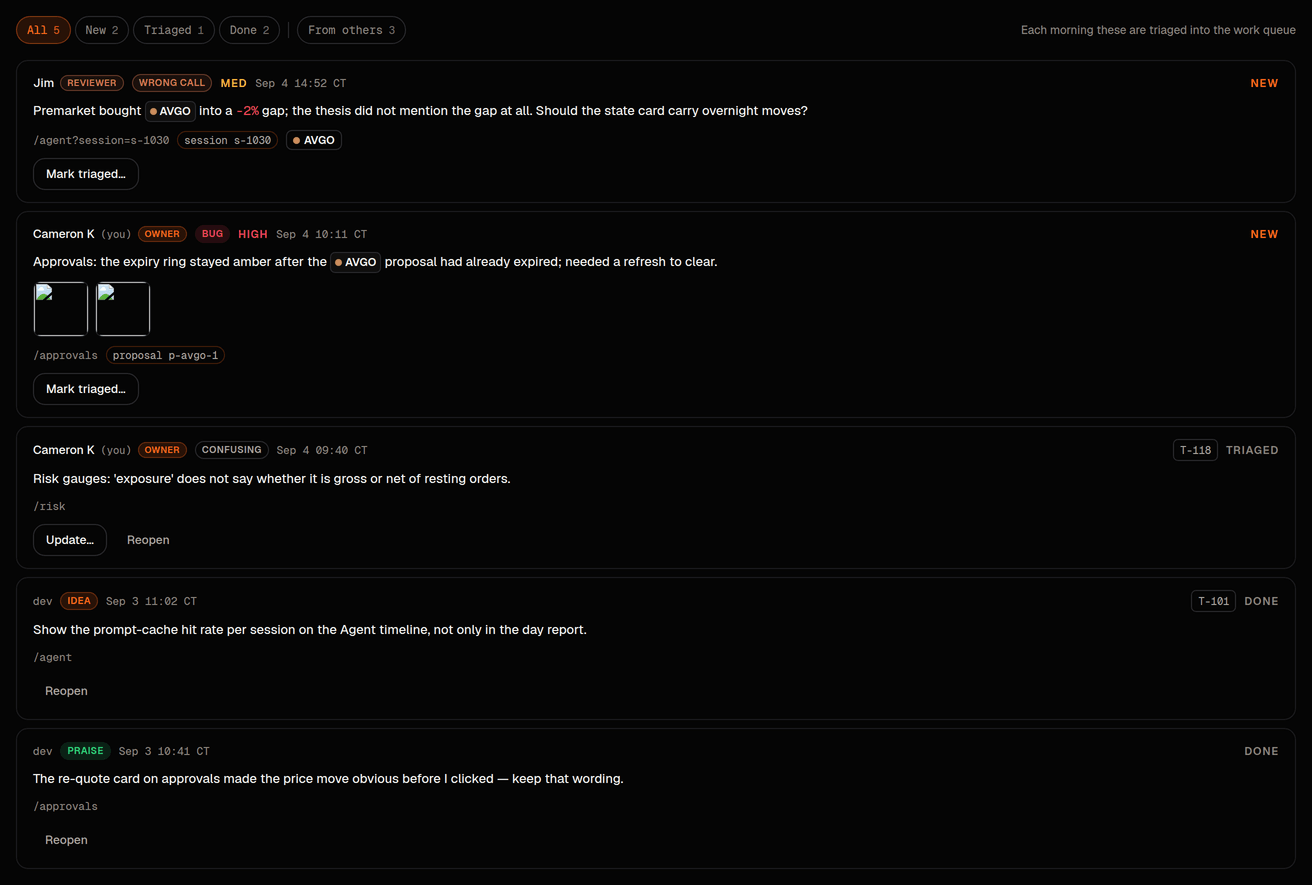
Owners and operators triage from here: Mark triaged… records the tracker reference it became, Done closes it, and Reopen sends either back to new. Each change is audited. Reviewers, viewers and visitors see the log but cannot triage.
How feedback reaches people, not the agent
There is no path from a feedback row to a guidance note, a lesson, a prompt or a memory file. The Bellwether team reads the log (the same rows print as proposed tracker items next to yesterday's anomalies and the Advisor digest), decides what to do with each (build it, change a rule or prompt, test it in the Lab first, or park it), and only then does anything enter the tracker, with the row linked as provenance. A reviewer's "wrong call" is discussed, never ingested. If you want the PM to behave differently today, that is what a note on Strategy › Guidance is for, and only an owner or operator can write there.