Multiple books
A book is one broker account with its own settings, agents, memory and history; how to run a second book of your own, compare two, what the owner can do across books, and the isolation promise behind it.
- Who it is for
- Owners & operators
- Reading time
- 15 min read
- Updated
A book is one broker account and everything that belongs to it: its limits and , its and notes, its agents' memory and transcripts, its , orders, P&L and audit trail. Every login has one home book, the one it signed up with, and may also run further books of its own beside it or be let into someone else's. A new book is always seeded the same safe way (trading off, every proposal needing approval, moderate limits and a starter ), and nothing trades and no sessions run for it until someone walks through Connect your broker with that book's own Alpaca paper keys and the verifies them.
If you are the owner of the deployment, your home book is also the house book, and owners only ever live there.
How you reach a book
There are three ways a book can appear in your book switcher (top bar; it only shows once you can open more than one book, or can create one):
Home
- What you may do there
- Your login role in full
- Where it comes from
- The book you signed up into
A book you run (an owner or operator membership)
- What you may do there
- Act on it with that role, capped by your login role: an operator login holding an owner membership is an operator there, a read-only login never writes anywhere, and Admin never comes from a membership
- Where it comes from
- Creating a book of your own with Add a book… makes you its owner; someone else makes you an Operator of theirs from their People page (Admin › People, or Settings › People for an operator of their own book)
Shared with you, read only
- What you may do there
- Read, send feedback, ask in your own visitor threads; nothing that changes the book
- Where it comes from
- Read only given to you on the other book’s People page, or, for the house owner, any book
The switcher groups the first two under Your books and the third under Shared with you, marked read only (a lock and the owner's initial). Every row shows that book's latest equity, today's move, its posture (Moderate, Aggressive…) and a PAPER or LIVE badge (or "no broker" for a book that is not connected yet), each read from that book alone. Picking a book reloads the console so nothing cached from one book lingers under another, and the choice is remembered on this device until you switch again. Under Compare with… each other book opens Compare books for the book you are in against that one. The account menu reports the role you effectively hold on the book you are looking at, so a control the server would refuse is never drawn as if it worked. See sharing and viewers for what a visitor sees.
Adding a book
One of your own
Open the book switcher and choose Add a book… (also in ⌘K). The sheet asks for a name (up to 80 characters) and a starting point:
- Start from Bellwether defaults: Moderate posture, Manual (every order waits for you), the standard watchlist.
- Copy settings from ‹a book you run› (shown with that book's posture and equity): copies risk limits (clamped into the code bounds), posture, the , the weights, cadence and models, the focus list, the active playbook note and your standing guidance (as fresh notes of the new book). Autonomy is never higher than the source: Full autonomy becomes Semi-automatic with the automatic , Semi keeps its pinned line, Manual stays Manual. Any reason is cleared. It never copies keys or connections, proposals, orders, positions, P&L, sessions, transcripts, memory, time-boxed guidance notes or hard rules (the sheet's result says how many hard rules to re-add by hand), Consult threads, alerts, audit or research pins. Only books you act on are offered as a source; a book you merely view (a share, or the house owner's admin look) cannot be copied, and the server answers as if it did not exist.
Create and connect makes the book with you as its owner, writes one audit row in the book you were in and the seed or copy rows in the new one, switches the console to it and lands on Connect your broker: the new book needs its own key pair. Alpaca lets one login hold several paper accounts: in the Paper dashboard, open the account menu and choose Open new , then generate that account's keys and paste them. The book starts trading as soon as its paper account verifies (the trading switch turns itself on for a book nobody has touched); halt it from Risk if you want it parked first. Creating a book is refused while you are looking at a book read-only, and a login may run at most 12 books besides its home one (a book you retire frees its slot). The Executor picks a newly verified book up within about 30 seconds and the Scheduler it into the day's plan within 5 minutes, both without a restart; slots that had already passed are skipped, never run late.
For someone else
A book for another person is created by inviting them; there is no empty book without an operator, and no "New book" button on Admin. Only the owner of the house book can do it:
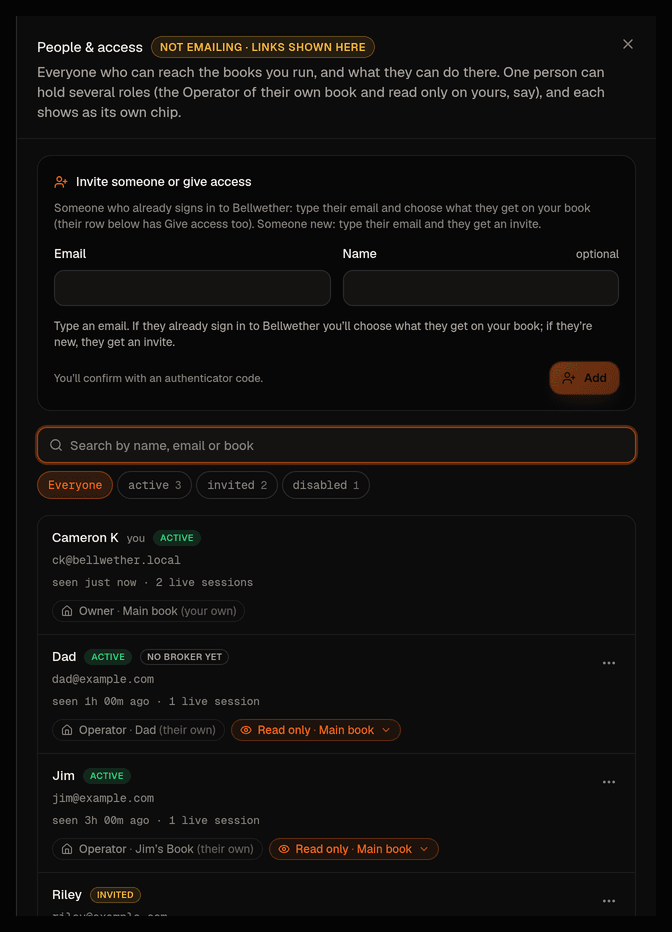
- Open Admin › People and type their email and name under Add someone.
- Under "What they get" keep Their own book (the default), a separate book they run themselves. If they should also see one of yours, choose One of my books, pick the book, and keep Read only, plus a book of their own. Give their book a name if you like; left empty it becomes "‹Name›'s book".
- Press Send invite and confirm with your (one entered in the last 30 minutes counts). The answer shows the one-time setup link, valid for 30 minutes, emails it when email is switched on, and keeps it under the person's row with Copy link and Send a fresh link until they use it.
The invitee is that book's Operator. When they finish setup the console sends them straight to Connect your broker. An operator of an ordinary book cannot invite people, and the server refuses the attempt, not only the form.
Renaming, marking or archiving a book
At the bottom of the book switcher, Manage books… (or Book settings… when you act on one book) opens a list of the books you act on; a row opens that book's settings. Owners and operators of a book can change three things there, none of which needs a code and all of which are written to that book's audit log:
- Mark: one emoji shown before the name in the switcher, the Manage books list and the sheet title, so two books are told apart at a glance. Pick one of the suggestions or type your own; letters and digits are refused ("One emoji, or leave it empty.").
- Name: the same name everywhere the book is named (menu, Compare, reports, Admin). Renaming changes nothing else about the book.
- Description: one or two sentences about what the book is for; shown under the name in the Manage books list and in Settings.
The same sheet opens from Edit book on Settings › Book, and from a search for "manage books" or "rename book". A People with access row leads to the People page. A book you only look at never appears in the list: its owner changes it.
An owner can also archive a book they own that is neither the house book nor the book their login lives on. Archiving is a ceremony like the other dangerous actions: the dialog says what happens, you type ARCHIVE, then confirm with a code from your . An archived book leaves the book switcher, the compare pickers and the People placement lists for everyone, and its trading switch is turned off in the same step; the Executor and the scheduler skip it from then on, so an archived book gets no desk sessions, no Consult turns, no reports and no reminders until it is restored. Nothing is deleted: positions history, reports and the audit trail stay, Admin › Books still lists it with an archived stamp, and its owner brings it back from the Archived list at the bottom of Manage books (a code; it comes back paused). The sheet says up front when archiving is not possible and why: "The house book is where the service itself runs, so it can't be archived." · "This is the book your login lives on, so it can't be archived from here." · "Close its 3 open positions first (Portfolio), then archive." A book that other logins sign in to (people invited into it as their home) cannot be archived until they are disabled or moved. Operators never see the archive row.
Comparing two books
Compare books (from the switcher's Compare with…, or ⌘K → Compare books) puts two books you can open side by side over one range (1W to ALL) and changes nothing in either: both equity curves on the same axes (growth of 100 with deposits stripped out, or dollars), the headline numbers (return, max , Sharpe with a note when the sample is under 60 days because a short Sharpe is mostly noise, trades and orders, AI cost) and how the two are set up differently, written as sentences the code derives from the settings themselves: "Aggressive vs Moderate: the $100k book makes larger first buys (risks 0.75% of the book per idea vs 0.5%), works toward 70 to 90% invested vs 40 to 60%, orders up to $1,000 vs $500…", whether one sends orders on its own while the other asks you, which algorithms only one of them uses or leans on, which names only one of them watches, and how many standing guidance notes each carries. Pick or swap the books at the top; on a phone everything stacks. Performance › Compare books keeps the deeper view: the full metrics table and each book's same-day trading sessions with their proposals, slot by slot. Both read each book in its own scope: a book you cannot open is answered as unknown, whether or not it exists.
Paper or live comes from the connection, not a switch
No lets you choose paper or live, not even on Connect your broker: the keys form has no account-type control, only a note that the environment is detected, not chosen. The Executor, the one process that talks to a broker, asks Alpaca which environment the pasted keys belong to when it verifies the connection (within about 30 seconds of saving): the paper endpoint first, the live endpoint only if paper says the keys are not its account, and an outage is never read as "live". Whatever authenticates becomes the connection's environment; the Connected step then shows Detected from your keys: PAPER account ••… · equity with a note that it was read from Alpaca by the trading service, not chosen here, and the Account type fact reads "Paper account, simulated cash".
One book, a paper account and a live account
A book is built to hold one paper and one live Alpaca account at the same time, with exactly one of them the account the book trades and the other its standby. When both exist, Connect your broker shows the pair: which account trades, which stands by, when each was last checked. Two moves exist and they are deliberately unequal. Switch to live is only ever done through Go live: a checklist the code verifies, a that names the money and a cooling-off period. Until that procedure opens, the panel says so in a sentence with a link to what checks; there is no switch, on this or any screen, that makes a live account the active one. Switch back to paper is allowed at any time: it asks for an authenticator code, the paper keys are checked again before anything trades, and the live account becomes the standby. The trading service only ever reads or trades the active account; a standby account is never probed or opened by it.
Other brokers
Connect your broker offers Alpaca, the one that connects today, and says in one line that more brokers come later; the names of the four that are drafted (Interactive Brokers, Charles Schwab, Tradier, Robinhood) are behind the underlined words. Each waits for its own reason: a gateway that has to stay signed in; no paper trading through the API, so it waits for go-live; a sandbox adapter without its connect flow yet; no official stock-trading API for individual accounts at all. A broker that is not ready cannot be picked.
Detection only ever labels; it never enables live trading. On this deployment the Executor runs paper, so a live account is recognised, stored as live, and refused: the book is parked (trading off, autonomy back to Manual, approval line 0), the connection shows an error, a critical environment-mismatch alert is written to the activity log, and the keys step explains that a LIVE account was detected and asks for the paper pair instead (Alpaca paper key IDs start with PK, live ones with AK). Nothing is placed with it. The probe repeats every time the Executor opens the book, so keys swapped under the same connection or a label edited by hand are caught the same way and the open is refused. Only a deployment whose Executor was started for live verifies a live account, and that is the paper vs live cut-over, not a console action. Once a book is running, risk check 1 still compares the book's environment with the connection on every order and halts on any disagreement rather than send it.
What exists today
- People and access. From Admin › People the house owner answers requests for access and invites a person into their own book (the default, above), or gives them access to one of yours in the same step (read only plus their own book, or a login that lives on your book as operator or read only); any owner or operator gives someone who already signs in Read only or Operator on a book they run, changes that role, or removes it (an operator of their own book does this on Settings › People). See people and access.
- Books of your own, cloning and compare, as described above.
- Read-only visitors. A login from another book that was given read only may read, send feedback and ask Consult in threads of their own, nothing else (sharing and viewers).
- The Admin screen. Admin is owner-only and lives on the house book (while viewing another book it says so and offers the way back). It wears the same tab bar as Settings, under its title, with the tabs Books, People, Usage, Audit, Health and Readiness. The Books tab lists every book with its status (halt state, autonomy and posture), connection, equity, today's P&L, positions, approvals waiting, last session, month-to-date AI cost and open alerts, and opens a detail drawer per book. It also carries the emergency levers: halt or resume one book, disable its trading, and HALT ALL / RESUME ALL across every book, which sit in a one-line kill switch strip in the title block on every tab. Each of these asks for an authenticator code from the last 5 minutes; resuming a book also asks you to type its name, and the global levers ask for the words HALT ALL or RESUME ALL. Halting one book or disabling its trading asks for the code only. Every lever writes one audit row and raises one alert per affected book. The owner's ordinary Halt on Risk still stops the house book in one click; the admin version is the same flag, with ceremony.
The Admin screen never shows a credential. Connections appear masked, exactly as Accounts shows them.
Coming soon
The go-live procedure that can make a live account the one a book trades; connect flows for the drafted brokers; a per-book role higher than your login role, groups of people with one role, and copying notification preferences when copying a book's settings. Everything else on this page is live.
The isolation promise
The operator's requirement is zero chance of one book's context reaching another's, and each guarantee is proven by a named test in the tenancy architecture doc. In plain words:
- No cross-book context ever reaches an agent. The PM, Consult and the read the , memory, transcripts and guidance of one book only. Their tools close over the book; there is no book parameter the model could pass. Search follows the same rule: ⌘K and Consult's search answer from the book you are in and the shared research corpus, never from another book's briefs, sessions, proposals or alerts.
- One model subprocess per book and session, with its own working directory and config directory. Sessions are never resumed or forked across books, and the only thing two books can share through the prompt cache is the static template text.
- The API decides who you are and what you may touch from your session, never from anything the page sends. The book switcher can only select a book you own, run or were granted; a shared book and the owner's Admin look are read-only whoever is looking; a membership gives you that book's controls and nothing of any other; every mutating route on a book you only view answers 403, and the console hides those controls before you get that far. A live screen re-checks its session and grant about every 30 seconds, so a revoked share stops updating without a reload.
- The server's own broker credentials belong to the house book only. Every other book trades through the keys its owner pasted on Connect your broker; the database refuses to point a second book at the house credentials, and the Executor refuses to open such a book if a row ever claimed them (that book gets a critical "Could not connect to your broker account" alert and stays parked while the house keeps trading).
- The Executor refuses to submit a proposal whose book does not match its connection, and raises a critical alert if it ever sees one.
- Alerts, audit rows, reports and sessions all carry the book they belong to, and the logs name it.
The one known residual: research items (news, filings, macro) are a shared public corpus, and their importance score is computed from the union of what every book holds or watches; likewise the bare existence of a symbol in search is global. A reader could at most infer that some book cares about a symbol. Nothing you type enters that corpus: the note on a pin and any free-text pin live on your book's own pin list, are read by your only, and never appear in another book's feed, briefs or state card. No text, notes, pins or agent output cross.