Autonomy levels
Manual, Semi and Full only move the approval threshold. No level skips a risk check, and Pause trading works the same in all of them.
- Who it is for
- Owners & operators
- Reading time
- 8 min read
- Updated
The lives in the Profile section at the top of Strategy (Strategy › Profile › Autonomy; the Risk and Inbox headers show the current setting as a chip that links there) and answers one question: how big does an order have to be before it waits for you? Under the hood it is one number, the approval threshold· Strategy › Profile › Autonomy (require_approval_over_usd, risk check 17, approval_threshold); the three levels are three settings of it.
The three levels
Manual
- Threshold
- $0: every order waits for you, whatever its size
- On screen
- "Manual: every order waits for you"
Semi
- Threshold
- X you choose: orders up to X go through on their own, bigger ones wait
- On screen
- "Semi-automatic: orders over X wait for you"
Full
- Threshold
- Always above the largest order the book can place, so nothing can wait, even after your limits change
- On screen
- "Full: nothing waits for you"
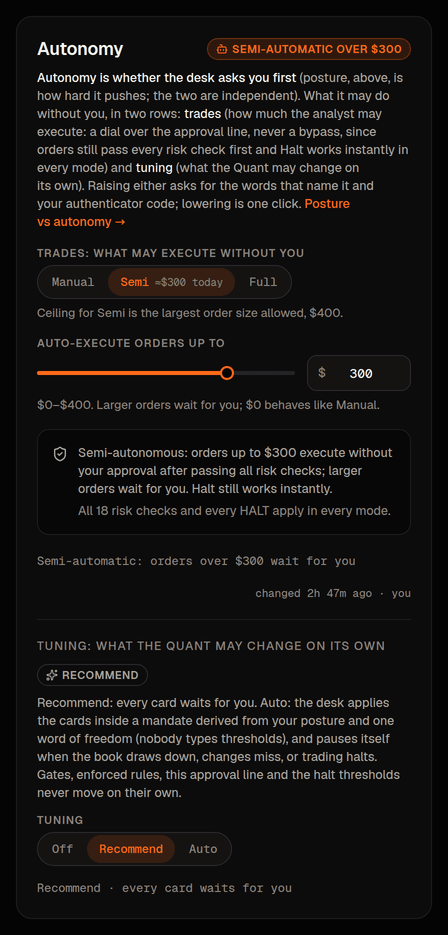
A new book starts on Manual. For Semi, the slider runs from $0 to the largest single order your limits allow ($500 on the Moderate ) in $10 steps; $0 behaves like Manual. Full sets the threshold one cent above that ceiling: an order bigger than the ceiling is already rejected by the per-order cap (check 8) before check 17 is reached, so nothing can ever require approval.
Semi comes in two flavours: a dollar figure you pin yourself, or the automatic line (AUTO) described next.
The automatic line (AUTO)
When Semi is chosen without a dollar figure (that is what the Semi-automatic option in the Connect wizard does), nobody stores a number for the to obey. Instead the Executor works the line out from the account itself, every time it decides on an order.
The rule
- Take 5% of the book's equity as the Executor sees it at that moment.
- Round down to a $25 step.
- Never go below $100.
- Never reach the largest single order: the line stops one $25 step under the per-order cap, so it is always strictly below it.
The last rule is deliberate. Check 17 only asks you when an order is over the line, and check 8 already refuses any order over the cap, so a line equal to the cap could never stop anything: it would be Full wearing a Semi label. Keeping AUTO one step under the cap means an order at the cap always waits for you.
Why $475 on a $10,000 account
With the Moderate posture the largest single order is $500 (the code default). On a $10,000 , 5% of equity is $500, already a $25 multiple and above the $100 floor. But $500 is not strictly below the $500 cap, so the line steps down to the highest figure that still is: $475. Orders up to $475 go through on their own; a $480 or $500 order waits in the Inbox.
The same arithmetic elsewhere: a $100,000 account gives $5,000, clipped to $475 by the same cap; a $3,000 account gives $150; a $1,500 account gives $75, lifted to the $100 floor. On the Conservative posture (cap $250) AUTO can never exceed $225; on Aggressive (cap $1,000) a $10,000 account sits at $500 and a $19,500 account reaches the $975 ceiling.
It follows the account, not a snapshot
The Executor re-derives AUTO from live equity on every decision it makes (new entries, replacement orders and exit re-prices alike), so the line grows and shrinks with the book without anyone touching a setting. The Autonomy card on Strategy › Profile › Autonomy computes its "≈$475 today" the same way, from the latest equity the platform holds. The number written down when AUTO was chosen is only a snapshot: the Inbox header and the read-only chips elsewhere repeat that stored figure, so on a book whose equity has moved a long way they can lag the card until autonomy is saved again; what the Executor enforces is always the fresh derivation. Tighten the per-order cap on Risk › Limits and AUTO drops with it on the next decision.
Pinning your own line instead
If you would rather have a fixed figure, open Strategy › Profile › Autonomy, keep Semi, drag Auto-execute orders up to (the slider runs $0 to the cap in $10 steps; the "saved" mark shows today's line) and press Lower to … or Raise to …. Saving from this card always pins the dollar figure you chose; from then on the Executor uses that number as is and stops re-deriving. A pinned line may sit anywhere from $0 (behaves like Manual) up to the cap itself. A line pinned at the cap lets everything through, for the reason above, so pin below it if you still want the largest orders to ask.
In this build the card has no "back to automatic" control: AUTO is set by the Connect wizard's Semi-automatic choice, and once you pin a figure the card keeps working with pinned figures. Raising, whether to a higher pinned figure or from Manual, goes through the same typed word and as any other raise (below).
Limits still apply in every level
The is not a limit. Your posture's limits (largest order, position size, total exposure, orders per day, loss halts and the rest) are enforced by the Executor on every order whatever the level; an order over a limit is refused, never asked about. The level only routes orders that have already passed. With a $1,000 order cap: on Semi at $500 a $400 order goes, a $900 order waits, a $1,200 order is refused; on Full the $400 and the $900 both go and the $1,200 is still refused; on Manual both wait and the $1,200 is still refused. The side-by-side table is in Posture vs autonomy.
The second row: Tuning
The same card has a second row for the other kind of autonomy: not what may trade without you but what the Quant desk may change without you. Off · Recommend · Auto, and on Auto one word of freedom (Tight · Balanced · Free hand) from which the code derives the whole mandate. It has its own words to type (AUTO to switch on, MORE FREEDOM to widen, RESUME AUTO after the desk paused itself) and its own promises (every change a card with a Revert; reverts itself unless it holds; pauses itself on a ). The two rows are independent: a book can trade on Manual while the Quant tunes on Auto, or the reverse. What the Quant may change on its own has the table.
What does not change
Every risk check runs at every level, on every order the PM proposes. The per-order cap, the position and exposure caps, the loss and drawdown halts, the : none of them care about autonomy. Full means "the checks are my approval", never "skip the checks".
works the same in every mode: the top-bar button stops all new buying within about 5 seconds and never asks for a code. still refuse buys in every mode.
Raising and lowering
Lowering (more things wait for you) is one click:
- Open Strategy › Profile › Autonomy and pick the lower level (or drag the Semi amount down).
- Press Lower to …. The change is saved and audited at once; the Executor picks it up within 5 seconds.
Raising (fewer things wait) is a loosening, so it asks for more:
- Open Strategy › Profile › Autonomy and pick the higher level or amount.
- Press Raise to …. A dialog shows the before and after.
- Type MORE AUTONOMY, then press Confirm with code and enter your authenticator code.
- Press Raise to … in the dialog. Nothing is written until the word and the code are both accepted.
A code entered in the last 30 minutes covers an ordinary raise. Moving to Full is a critical action: it wants a code entered in the last 5 minutes, even if you verified a moment ago for something else. Both directions write an audit-log line, visible under Activity › Config changes.
The ceiling for Semi and Full is the largest single order on Risk › Limits. Tighten that cap and the dial follows it down: Full re-pegs to the new ceiling and stays Full, a Semi threshold above the new cap is clamped down to it. A Semi threshold never moves up on its own when the cap is raised. If the stored number ever disagrees with the level shown, the number wins and the card says so.
How it meets the thesis window and the Inbox
An order over the threshold does not fail; it stops in the Inbox as a card valid for as long as the PM's is (" 14:30 CT", not a short fuse). Approve re-quotes and runs every risk check again before anything is sent; leave it and it expires unsent at the end of its window. Orders at or under the threshold execute on their own and appear under Decided today. Approve or reject and thesis windows cover the card itself.
A second, higher line over which Approve would also ask for your authenticator code is planned, not in the console yet: on this build no approval asks for a code, whatever the size.
The dial only decides whether a card waits for you; what the PM proposes, how often and how big come from posture and the .
Which level should I use
- Start on Manual for a few days and read every card. You learn the PM's habits; it learns from your rejections and the notes you attach to them.
- Move to Semi with a small amount once the cards look sensible. Small trades stop interrupting you; anything meaningful still asks. Most people settle here.
- Consider Full only when you have stopped changing your answers and the shows few expired cards. On a paper book it shows what the system does unattended; on a live book the become your only gate.
If unsure, go one step lower; lowering is always one click and always safe.